Answer

Renewal

  • January 23, 2019
  • 4 replies
  • 113 views

Forum|alt.badge.img
Hey guys,

I renewed my keycode earlier this month, and have 363 days on according to my web admin, but its reading as expired in the desktop app. I uninstalled/reinstalled and pasted the code in from the webadmin but still coming up expired. Is there any way to force a refresh?

Best answer by TripleHelix

Hello @kfs and Welcome to the Webroot Community!

It would be best to Submit a Support Ticket and they will get it sorted out for you!

Thanks,

4 replies

TripleHelix
Moderator
Forum|alt.badge.img+63
  • Moderator
  • Answer
  • January 23, 2019
Hello @kfs and Welcome to the Webroot Community!

It would be best to Submit a Support Ticket and they will get it sorted out for you!

Thanks,

NicCrockett
Popular Voice
Forum|alt.badge.img+28
  • Popular Voice
  • January 24, 2019
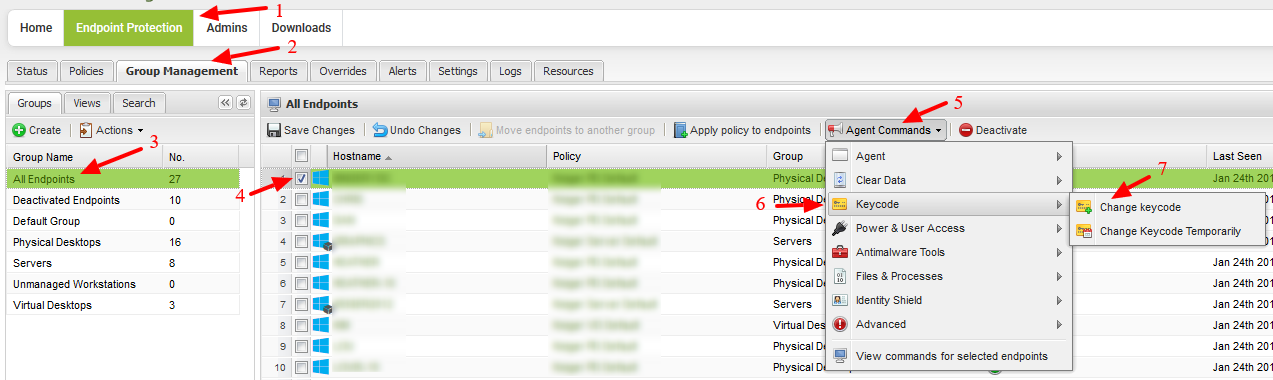
Have you tried to push out the keycode from the console. If not follow the red arrows in the screenshot from 1-7.


TripleHelix
Moderator
Forum|alt.badge.img+63
  • Moderator
  • January 24, 2019
Have you tried to push out the keycode from the console. If not follow the red arrows in the screenshot from 1-7.


I'm just not sure he is a Business user and from the Consumer Console you can do that so that's why i sent him to Support.

NicCrockett
Popular Voice
Forum|alt.badge.img+28
  • Popular Voice
  • January 24, 2019

Have you tried to push out the keycode from the console. If not follow the red arrows in the screenshot from 1-7.

I'm just not sure he is a Business user and from the Consumer Console you can do that so that's why i sent him to Support.


I only thought they might be because they mentioned web admin. However, all that matters is that they get the answer they need.