Answer

tor show error " can not load xpcom "

  • March 22, 2014
  • 10 replies
  • 309 views

durantash
Community Leader
Forum|alt.badge.img+37
Hi ,
 
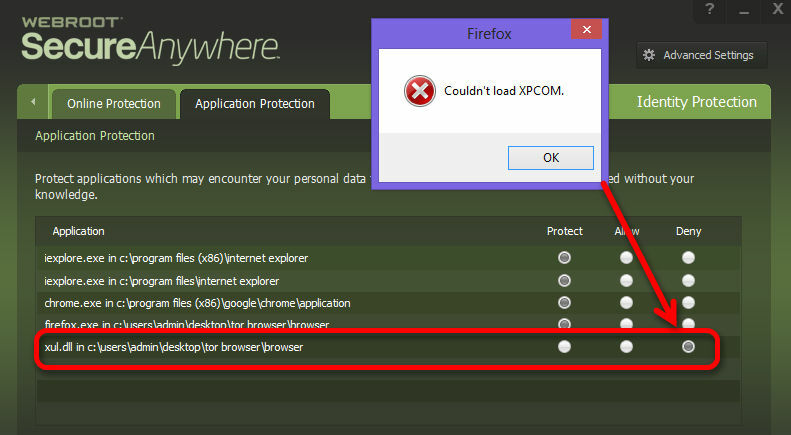
when i try run Tor Browser 3.5.3 show error " can not load xpcom " .
 
but when shut down webroot , easy run .
 
 
Regards ,

Best answer by Petrovic

Hi
 
Go to application pritection
 
Allow - xul.dll


Thank you
Petr.

10 replies

Petrovic
Gold VIP
Forum|alt.badge.img+52
  • Gold VIP
  • Answer
  • March 22, 2014
Hi
 
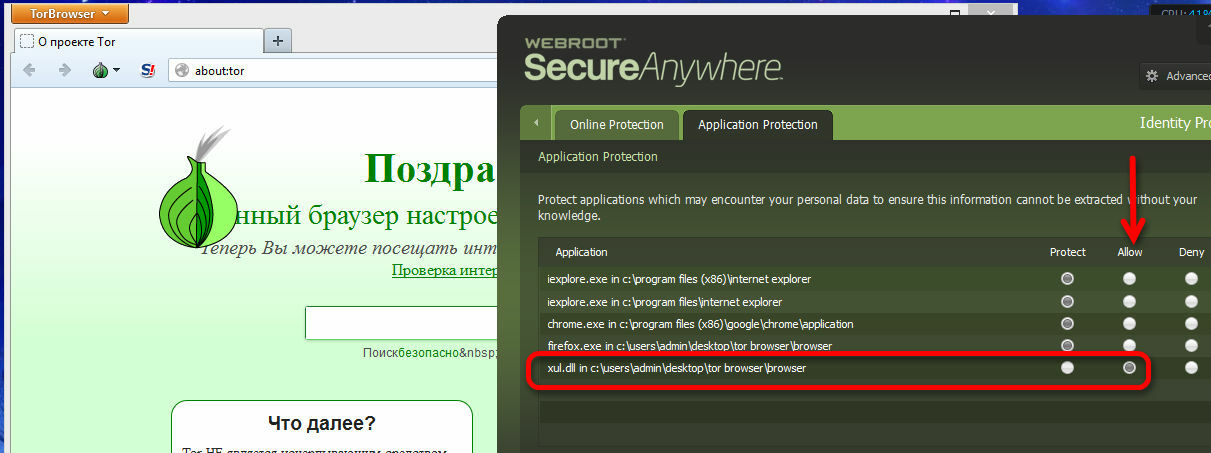
Go to application pritection
 
Allow - xul.dll


Thank you
Petr.

durantash
Community Leader
Forum|alt.badge.img+37
  • Author
  • Community Leader
  • March 22, 2014
Dear ,
 
thank you so much .
 
I add  file in trust and now solve problem and easy run Tor Application .
 
Have a best time ,
 

Petrovic
Gold VIP
Forum|alt.badge.img+52
  • Gold VIP
  • March 22, 2014
Thanks
Please feel free to ask any further questions you might have.
 
Petr

  • May 6, 2014
Setting "Allow" for XUL.dl didn't fix my probem, which was also "Can not load XPCOM". When that didn't work, I "Allowed" all of the ddlls first in the list, and then finally I "Allowed" every dll in the Tor directory.  Not only did that do no good, but the bug in the Block/Allow screen made it quite a chore.
 
I eventually found the solution: Uninstall Webroot and find another anti-virus solution. The one I chose is rated equal to Webroot. Oh, and it's free. Tor works just fine with it.
 
You guys need to realize that there's only one Tor browser. We have no choice there, but there are lots of anti-virus products. We do have many choices there.

Ssherjj
Moderator
Forum|alt.badge.img+62
  • Moderator
  • May 6, 2014
Hello oldmoses, sorry you were having problems but sorry doesn't cut does it. Everyone has choices and you found a solution for your problem and I wish you the best in your endeavors.

Me? I'll always support WSA because there's NO support like Webroot Support!

Have a great day!
Best Regards

  • June 11, 2014
I have also tried to allow the tor files under "Application Protection" and am still getting the xpcom error. Is there a fix for this?

Ssherjj
Moderator
Forum|alt.badge.img+62
  • Moderator
  • June 11, 2014
Welcome richig. ..excuse the delay but I'm hoping one of our experts replies for you.  @ or @ can answer this for. I'm not on a PC as of yet...please be patient and we will figure this out or you can issue a Support Ticket.

Best Regards

RetiredTripleHelix
Gold VIP
Forum|alt.badge.img+56
Sherry is Correct you should Submit a Support Ticket as it could be a simple thing of getting some files Whitelisted in the Cloud Database.
 
Thanks,
 
Daniel 😉

I was pretty frustrated as well about not being able to run Tor with Webroot but I found a solution that worked for me. I went to Application Protection in Identity Protection and allowed all the Tor files. when that didn't work for me either I then went to the PC Security settings and clicked on the Block/Allow Files tab and clicked on the Add File tab at the bottom and when the list of files popped up to choose from, I went into my (C: ) drive and put Tor into the search field and literally dragged and dropped every single Tor file I could into the Block/Allow list. I then reinstalled the Tor Browser Bundle and...voila! I can now run the Tor Browser with webroot. Hope this works for others too.

RetiredTripleHelix
Gold VIP
Forum|alt.badge.img+56
Hello and Welcome to the Webroot Community Forums.
 
It would be best for you to Submit a Support Ticket like I said above it could be a new version of Tor and maybe some files need to be Whitelisted in the Cloud Database then you would not have to do anything with Block/Allow.
 
Thanks,
 
Daniel 😉