
I have a Windows 8 laptop and I cannot PERMANENTLY remove Webroot from my computer.
It no longer shows up in my applications list, but it still runs in the background. And when I go to uninstall it, it says it no longer exists and it has been uninstalled. BUT IT IS STILL RUNNING. And the one folder with the program in it will not allow me to delete it because "it is running somewhere else". How do i completely get rid of this antivirus?!
It's interferring with my antivirus i have now, and I am not happy about it.
Help as soon as possible would be much appreciated.
- Home
- Community overview
- Webroot
- Webroot® SecureAnywhere™ - Home
- I have a Windows 8 Laptop and I cannot remove Webroot permanently
I have a Windows 8 Laptop and I cannot remove Webroot permanently
- October 29, 2014
- 24 replies
- 486 views
24 replies


 +62
+62- Moderator
- October 29, 2014
Hello RiveBeauty,@ wrote:
I have a Windows 8 laptop and I cannot PERMANENTLY remove Webroot from my computer.
It no longer shows up in my applications list, but it still runs in the background. And when I go to uninstall it, it says it no longer exists and it has been uninstalled. BUT IT IS STILL RUNNING. And the one folder with the program in it will not allow me to delete it because "it is running somewhere else". How do i completely get rid of this antivirus?!
It's interferring with my antivirus i have now, and I am not happy about it.
Help as soon as possible would be much appreciated.
Welcome to the Community!
Please do the following:
For Windows 8:
- Move your cursor to the bottom right of the screen to open the Charm Bar menu.
- Click Search, then type the following into the Start Search bar, exactly as it appears below. Note: This path is for the default location. If you installed the program elsewhere, be sure to modify the path accordingly. "C:Program FilesWebrootWRSA.exe" –uninstall
- Press the Enter key on your keyboard.
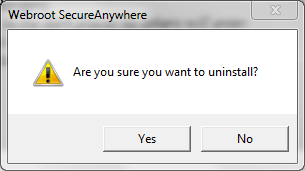
- When prompted to uninstall, click Yes.
If neither of the methods above is successful, please repeat the steps in Windows Safe Mode. We recommend you print these instructions, then click here for information on starting your computer in Safe Mode.
EDITED..Also have you deactivated from your Account Console
Let us know if you need more help!
Best Regards,
IMac 2021 27 in i5 Retina 5, iMac OS Sequoia (15.7.2), Security: iPads, ALIENWARE 15 R6, W11 Microsoft Windows Workstation, x64, Webroot® SecureAnywhere™ Internet Security Complete, Android Samsung Galaxy Ultra Note 23, Webroot Beta Tester



- Popular Voice
- November 1, 2014
Hi:-)@ wrote:
I have a Windows 8 laptop and I cannot PERMANENTLY remove Webroot from my computer.
It no longer shows up in my applications list, but it still runs in the background. And when I go to uninstall it, it says it no longer exists and it has been uninstalled. BUT IT IS STILL RUNNING. And the one folder with the program in it will not allow me to delete it because "it is running somewhere else". How do i completely get rid of this antivirus?!
It's interferring with my antivirus i have now, and I am not happy about it.
Help as soon as possible would be much appreciated.
Welcome to the club. I have the same propblem and have tried everything to uninstall it.
You will never be able to get rid of that webroot.exe file. Kudos to WSA's self protection.
Submit a support ticket
Ignore the above solution--it is outdated--there is no longer any file named webroot.exe-uninstall.
"As for there being no uninstall file, that is quite normal. the "-uninstall" on the command to remove WSA is what is called a Command Line Switch. That passes specific directions to the file being called on, and is not a file itself. All that means is that the "WSA.exe -uninstall" will access WSA.exe and include a direction to remove WSA. The uninstaller is built right into the main program and not a separate file."
Here's my thread where the above quote was set out:
https://community.webroot.com/t5/Webroot-SecureAnywhere-Antivirus/So-I-Really-Screwed-Up-Today-with-WSA/td-p/165613

 +56
+56- Gold VIP
- November 1, 2014
That is not true if you had not messed around with an Uninstaller in the first place you said that caused the problem and everything else is on you!@ wrote:
Ignore the above solution--it is outdated--there is no longer any file named webroot.exe-uninstall.
TH

- Gold VIP
- November 1, 2014
I am afraid that it is you who are incorrect as I certainly DO have a file called WRSA.exe on that path!
And please, when posting a comment about a previous post... especially in response to which you disagree...do so more respectfully of the poster's feeling...i.e., Don't kill the mood!
Thanks, Baldrick
EDIT: Daniel got there before me...story of my life...;)
And please, when posting a comment about a previous post... especially in response to which you disagree...do so more respectfully of the poster's feeling...i.e., Don't kill the mood!
Thanks, Baldrick
EDIT: Daniel got there before me...story of my life...;)
- Gold VIP
- November 1, 2014
That is not to be read as a file name... the -uninstall is an 'argument' passed onto the file to perform a specific function.@ wrote:
Hi:-)@ wrote:
I have a Windows 8 laptop and I cannot PERMANENTLY remove Webroot from my computer.
It no longer shows up in my applications list, but it still runs in the background. And when I go to uninstall it, it says it no longer exists and it has been uninstalled. BUT IT IS STILL RUNNING. And the one folder with the program in it will not allow me to delete it because "it is running somewhere else". How do i completely get rid of this antivirus?!
It's interferring with my antivirus i have now, and I am not happy about it.
Help as soon as possible would be much appreciated.
Welcome to the club.
Ignore the above solution--it is outdated--there is no longer any file named webroot.exe-uninstall.
https://community.webroot.com/t5/Webroot-SecureAnywhere-Antivirus/So-I-Really-Screwed-Up-Today-with-WSA/td-p/165613
The file name with path itself is "C:Program FilesWebrootWRSA.exe"
Once you add the 'argument', the WRSA.exe file then knows to run the built in uninstall portion of the file.
WRSA.exe is the only executable file in WSA... that is how it is kept so incredibly small. Efficient programming.
Try running it as:
"C:Program FilesWebrootWRSA.exe" –uninstall
Pleae note the space prior to the -uninstall
I hope this helps!
EDIT: Daniel AND Baldrick beat me to it!
- Popular Voice
- November 1, 2014
That sir is a poor excuse. Yeah, I did not use the Windows uninstaller. I used one that in the past has proven to be more effective.@ wrote:
That is not true if you had not messed around with an Uninstaller in the first place you said that caused the problem and everything else is on you!@ wrote:
Ignore the above solution--it is outdated--there is no longer any file named webroot.exe-uninstall.
TH
As partof it's uninstall process it starts withthe Windows uninstaller and then digs deeper for traces.
- Gold VIP
- November 1, 2014
Sometimes, sir, 3rd party uninstallers are not the smart idea to begin with. A bit of research should be used prior to using them, EVERY time. For software that does not have a long record of being hard to remove, the standard uninstaller should be used FIRST, and a 3rd party uninstaller be used after that to look for any leftovers.@ wrote:
That sir is a poor excuse. Yeah, I did not use the Windows uninstaller. I used one that in the past has proven to be more effective.@ wrote:
That is not true if you had not messed around with an Uninstaller in the first place you said that caused the problem and everything else is on you!@ wrote:
Ignore the above solution--it is outdated--there is no longer any file named webroot.exe-uninstall.
TH
As partof it's uninstall process it starts withthe Windows uninstaller and then digs deeper for traces.
- Popular Voice
- November 1, 2014
Well I'm sorry you feel my post was offensive. It certanly was noy intended to be.@ wrote:
I am afraid that it is you who are incorrect as I certainly DO have a file called WRSA.exe on that path!
And please, when posting a comment about a previous post... especially in response to which you disagree...do so more respectfully of the poster's feeling...i.e., Don't kill the mood!
Thanks, Baldrick
EDIT: Daniel got there before me...story of my life...;)
If anyone is offended I offer my sincere apology.
Just gotten to the point where I have become a bit frustrated about this issue
+56- Gold VIP
- November 1, 2014
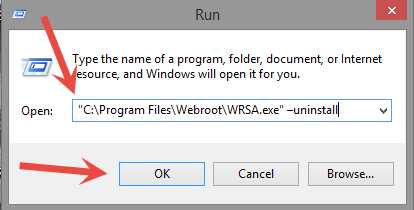
Hawkeye I'm saying your dead wrong end of story! "C:Program FilesWebrootWRSA.exe" –uninstall
It works via Start Run or Search on Win 8.1!
TH
It works via Start Run or Search on Win 8.1!
TH

- Gold VIP
- November 1, 2014
Actually, David, the one that I and Daniel use, does both one after the other...plus a Create Restore Point and a backup of the Registry...but even though I trust it as a great piece of kit I ALWAYS very carefully check what is proposed as residue to remove and anything that does not look more than 99% safe (and there are some simple rules here as to how to check without needing to be a tech head) I just leave WELL alone.
Baldrick
Baldrick
- Popular Voice
- November 1, 2014
Would have been helpful if you had said that yeterday. I guess that's what you meant by "As for there being no uninstall file, that is quite normal. the "-uninstall" on the command to remove WSA is what is called a Command Line Switch."@ wrote:
That is not to be read as a file name... the -uninstall is an 'argument' passed onto the file to perform a specific function.@ wrote:
Hi:-)@ wrote:
I have a Windows 8 laptop and I cannot PERMANENTLY remove Webroot from my computer.
It no longer shows up in my applications list, but it still runs in the background. And when I go to uninstall it, it says it no longer exists and it has been uninstalled. BUT IT IS STILL RUNNING. And the one folder with the program in it will not allow me to delete it because "it is running somewhere else". How do i completely get rid of this antivirus?!
It's interferring with my antivirus i have now, and I am not happy about it.
Help as soon as possible would be much appreciated.
Welcome to the club.
Ignore the above solution--it is outdated--there is no longer any file named webroot.exe-uninstall.
https://community.webroot.com/t5/Webroot-SecureAnywhere-Antivirus/So-I-Really-Screwed-Up-Today-with-WSA/td-p/165613
The file name with path itself is "C:Program FilesWebrootWRSA.exe"
Once you add the 'argument', the WRSA.exe file then knows to run the built in uninstall portion of the file.
WRSA.exe is the only executable file in WSA... that is how it is kept so incredibly small. Efficient programming.
Try running it as:
"C:Program FilesWebrootWRSA.exe" –uninstall
Pleae note the space prior to the -uninstall
I hope this helps!
EDIT: Daniel AND Baldrick beat me to it!
It is often the case that persons with a high degree of technical knowledge assume that the technically challenged don't understand things to the same degree and need to be spoon fed what you are telling them 🙂
- Gold VIP
- November 1, 2014
True, very true. I forgot which one you use. THAT one can be run first.. Many others should not be@ wrote:
Actually, David, the one that I and Daniel use, does both one after the other...plus a Create Restore Point and a backup of the Registry...but even though I trust it as a great piece of kit I ALWAYS very carefully check what is proposed as residue to remove and anything that does not look more than 99% safe (and there are some simple rules here as to how to check without needing to be a tech head) I just leave WELL alone.
Baldrick
- Gold VIP
- November 1, 2014
I am sorry... I tried to explain it clearly, and many people have understood what I meant by that. Some do not.... but when they dont understand they generally ask for clarification.@ wrote:
Would have been helpful if you had said that yeterday. I guess that's what you meant by "As for there being no uninstall file, that is quite normal. the "-uninstall" on the command to remove WSA is what is called a Command Line Switch."@ wrote:
That is not to be read as a file name... the -uninstall is an 'argument' passed onto the file to perform a specific function.@ wrote:
Hi:-)@ wrote:
I have a Windows 8 laptop and I cannot PERMANENTLY remove Webroot from my computer.
It no longer shows up in my applications list, but it still runs in the background. And when I go to uninstall it, it says it no longer exists and it has been uninstalled. BUT IT IS STILL RUNNING. And the one folder with the program in it will not allow me to delete it because "it is running somewhere else". How do i completely get rid of this antivirus?!
It's interferring with my antivirus i have now, and I am not happy about it.
Help as soon as possible would be much appreciated.
Welcome to the club.
Ignore the above solution--it is outdated--there is no longer any file named webroot.exe-uninstall.
https://community.webroot.com/t5/Webroot-SecureAnywhere-Antivirus/So-I-Really-Screwed-Up-Today-with-WSA/td-p/165613
The file name with path itself is "C:Program FilesWebrootWRSA.exe"
Once you add the 'argument', the WRSA.exe file then knows to run the built in uninstall portion of the file.
WRSA.exe is the only executable file in WSA... that is how it is kept so incredibly small. Efficient programming.
Try running it as:
"C:Program FilesWebrootWRSA.exe" –uninstall
Pleae note the space prior to the -uninstall
I hope this helps!
EDIT: Daniel AND Baldrick beat me to it!
It is often the case that persons with a high degree of technical knowledge assume that the technically challenged don't understand things to the same degree and need to be spoon fed what you are telling them :-)
I really am sorry you did not get it... and i really wish you had asked for more clarification yesterday.
+56- Gold VIP
- November 1, 2014
Sorry again and we will be doing more testing and I will contact support ASAP!
Daniel 😞
- Gold VIP
- November 1, 2014
Apologies here too.
This is an example of why it can be so very important to follow suggestions or Support's instructions exactly, and report exactly what happened, without trying anything else. A possible problem is kept hidden and undetected.
This is an example of why it can be so very important to follow suggestions or Support's instructions exactly, and report exactly what happened, without trying anything else. A possible problem is kept hidden and undetected.
- Gold VIP
- November 1, 2014
I know the command prompt works under Windows 7, but I have a few other tests to do. Rather late for me to get into multiple uninstall, reinstall with screen shots, but @ I will get more info to you tomorrow as to what I can find and replicate!
- Popular Voice
- November 1, 2014
Well after many unsuccessful attempts I was able to do a complete reinstall of WSA A/V. I did it by disabling Webroot Protection first from the task bar icon. Went through the complete install process, which was a good thing because I had so butchered WSA trying to temporarily uninstall it I was concerned I had a corrupted version on my PC. That was my major concern. I am now confidant that it is a pure install BUT I still have no listing for WSA in my uninstall list.@ wrote:
@ sorry there is a problem as it doesn't work for me on both of my Win 8.1 Pro 32bit & 64bit VM's so we will have to look into it as it could of been broken for awhile?
Sorry again and we will be doing more testing and I will contact support ASAP!
Daniel :(
WSA FOREVER !
+56- Gold VIP
- November 1, 2014
Please keep in contact with Support from your end as I sent them the link to this thread!@ wrote:
Well after many unsuccessful attempts I was able to do a complete reinstall of WSA A/V. I did it by disabling Webroot Protection first from the task bar icon. Went through the complete install process, which was a good thing because I had so butchered WSA trying to temporarily uninstall it I was concerned I had a corrupted version on my PC. That was my major concern. I am now confidant that it is a pure install BUT I still have no listing for WSA in my uninstall list.@ wrote:
@ sorry there is a problem as it doesn't work for me on both of my Win 8.1 Pro 32bit & 64bit VM's so we will have to look into it as it could of been broken for awhile?
Sorry again and we will be doing more testing and I will contact support ASAP!
Daniel :(
WSA FOREVER !
Daniel
- Popular Voice
- November 1, 2014
NP: Often we don't know what we don't know.@ wrote:
I am sorry... I tried to explain it clearly, and many people have understood what I meant by that. Some do not.... but when they dont understand they generally ask for clarification.@ wrote:
Would have been helpful if you had said that yeterday. I guess that's what you meant by "As for there being no uninstall file, that is quite normal. the "-uninstall" on the command to remove WSA is what is called a Command Line Switch."@ wrote:
That is not to be read as a file name... the -uninstall is an 'argument' passed onto the file to perform a specific function.@ wrote:
Hi:-)@ wrote:
I have a Windows 8 laptop and I cannot PERMANENTLY remove Webroot from my computer.
It no longer shows up in my applications list, but it still runs in the background. And when I go to uninstall it, it says it no longer exists and it has been uninstalled. BUT IT IS STILL RUNNING. And the one folder with the program in it will not allow me to delete it because "it is running somewhere else". How do i completely get rid of this antivirus?!
It's interferring with my antivirus i have now, and I am not happy about it.
Help as soon as possible would be much appreciated.
Welcome to the club.
Ignore the above solution--it is outdated--there is no longer any file named webroot.exe-uninstall.
https://community.webroot.com/t5/Webroot-SecureAnywhere-Antivirus/So-I-Really-Screwed-Up-Today-with-WSA/td-p/165613
The file name with path itself is "C:Program FilesWebrootWRSA.exe"
Once you add the 'argument', the WRSA.exe file then knows to run the built in uninstall portion of the file.
WRSA.exe is the only executable file in WSA... that is how it is kept so incredibly small. Efficient programming.
Try running it as:
"C:Program FilesWebrootWRSA.exe" –uninstall
Pleae note the space prior to the -uninstall
I hope this helps!
EDIT: Daniel AND Baldrick beat me to it!
It is often the case that persons with a high degree of technical knowledge assume that the technically challenged don't understand things to the same degree and need to be spoon fed what you are telling them :-)
I really am sorry you did not get it... and i really wish you had asked for more clarification yesterday.
Thanks to former Sec of Defense Donald Rumsfeld for pointing that out to us in speaking about the War in Iraq.
+56- Gold VIP
- November 1, 2014
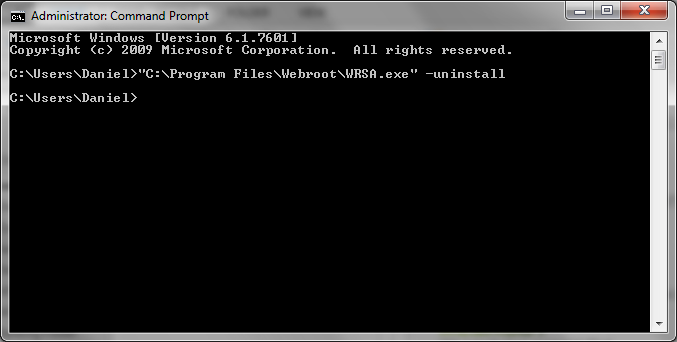
Thanks,
Daniel

- Gold VIP
- November 1, 2014
That would explain why it failed for me at START but worked at command line.... I didn't paste into the Command line.
+56- Gold VIP
- November 1, 2014
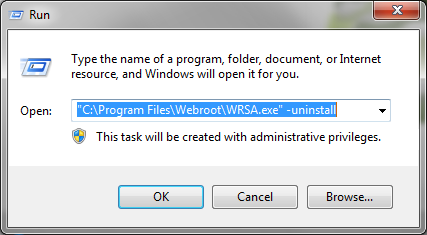
And it works via RUN as well if you tpye it in.
Daniel
From Support:
Top line there was pasted, second line typed in. Looks identical, first didn’t work.
Funny thing:
I tried pasting and then erasing the “-uninstall” bit and re-typing, that fixed it also. Strange, but probably a different ASCII – character then what CMD wants, or a Unicode issue with our forums. Not sure, but strange indeed! Not an issue with the exe though, good!
Daniel
From Support:
Top line there was pasted, second line typed in. Looks identical, first didn’t work.
Funny thing:
I tried pasting and then erasing the “-uninstall” bit and re-typing, that fixed it also. Strange, but probably a different ASCII – character then what CMD wants, or a Unicode issue with our forums. Not sure, but strange indeed! Not an issue with the exe though, good!
- Popular Voice
- November 1, 2014
Thanks :-) I'm a post- DOS technically-challenged user. After all of this I think Im just gonna leave it in as is :-)@ wrote:
@ well what support found at this time this does work if you type it in don't Copy & Paste in the Command prompt window so give that a try will give more info tomorrow if I get some more. "C:Program FilesWebrootWRSA.exe" –uninstall
Thanks,
Daniel
After the latest successfull install I just was finally able to do I'm sure its a good install and if it ain't broke don't fix it. ;-)
But I am bookmarking this page just in case :-)
Command Prompt? I don't think I have ever used it.
Old dawg that didn't learn old tricks 🙂
- Gold VIP
- November 1, 2014
I am too actually.... It gives a good explanation of what is going on with the unintall command!
Login to the community
No account yet? Create an account
Enter your E-mail address. We'll send you an e-mail with instructions to reset your password.
Scanning file for viruses.
Sorry, we're still checking this file's contents to make sure it's safe to download. Please try again in a few minutes.
OKThis file cannot be downloaded
Sorry, our virus scanner detected that this file isn't safe to download.
OK