I need to download a pdf file reader from Adobe. It claims that webroot is stopping the download.

  • October 13, 2014
  • 4 replies
  • 23 views

What can I safely change in my settings to allow the download to finish??

4 replies

Rakanisheu Retired
Probably because your downloading it from a 3rd party site and not Adobe
 
Please get Adobe reader directly from Adobe
 
https://get.adobe.com/reader/

shorTcircuiT
Gold VIP
  • Gold VIP
  • October 13, 2014
Hello there, welcome to the Webroot Community!
 
I do have a couple of questions, to clarify everything so we can help you.
 
1) When installing WSA, did you keep the default settings?  Have you changed the settings?
 
2) Are you trying to download it DIRECTLY from Adobe?  If you are using a 3rd party website to obtain it, WSA may be blocking it due to any other software that has been added into the installer.  
 
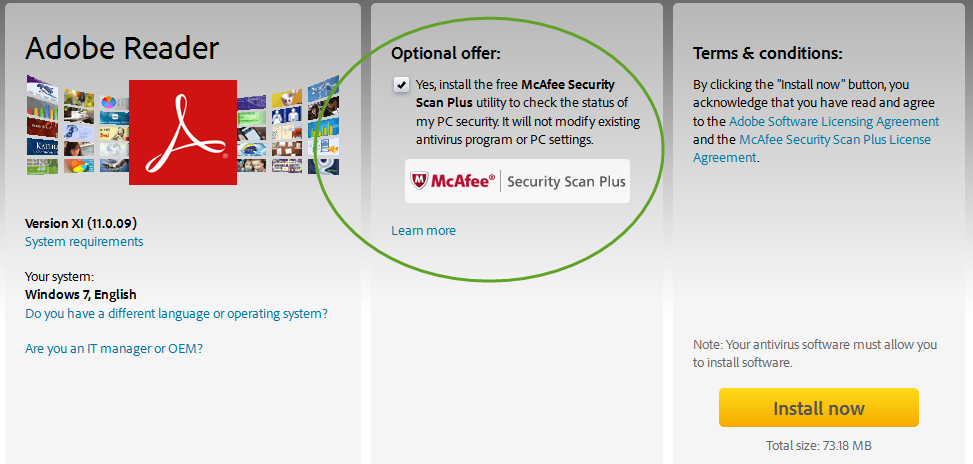
If you ARE installing directly from Adobe, try again, but watch very carefully.  Adobe software DOES try to provide what they call  "added value software".  We call those garbage, and WSA may be flagging those.  While they are checked by default, you can uncheck them to opt out.
 
Please let us know if any of this helps!

RetiredTripleHelix
Gold VIP
Forum|alt.badge.img+56
And even from Adobe make sure to uncheck any unwanted add-ons PUA's!
 
Daniel ;)


shorTcircuiT
Gold VIP
  • Gold VIP
  • October 13, 2014
Thank you for the screenshot Daniel!  That is what I was trying to describe 🙂