Prloblem with Password Manager - Group

  • August 5, 2014
  • 16 replies
  • 109 views

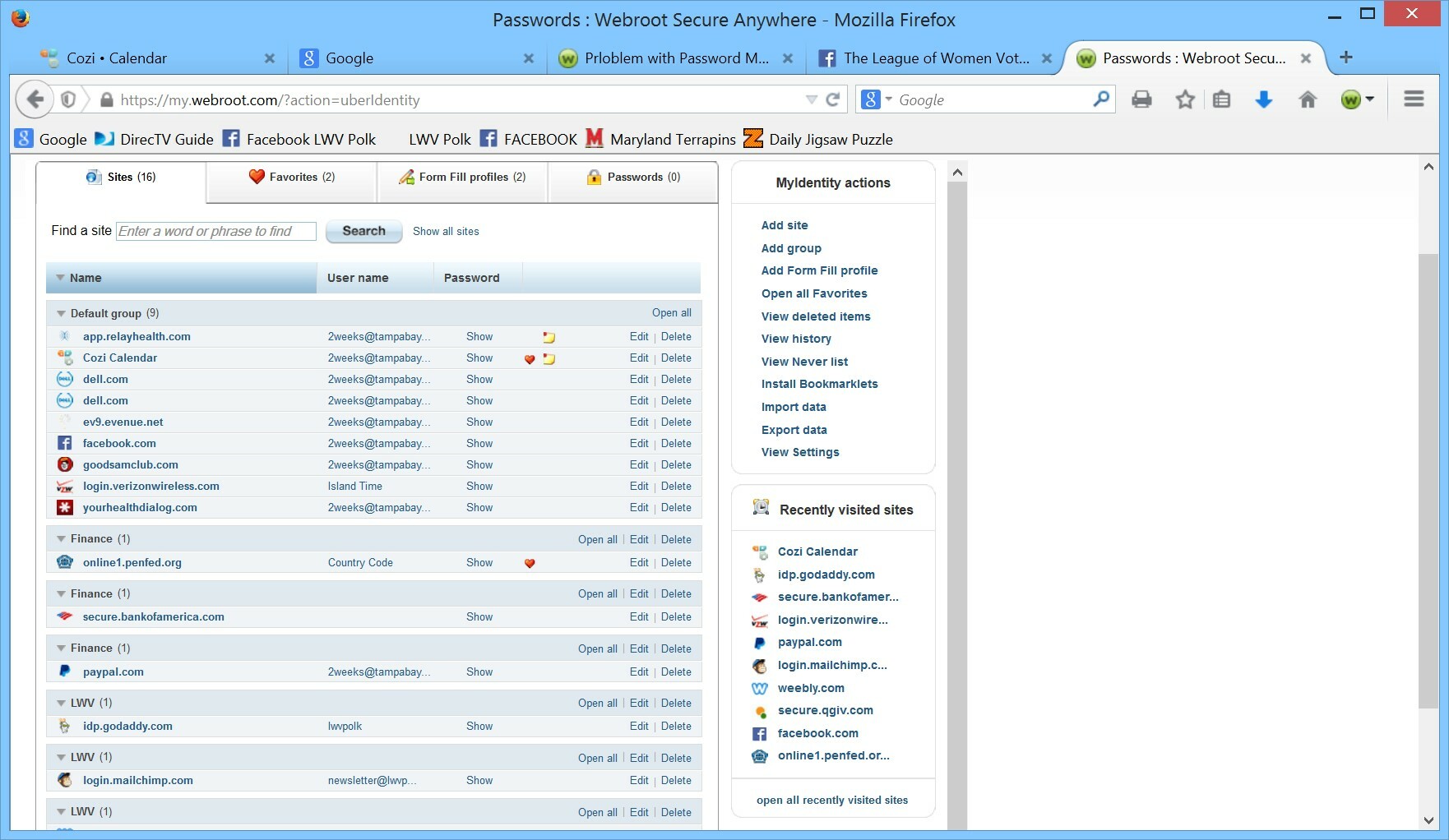
I have added 2 new groups in addition to the Default group.  When I add a new site under one of my new groups, it displays as another group with the same name.  I have a series of groups with the same name and only one site listed for each.
 
Am I creating the groups incorrectly or what?
 
I have high hopes for the Password Manager, but need help with this aspect.  Thanks.

16 replies

nic
Forum|alt.badge.img+56
  • Retired Webrooter
  • August 5, 2014
Welcome to the community!
 
I tried reproducing this problem and wasn't able to get it to happen.  Was the capitalization the same on both of the groups?  I'm wondering if there is a typo that accidentally made a new group.  Also if you could post a picture of this behavior that would help as well.

Baldrick
Gold VIP
  • Gold VIP
  • August 5, 2014
Same here, Nic...cannot reproduce.  I do think that we need a little bit more info or some more precise steps as to how to cause this. :8

  • Community Leader
  • August 7, 2014
@ wrote:
I have added 2 new groups in addition to the Default group.  When I add a new site under one of my new groups, it displays as another group with the same name.  I have a series of groups with the same name and only one site listed for each.
 
Am I creating the groups incorrectly or what?
 
I have high hopes for the Password Manager, but need help with this aspect.  Thanks.
Welcome to the community 2weeks!
 
Thank you for sharing your experience.
 
As Baldrick suggested, perhaps a few more details may help us assist you better as both he and Nic did not experience the same situation. I have not experience this either.
 
Please let us know.
 
Beth


  • Author
  • Fresh Face
  • August 7, 2014

It happens whether I type in a new name or whether I select an existing group from the drop down menu. Here's a screen.

  • Community Leader
  • August 7, 2014
@ wrote:

It happens whether I type in a new name or whether I select an existing group from the drop down menu. Here's a screen.
Hi 2weeks!
 
I cant see your image until a moderator aproves it. @ will approve it when he gets in  and will help you out.
 @The @ sent a message to Nic so he will be alerted to tour post.
 
Sorry you are experiencing a proplem with Password Manager. I'm sure Nic will be able to help you.
 
Beth

MarkM
  • Retired Webrooter
  • August 7, 2014
Hi folks, image approved 🙂

Ssherjj
Moderator
Forum|alt.badge.img+62
  • Moderator
  • August 7, 2014
@ wrote:

It happens whether I type in a new name or whether I select an existing group from the drop down menu. Here's a screen.
Hello and Welcome 2weeks!:D
May I ask if you checked out this Article/KB ?
As Beth has mentioned Nic shoud be able help to here..
Or you may issue a Support Ticket as well.
Regards,
 

  • Author
  • Fresh Face
  • August 7, 2014
I did check out the User Guide. I also searched everywhere I could find to get more information on Groups. Basically all I found was the stock paragraph on entering or selecting a Group in the dialog box - which should be standard Windows behavior.

nic
Forum|alt.badge.img+56
  • Retired Webrooter
  • August 7, 2014
@ wrote:
I did check out the User Guide. I also searched everywhere I could find to get more information on Groups. Basically all I found was the stock paragraph on entering or selecting a Group in the dialog box - which should be standard Windows behavior.
Since none of us are able to reproduce it probably your best bet is to contact support at this point.

bogeyman459
New Voice
  • New Voice
  • August 25, 2014
i've had this problem as well, please be advised that if you 'TYPE' in the name of the group when it asks you which group to put the new link in it will create a new group with the same name thereby creating multiple groups. try using the drop down box and selecting the group from there. if choosing the group from the dropdown box is you standard practice then please disregard this reply as i have no idea how your problem is being created.

  • Author
  • Fresh Face
  • August 25, 2014
Thanks, but it happens even when I select from the dropdown.

nic
Forum|alt.badge.img+56
  • Retired Webrooter
  • September 8, 2014
Did you contact support about this one?  Just curious as to how it turned out.

I was glad to find this thread here in the community as I am having the exact same problem, but I see that there's been no answer offered so far. Anyone had any luck figuring out why this is happening?

Ssherjj
Moderator
Forum|alt.badge.img+62
  • Moderator
  • December 17, 2014
Hello tanzimerritt,
 
Welcome to the Community!
 
My advice is your best bet is  contact support free of charge and they can look into this for you!
 
 
Best Regards,


  • New Voice
  • December 20, 2014
Was this problem ever solved, because I'm having the same issue!
 
Keeps giving me multiple groups.  And I always use the drop down.
 

nic
Forum|alt.badge.img+56
  • Retired Webrooter
  • December 22, 2014
Go ahead and contact support on this one so we can get it documented.