Answer

Is there a way to change speed of scan?

  • July 8, 2014
  • 4 replies
  • 66 views

I have XP on a DELL laptop with WR secureAnywhere complete. I have scan set to start each day at the same time (1 PM). This is a work computer so I do not know what I will be doing when the scan starts. Is there a way to set the scan to use the least amount of system resources and have the smallest impact/ slowdown on other running programs? I am not concerned with the speed of the scan, since it is a done each day.
Thanks

Best answer by Retired013118

@ wrote:
I have XP on a DELL laptop with WR secureAnywhere complete. I have scan set to start each day at the same time (1 PM). This is a work computer so I do not know what I will be doing when the scan starts. Is there a way to set the scan to use the least amount of system resources and have the smallest impact/ slowdown on other running programs? I am not concerned with the speed of the scan, since it is a done each day.
Thanks
Hello krazykat and welcome to the community!
 
The scan is very fast and uses very little resources and should not impact any running programs. You can change the time of the scan by clicking the gear next to advanced settings, click on scheduler and choose the time.
 
Hope that helps! Please let us know and visit often!

4 replies

  • Community Leader
  • Answer
  • July 8, 2014
@ wrote:
I have XP on a DELL laptop with WR secureAnywhere complete. I have scan set to start each day at the same time (1 PM). This is a work computer so I do not know what I will be doing when the scan starts. Is there a way to set the scan to use the least amount of system resources and have the smallest impact/ slowdown on other running programs? I am not concerned with the speed of the scan, since it is a done each day.
Thanks
Hello krazykat and welcome to the community!
 
The scan is very fast and uses very little resources and should not impact any running programs. You can change the time of the scan by clicking the gear next to advanced settings, click on scheduler and choose the time.
 
Hope that helps! Please let us know and visit often!

RetiredTripleHelix
Gold VIP
Forum|alt.badge.img+56
Hello krazykat and Welcome to the Webroot Community!
 
Yes there are settings you can setup here: http://live.webrootanywhere.com/content/586/Changing-the-scan-schedule
 
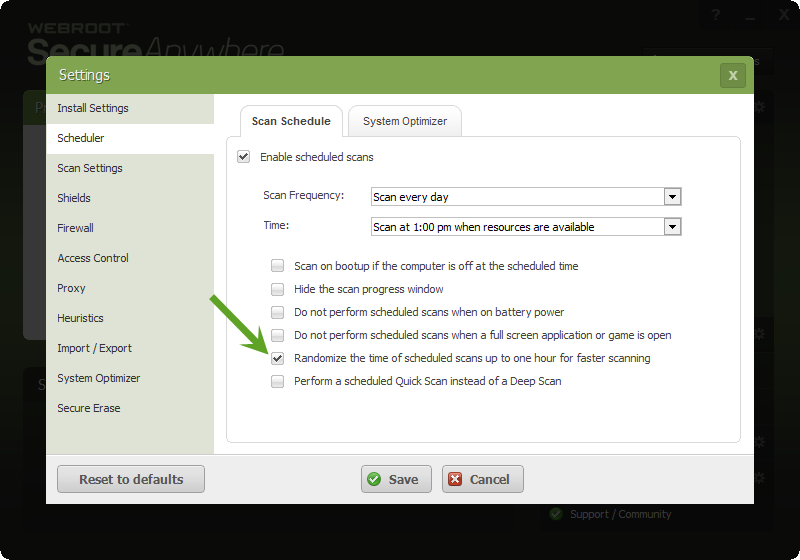
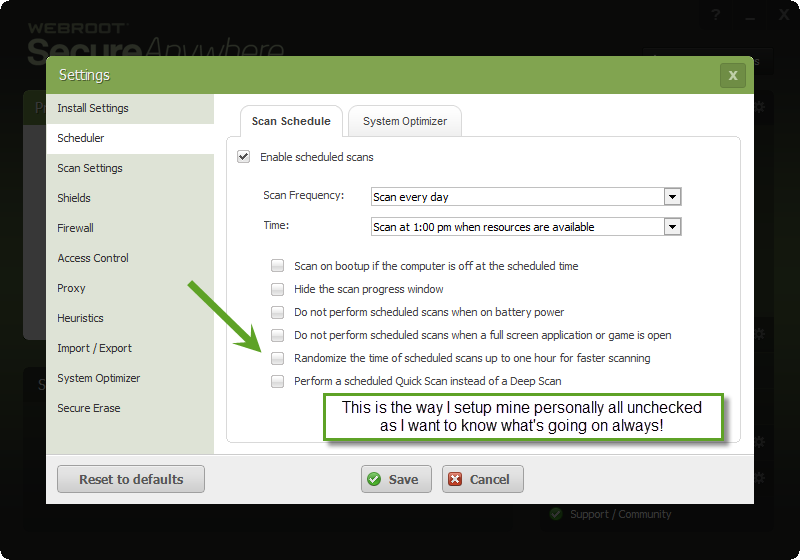
Also if you want it to scan at 1PM right on the dot then uncheck this box and it will everyday in the picture below! Also WSA's Realtime Sheild is always looking after your system as well. And as BB97 said above the scan times are fast 1 to 2 minutes and you can do custom scans here: http://live.webrootanywhere.com/content/838/Creating-a-custom-scan
 
Thanks,
 
Daniel ;)


  • Community Leader
  • July 8, 2014
Thanks Daniel for the photo description. I'm a little slow adding those right now

RetiredTripleHelix
Gold VIP
Forum|alt.badge.img+56
@BB97 wrote:
Thanks Daniel for the photo description. I'm a little slow adding those right now
You are welcome and that comes in time and I use Snagit to take snapshots. ;)
 
Daniel