
Answer

Master password

  • October 23, 2014
  • 3 replies
  • 82 views

I accidentally deleted my master password. I didn't write it down anywhere. What do I do now?

Best answer by Ssherjj

@ wrote:
I accidentally deleted my master password. I didn't write it down anywhere. What do I do now?
 Hello rhm04
 
Welcome to the Community!
 
Please go to your Account Console and Clickcan't sign in and there you will find this box. There are two ways to do this as provided.
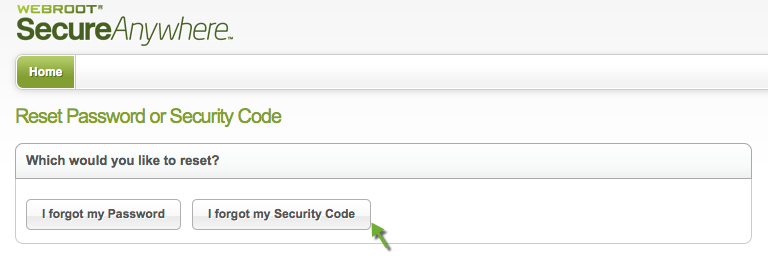


To change your account login credentials within the online management account, please do the following:
    [list=1]
  1. Click here to log in to the management website.
[/list] 
    [list=1]
  1. At the top right corner of the page, your user name is listed with a drop-down arrow. Click the arrow to open the drop-down menu. [img]http://sw.nohold.net/Webroot/Images/wsa_changecredentials1.png[/img]
[/list] 
    [list=1]
  1. In the menu, click Account Settings. [img]http://sw.nohold.net/Webroot/Images/wsa_changecredentials2.png[/img]
[/list] 
    [list=1]
  1. Click Change next to the setting you want to edit: Password, Security Code, or Security Question [img]http://sw.nohold.net/Webroot/Images/wsa_changecredentials3.png[/img]
[/list] Note: You will be asked for your original password for each of these that you wish to reset.


If you do not know your current credentials, follow the instructions below to reset them.
    [list=1]
  1. Click here to access the management website.
[/list] 
  1. Click on the "Can't log in?" link in blue next to the Log In button. [img]http://sw.nohold.net/Webroot/Images/wsa_changecredentials4.png[/img]  
  2. Select if you would like to reset your Password or Personal Security Code. [img]http://sw.nohold.net/Webroot/Images/wsa_changecredentials5.png[/img]  
  3. Enter your email address in the box provided. [img]http://sw.nohold.net/Webroot/Images/wsa_changecredentials6.png[/img]
 
 
Please let us know if you need if this resolves your issues and if not please come on back
 
Best Regards,
 
 
Sherry

3 replies

Ssherjj
Moderator
Forum|alt.badge.img+62
  • Moderator
  • Answer
  • October 23, 2014
@ wrote:
I accidentally deleted my master password. I didn't write it down anywhere. What do I do now?
 Hello rhm04
 
Welcome to the Community!
 
Please go to your Account Console and Clickcan't sign in and there you will find this box. There are two ways to do this as provided.


To change your account login credentials within the online management account, please do the following:
    [list=1]
  1. Click here to log in to the management website.
[/list] 
    [list=1]
  1. At the top right corner of the page, your user name is listed with a drop-down arrow. Click the arrow to open the drop-down menu. [img]http://sw.nohold.net/Webroot/Images/wsa_changecredentials1.png[/img]
[/list] 
    [list=1]
  1. In the menu, click Account Settings. [img]http://sw.nohold.net/Webroot/Images/wsa_changecredentials2.png[/img]
[/list] 
    [list=1]
  1. Click Change next to the setting you want to edit: Password, Security Code, or Security Question [img]http://sw.nohold.net/Webroot/Images/wsa_changecredentials3.png[/img]
[/list] Note: You will be asked for your original password for each of these that you wish to reset.


If you do not know your current credentials, follow the instructions below to reset them.
    [list=1]
  1. Click here to access the management website.
[/list] 
  1. Click on the "Can't log in?" link in blue next to the Log In button. [img]http://sw.nohold.net/Webroot/Images/wsa_changecredentials4.png[/img]  
  2. Select if you would like to reset your Password or Personal Security Code. [img]http://sw.nohold.net/Webroot/Images/wsa_changecredentials5.png[/img]  
  3. Enter your email address in the box provided. [img]http://sw.nohold.net/Webroot/Images/wsa_changecredentials6.png[/img]
 
 
Please let us know if you need if this resolves your issues and if not please come on back
 
Best Regards,
 
 
Sherry

  • Author
  • Fresh Face
  • October 23, 2014
Hello. Thank you for your quick response. I did what you suggested, all is good now, Once again Thank You! :D

shorTcircuiT
Gold VIP
  • Gold VIP
  • October 23, 2014
Glad that things are working now!  Thank you for letting us know.
 
Any time you have a question or problem, drop back in, we are always happy to try to help 🙂


