Answer

SecureAnywhere Complete Keycode

  • December 31, 2014
  • 4 replies
  • 63 views

I am trying to add Kindle to the SecureAnywhere package and it is asking for the Complete Keycode which I assumed was the activation code but it didn't accept this.  I tried my security code which is in lower case and it only seemed to want it in capitals - so not sure what "the complete keycode" is.  Can anyone explain please.

Best answer by teasleflower

Thanks, so much, Baldrick.  One of the problems was that Kindle said the Google play version wasn't the correct version and I had to install it from Amazon App store.  Anyway, one way or another it has sorted itself out now and everything is again synced to my account.  

4 replies

Baldrick
Gold VIP
  • Gold VIP
  • December 31, 2014
Hi teasleflower
 
Welcome to the Community Forums.
 
Let's start from the top, so please bear with me if some of this is already done/known to you.
 
You'll need to go to the Google app store from your Kindle to download it.  In terms of further information you need to go here and install and then enter your keycode to get the Premier version, and for the the Free SecureWeb Browser, here
 
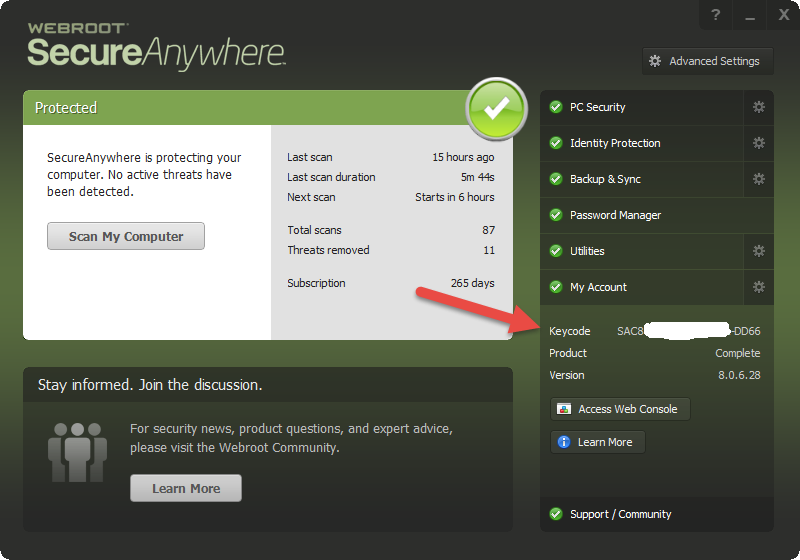
The Complete keycode will be the keycode that you used to activate WSA on your PC, and can be found from the main WSA window:


Hope that helps?  If not then please post back.
 
Regards, Baldrick
 

  • Author
  • Fresh Face
  • Answer
  • December 31, 2014
Thanks, so much, Baldrick.  One of the problems was that Kindle said the Google play version wasn't the correct version and I had to install it from Amazon App store.  Anyway, one way or another it has sorted itself out now and everything is again synced to my account.  

Baldrick
Gold VIP
  • Gold VIP
  • December 31, 2014
Hi teasleflower
 
You are most welcome.  Glad that yo are sorted.
 
Please do come back here if you have any further questions/need any further help.  There should always be a few members around who can help out.
 
A very Happy New Year to you.
 
Regards, Baldrick

  • Author
  • Fresh Face
  • December 31, 2014
Thanks, Baldrick. Have a great New Year to you and your family.

:)
All the best, Teasleflower