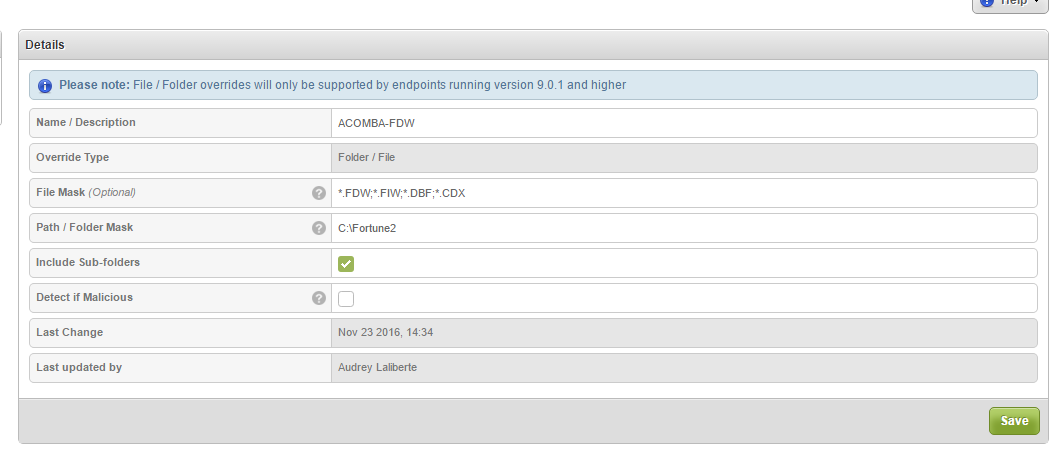
I am having trouble when installing Acomba on Webroot protected PCs. I tried to exclude C:Fortune (the installation folder of the software). Normally, I exclude that folder and the extensions ( *.FDW, *.FIW, *.DBF, *.CDX). It doesn't seems to work. The files are getting detected as bad and when I do a scan, it cleans the files. I don't know if my override is made correctly.
Best answer by jhartnerd123
Hey @,
When you made the exclusion, did you ensure that subfolders and the *.* wildcards were used? You can then push an agent command to the system to re-verify all files and processes and then a scan command to force the agent to pick up any now policy exclusions.
Also, don't ever feel alone, you can contact Webroot Technical Support and they'll be more than happy to assist in whitelisting your software package.
When you made the exclusion, did you ensure that subfolders and the *.* wildcards were used? You can then push an agent command to the system to re-verify all files and processes and then a scan command to force the agent to pick up any now policy exclusions.
Also, don't ever feel alone, you can contact Webroot Technical Support and they'll be more than happy to assist in whitelisting your software package.
Can we exclude only by file extensions without specifying a folder path ? I want to exclude ALL of .FIW .CDX .FDW .DBF from everywhere on the computer.
You might be able to do that by setting an override for *.CDX or whatever extension for C: and checking include subfolders.
That's usually not advisable though as the less overrides the better. It's best to take an inventory of where these are located and do for those folders only.
You can also go to the reports tab and run an "undeterminded software" report and look to see if there are any applications you have that are also running funny to see if they show up there. Then copy/paste the location into notepade of the folder path of the program and then when you're done that, go back to your overrides tab and create whitelist overrides for those folder paths as well.
But only for applications that are acting up. You kind of want to have some things show up there so the agent and the cloud can determine on their own that the programs are safe. Only do the above if the application is acting up. Or again, call support to assist.