
Answer

SecureAnywhere and vSphere View

  • July 7, 2014
  • 7 replies
  • 348 views

What are the things I should know before attempting to install SecureAnywhere in a vSphere View VDI environment?

Best answer by regnor

You can check if a software get's journaled both on the client and in the webconsole.
 
Client:
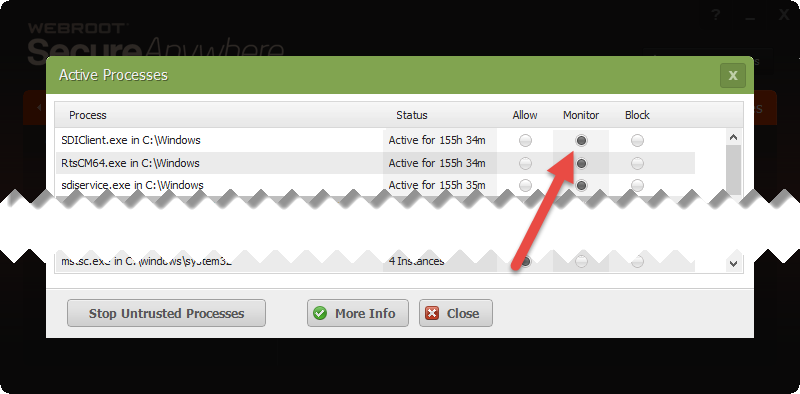
  • Running Processes: Open WSA -> Utilities -> System Control -> Control Active Processes: Look for the "monitor" checkmark.
l
 
  • %PROGRAMDATA%WRDATAWRLog.log: Look for the Tag "Monitoring process"
Webconsole:
  • There're reports for unkown software on your clients. Any unkown software will get journaled.

7 replies

  • Bronze VIP
  • July 7, 2014
 
VMware vSphere is supported by Webroot and WSA ideal for running in virtualized environments as it doesn't need much performance. But before running it on all of your virtual desktops I would do a trial installation on a single client and see how it performs and to check if any of your software gets journaled(especially look for VMware tools). If you find that good software is journaled you can either whitelist it or report it to support. 
 
This Webcast could be interesting for you: https://community.webroot.com/t5/Channel-Partners/Webinar-recording-Virtualization-Security-Meeting-the-Challenge/td-p/118008

  • Author
  • Fresh Face
  • July 7, 2014
I recall seeing something in the past about some install setting that needs to be done in a VDI environment to make sure each virtual desktop has a unique SecureAnywhere ID, but I can't seem to find it.

  • Bronze VIP
  • July 7, 2014
That's a good point. You're right, if you include WSA in your base image then there's a parameter which you would have to add to the installation; I'm not sure if it was -clone but I'll see if I can find it in the documentation.
Perhaps @ can provide this information quicker ;)
 
Edit: Take a look at the parameters in the documentation:  http://live.webrootanywhere.com/content/763/Deploying-SecureAnywhere-to-endpoints

nic
Forum|alt.badge.img+56
  • Retired Webrooter
  • July 7, 2014
Let me double-check with some folks here and see if there is anything else you need.

nic
Forum|alt.badge.img+56
  • Retired Webrooter
  • July 7, 2014
Here's what I got from the support folks:
 
Since it isn't Citrix, the best info would be to install with the  -uniquedevice switch. If that doesn't work, then the -clone switch. Either way, only deploy to a couple or a few machines at first and then see how it goes before deploying to the rest.

  • Author
  • Fresh Face
  • July 15, 2014
How can I tell if software is getting journaled?

  • Bronze VIP
  • Answer
  • July 15, 2014
You can check if a software get's journaled both on the client and in the webconsole.
 
Client:
  • Running Processes: Open WSA -> Utilities -> System Control -> Control Active Processes: Look for the "monitor" checkmark.

l
 
  • %PROGRAMDATA%WRDATAWRLog.log: Look for the Tag "Monitoring process"
Webconsole:
  • There're reports for unkown software on your clients. Any unkown software will get journaled.
