

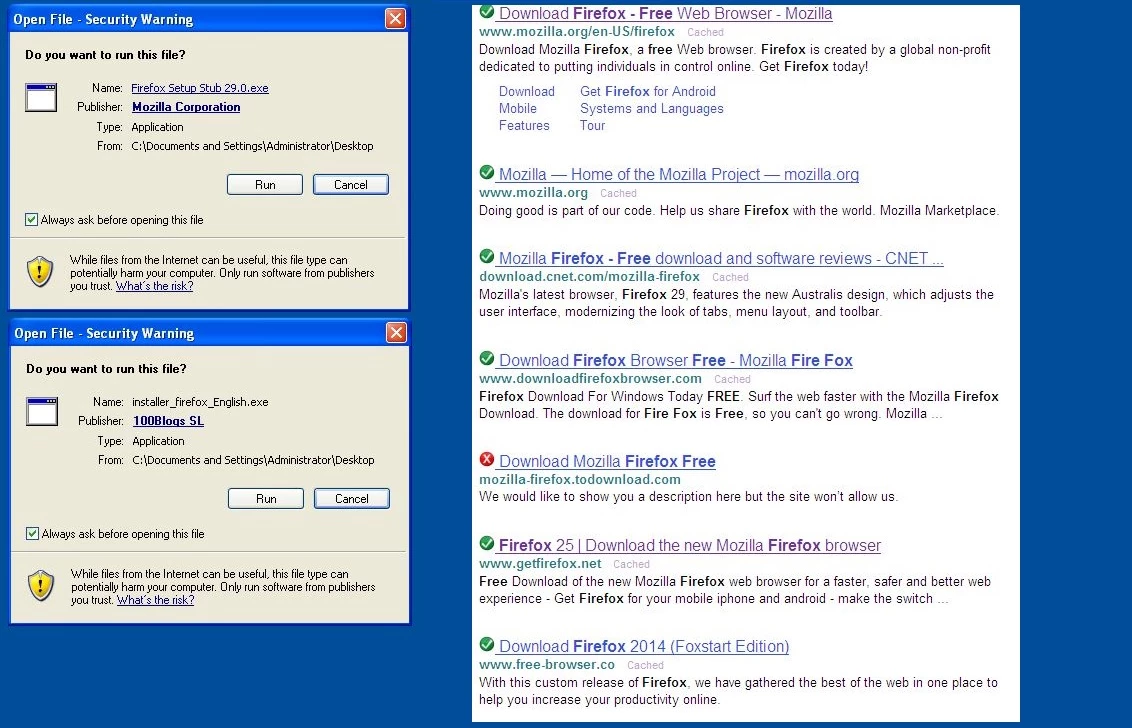
In the image below I have done a search using well known search provider. Note that in this case the first result was directly from the vendor (Mozilla) but as you start to go down the search results its gets a bit unclear.
To the left of the screen shot I am showing the open file -security warning alert on two versions of Firefox that I have downloaded. Note the top left one has a Publisher: Mozilla Corportation, the bottom one 100Blogs SL is a toolbar wrapped version.The File with the Mozilla Corporation was downloaded from the vendors website (the 1st link in the screenshot), the second one was from a 3rd party that contained a number of toolbars.
Please note that Publisher isnt always 100% accurate (we do see lots of spoofed digitial vendors etc) its still a useful piece of information. I would advise when installing software to use the custom installation option so you can untick any "unwanted" extra`s that the program may want to try and install.
I would advise using a modern secure browser with our extension installed (Adblock is also useful to install) as you can see one of the sites has a red X beside it indicating it may not be safe to visit.
If you are ever unsure dont run the file and submit a support ticket or post on the community. We can verify a file very quickly and if possible we can point you in the right direction for the correct download.
Thanks,
Roy










