Answer

How do I get rid of the annoying report popup?

  • January 11, 2022
  • 3 replies
  • 71 views

The greenish webroot popup is there every day. How can I turn that off? Why would I want to see it if there are no problems? At least include an option to have it pop up only if there are issues. So annoying.

Best answer by TripleHelix

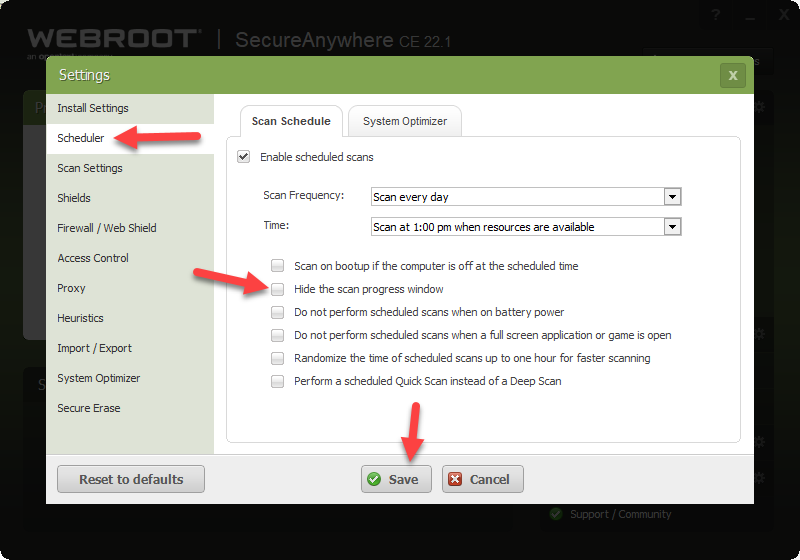
Okay under Advance settings make sure this is checked and save!


Click on picture to see full size!


Thanks,

3 replies

TripleHelix
Moderator
Forum|alt.badge.img+63
  • Moderator
  • January 11, 2022

Hello @scotsscripts 


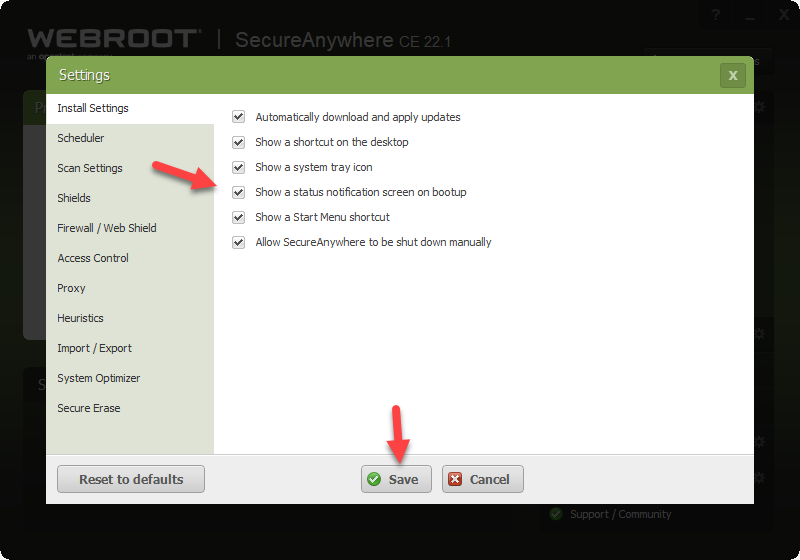
Is it during boot Up? If so uncheck and save this and you will not see it, under Advance settings.


https://docs.webroot.com/us/en/home/wsa_pc_userguide/wsa_pc_userguide.htm#SettingPreferences/SettingInstallPreferences.htm


Show a status notification screen on bootup Displays SecureAnywhere status when you boot up your computer.


Click on picture to see full size.


Thanks,


  • Author
  • Fresh Face
  • January 11, 2022

No, it’s not on bootup, it’s every morning when I wake up. The scan is at 3AM and every morning this green webroot box is on the screen with the info. I want to see that only if there is an issue, not every day.


TripleHelix
Moderator
Forum|alt.badge.img+63
  • Moderator
  • Answer
  • January 11, 2022

Okay under Advance settings make sure this is checked and save!


Click on picture to see full size!


Thanks,