Answer

How do you get task manager to show all tasks?

  • July 23, 2013
  • 10 replies
  • 56 views

It apparently doesn't show some as my CPU sometimes revs more than is shown under processes. Something revs it every now and then, that I can't see under processes, and I'd like to know what it is.

Best answer by RetiredTripleHelix

@ You can always download Process Explorer from Microsoft but you have to understand the info that is given as it can be a little confusing for new users but again I would just suggest to use Task Manager and do what Jim suggested.
 
Daniel
 

10 replies

JimM
  • Retired Webrooter
  • July 23, 2013
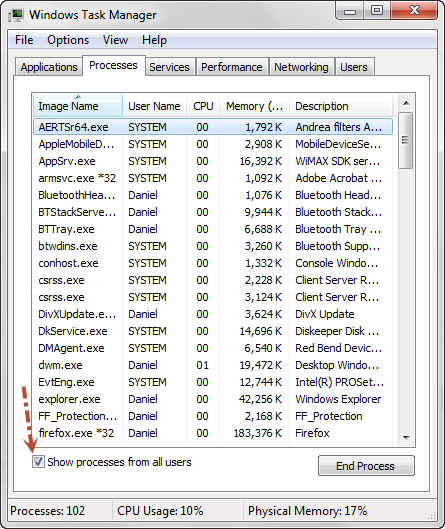
On XP/Vista/7, there is a checkbox for "Show processes from all users" on the Processes tab that you can check. Could be a system process.

RetiredTripleHelix
Gold VIP
Forum|alt.badge.img+56
@ You can always download Process Explorer from Microsoft but you have to understand the info that is given as it can be a little confusing for new users but again I would just suggest to use Task Manager and do what Jim suggested.
 
Daniel


ProTruckDriver
Moderator
Thanks Daniel for the link to "Process Explorer". I just downloaded it, nice tool.

RetiredTripleHelix
Gold VIP
Forum|alt.badge.img+56
You're very Welcome David! This is another one I have Process Hacker and it installs unlike Process Explorer which can run in your user space like Desktop or Download folder.
 
Daniel


shorTcircuiT
Gold VIP
New Toys to learn and play with... Thanks Daniel!!!

ProTruckDriver
Moderator
@DavidP wrote:
New Toys to learn and play with... Thanks Daniel!!!
Yea, I know what I'll be doing tomorrow. Exploring the Toys. 😃

RetiredTripleHelix
Gold VIP
Forum|alt.badge.img+56
Only for the one's that know how to read them correctly!


Daniel 😃

Rakanisheu Retired
Process explorer is the one I use when cleaning malware from my boxes manually. It also has the nice option of being able to replace task manager with a single click. And it doesnt need to install too so you can run it from just a exe on the desktop

  • Author
  • Popular Voice
  • July 24, 2013
Is there anyway to see all of the programs in the regualr task manager without having to type in an admin password each time? (I never use an admin account if I can avoid it).

shorTcircuiT
Gold VIP
@ wrote:
Is there anyway to see all of the programs in the regualr task manager without having to type in an admin password each time? (I never use an admin account if I can avoid it).
No.  Unless you disable User Account Control (Not Reccomended)