how do you turn off pop up blocker on a mac

  • November 13, 2015
  • 4 replies
  • 99 views

I am trying to communicate with the geek squad. I need to disable my pop up blocker on my mac and do not know how to do this. can you tell me?


4 replies

Ssherjj
Moderator
Forum|alt.badge.img+62
  • Moderator
  • November 13, 2015
Hello ?,
 
WElcome to the Webroot Community,
 
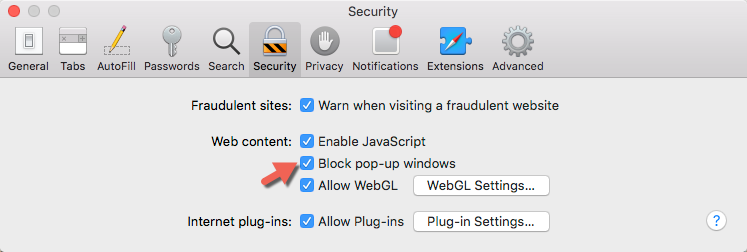
Are you using Safari? If you are open Safari and up in the LEFT hand corner. Click Preferences/Secuity and uncheck as shown here below. You might need to restart your browser for this to take affect. Edit: Make sure to recheck the box afterwards, OK?


edwin_eekelaers
Popular Voice
Forum|alt.badge.img+6
? , leave some topics void of your high quality answers please :D so our lesser experts can answer some too when we wake up & need a dose of the community to get thru the day :D
In short you are too good for us :D Thanks for your continued efforts to help the community.

Ssherjj
Moderator
Forum|alt.badge.img+62
  • Moderator
  • November 14, 2015
? What? ROFL.... 😉

Baldrick
Gold VIP
  • Gold VIP
  • November 14, 2015
Precisely, Sherry...ROFLMAO