icons rearranged

  • December 30, 2014
  • 5 replies
  • 23 views

each time I start my computer my desktop icons are rearranged, a pain in the butt - any suggestions?


5 replies

RetiredTripleHelix
Gold VIP
Forum|alt.badge.img+56
Hello and Welcome to the Webroot Community!
 
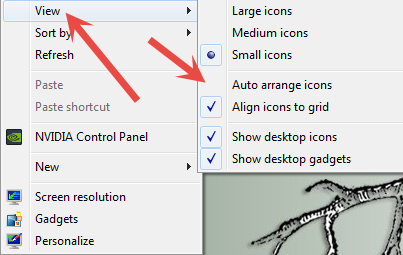
Make sure to uncheck "Auto Arrange Icons" by Right Clicking on the Desktop! And reboot to see if it stays as it should!
 
HTH,
 
Daniel ;)


  • Author
  • Fresh Face
  • December 30, 2014
Yes I have that unchecked, problems only started after I installed Webroot

RetiredTripleHelix
Gold VIP
Forum|alt.badge.img+56
Well WSA would not have anything to do with the Desktop Icons so can you Please Submit a Support Ticket and they can let you know what's going on.
 
Thanks,
 
Daniel ;)
 
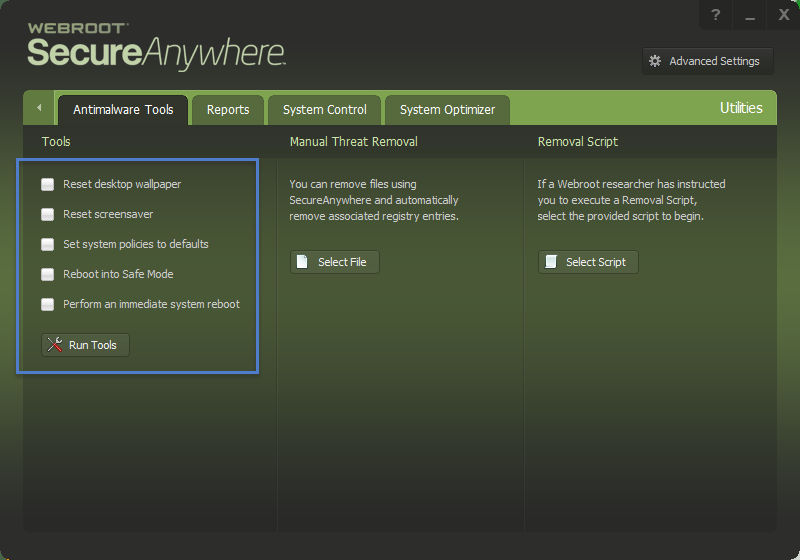
EDIT: Have you done anything here? But be sure to Contact Support.


  • Author
  • Fresh Face
  • December 30, 2014
Thanks - I did send a ticket, nothing yet. How does one ge t to that screen?

RetiredTripleHelix
Gold VIP
Forum|alt.badge.img+56
@ wrote:
Thanks - I did send a ticket, nothing yet. How does one ge t to that screen?
Thanks they will get to you ASAP! Here is how to get there: http://www.webroot.com/En_US/SecureAnywhere/PC/WSA_PC_Help.htm#C5_Quarantine/CH5c_UsingAntimalwareTools.htm
 
HTH,
 
Daniel 😉