Answer

Webroot startup splash screen keeps re-appearing

  • August 30, 2023
  • 11 replies
  • 734 views

kevlar_heart
Fresh Face

The splash screen that indicates Webroot Secure Anywhere is active keeps reappearing. I’ve restarted PC several times. Still keeps happening. Any suggestions?\I would ignore it, but the splash screen becomes an active window and interrupts whatever I’m doing.. Thanks

Best answer by TripleHelix

I have exactly the same issue with the splash screen, it started about 3 weeks ago.

Windows 11 

Hello,


Please contact Webroot Support that I posted above and they will help you. I have not personally seen this issue on Windows 10.


Thanks,

11 replies

TripleHelix
Moderator
Forum|alt.badge.img+63
  • Moderator
  • August 30, 2023

Hello @kevlar_heart 


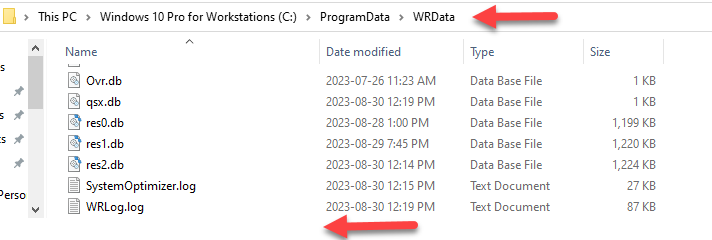
Have a look here to see if you have any DMP files! C:\ProgramData\WRData Folder it’s a hidden folder so you can use the Run command.


As you can see I don’t have any as they would be at the bottom of this page.


Please let us know or if you can post a snapshot like I did.


Thanks,


TripleHelix
Moderator
Forum|alt.badge.img+63
  • Moderator
  • August 30, 2023

Or if you want please do a clean reinstall of WSA!


Please follow the steps closely!

  • Make sure you have a copy of your 20 Character Alphanumeric Keycode! Example: SA69-AAAA-A783-DE78-XXXX
  • KEEP the computer online for Uninstall and Reinstall to make sure it works correctly
  • Download a Copy Here (Best Buy Geek Squad Subscription PC users click HERE) Let us know if it is the Mac version you need
  • Uninstall WSA and Reboot
  • Go into Safe Mode and Delete these Folders if they are there!
  • C:\Program Files\Webroot Folder
  • C:\ProgramData\WRData Folder (Hidden Folder)
  • C:\ProgramData\WRCore Folder (Hidden Folder)
  • Boot back into normal mode
  • Install with the new installer, enter your Keycode
  • Let it finish it's install scan
  • Reboot once again
  • DO NOT import any old settings as you can set it up as you like once it's done

Info in case you don’t know how to go into Safe Mode: https://support.microsoft.com/en-us/windows/start-your-pc-in-safe-mode-in-windows-10-92c27cff-db89-8644-1ce4-b3e5e56fe234


Please let us know if that resolves your issue?

Thanks,


kevlar_heart
Fresh Face
  • Author
  • Fresh Face
  • August 31, 2023

Hello @kevlar_heart 


Have a look here to see if you have any DMP files! C:\ProgramData\WRData Folder it’s a hidden folder so you can use the Run command.


As you can see I don’t have any as they would be at the bottom of this page.


Please let us know or if you can post a snapshot like I did.


Thanks,

Hello: 


Thanks for the response

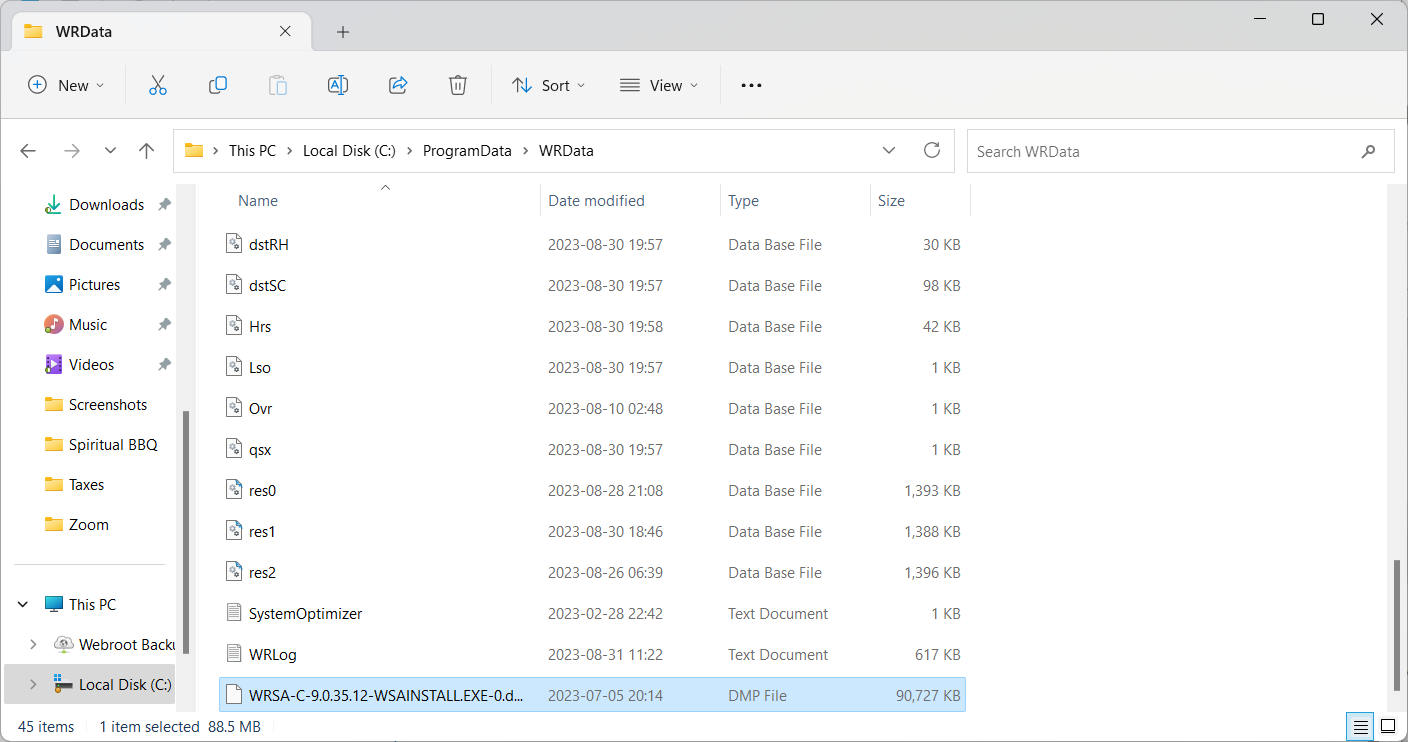
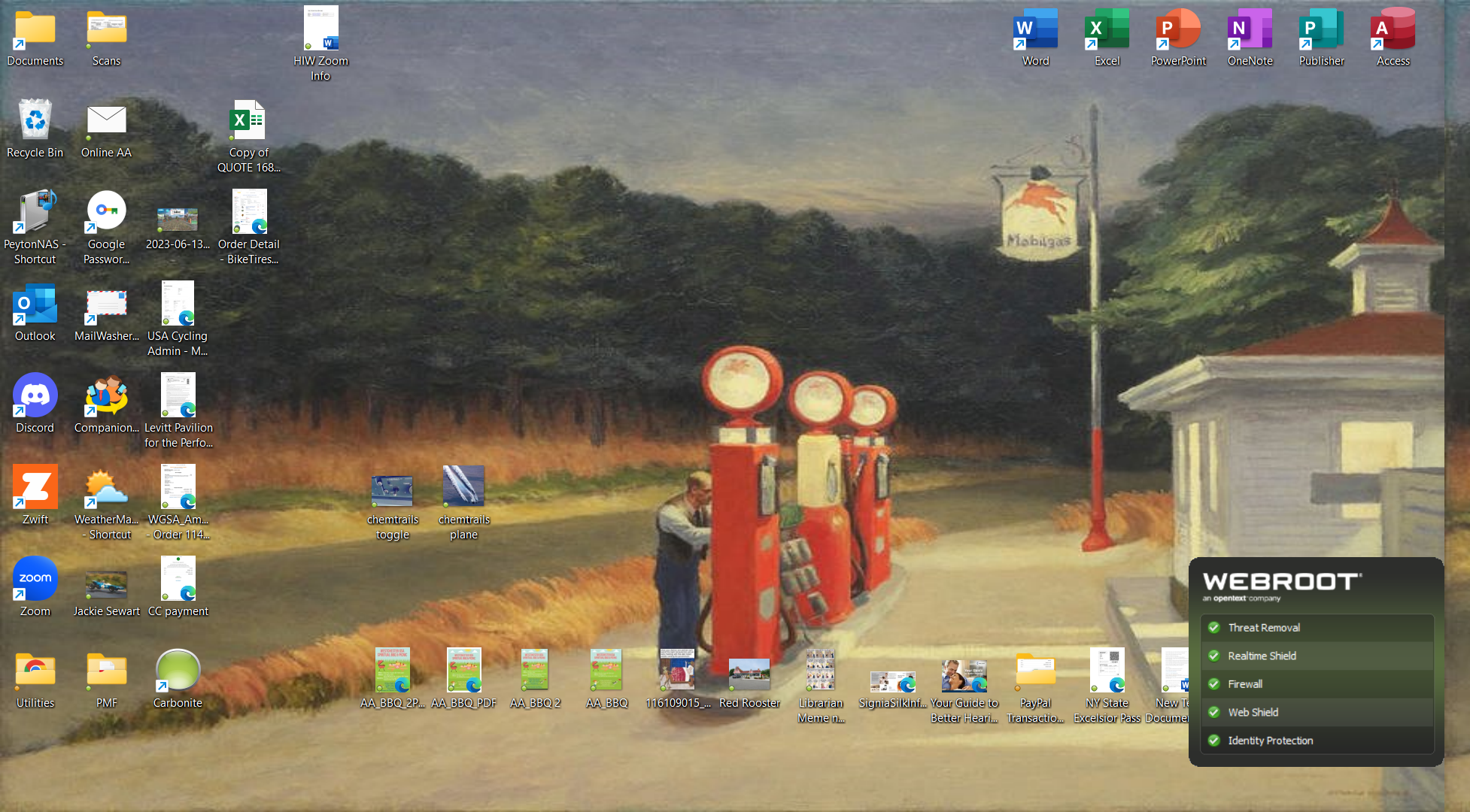
. Here is the splash screen that keeps popping up and a screenshot of the cited directory


kevlar_heart
Fresh Face
  • Author
  • Fresh Face
  • August 31, 2023

Sorry…


here is splash screen that keeps popping up


TripleHelix
Moderator
Forum|alt.badge.img+63
  • Moderator
  • August 31, 2023

Hello @kevlar_heart 


Please try a clean reinstall of WSA and after a couple of days let us know if it’s still popping up, to me when it keeps popping up WSA is restarting itself after a possible crash as it should restart and the DMP file is an older one so that wouldn’t be useful and after a clean reinstall and if it keeps doing it then you would need to Contact Webroot Support so lets try a clean reinstall first.


Thanks,


kevlar_heart
Fresh Face
  • Author
  • Fresh Face
  • September 2, 2023

Tried clean install….and boy was that a pain…finding all your directories is challenging


All seemed good until today….I get the pop up splash screen every minute or so.


Any other tips?


TripleHelix
Moderator
Forum|alt.badge.img+63
  • Moderator
  • September 2, 2023

Hi @kevlar_heart 


Yes it can be for some and we don’t want to leave any leftovers in case they are still there as every system is different. Are you using Windows 10 or 11?


At this point it would be best to get support to look into it as the Splash Screen should only pop-up on bootup of the system.


Click on picture to see full size!


Webroot Support

Submit a ticket the best way!

Call 1-866-612-4227

Note: When submitting a Support Ticket, Please wait for a response from Support. Putting in another Support Ticket on this problem before Support responses will put your first Support Ticket at the end of the queue.


Thanks,


kevlar_heart
Fresh Face
  • Author
  • Fresh Face
  • September 4, 2023

Hi @kevlar_heart 


Yes it can be for some and we don’t want to leave any leftovers in case they are still there as every system is different. Are you using Windows 10 or 11?


At this point it would be best to get support to look into it as the Splash Screen should only pop-up on bootup of the system.


Click on picture to see full size!


Webroot Support

Submit a ticket the best way!

Call 1-866-612-4227

Note: When submitting a Support Ticket, Please wait for a response from Support. Putting in another Support Ticket on this problem before Support responses will put your first Support Ticket at the end of the queue.


Thanks,

Thanks. The pop up is constant, meaning Webroot is constantly re-booting. Can’t access program as it shuts down/reboots every 30 seconds. I am using Win 11 Pro. I’ll contact Support via phone on Tuesday


TripleHelix
Moderator
Forum|alt.badge.img+63
  • Moderator
  • September 4, 2023

Okay please let us know the outcome.


Thanks,


  • New Member
  • September 12, 2023

I have exactly the same issue with the splash screen, it started about 3 weeks ago.

Windows 11 


TripleHelix
Moderator
Forum|alt.badge.img+63
  • Moderator
  • Answer
  • September 12, 2023

I have exactly the same issue with the splash screen, it started about 3 weeks ago.

Windows 11 

Hello,


Please contact Webroot Support that I posted above and they will help you. I have not personally seen this issue on Windows 10.


Thanks,