antivirus

  • August 23, 2015
  • 2 replies
  • 24 views

Is this AV program safe and secure for my computer?

2 replies

Ssherjj
Moderator
Forum|alt.badge.img+62
  • Moderator
  • August 23, 2015
Hello ?,
 
Welcome to the Webroot Community,
 
Once Webroot is installed ..you can set it and forget about it. Webroot does protect you from Malware. and look here at this video information onhttps:///t5/Webroot-SecureAnywhere-Antivirus/What-Happens-if-Webroot-quot-Misses-quot-a-Virus/ta-p/33374
 
 
 Webroot detects, blocks and removes all infections including highly sophisticated
banking malware from your PC in the fastest possible time.
• Has an integrated Identity Shield feature that provides a secondary layer of
defence against financial and information stealing malicious software.
• Identity Shield assumes your PC may already be infected with sophisticated
and hard to detect malware such as a banking Trojan and neutralises the
threat by shutting off its data theft activities on your PC, thereby keeping your
identity and online activities secure.
• Doesn’t need virus definition updates, these go out of date within minutes.
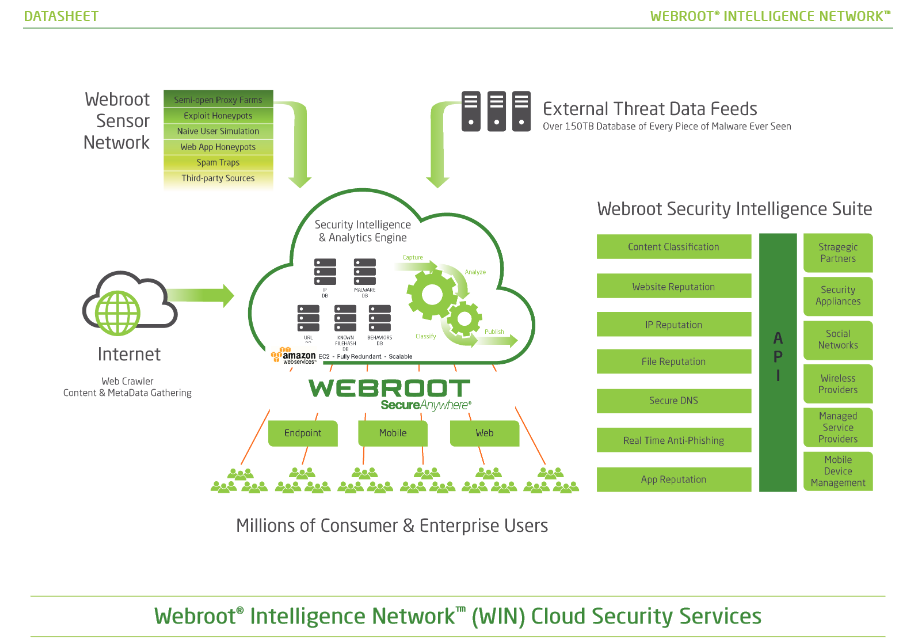
Instead it uses the Webroot Intelligence Network (the world’s largest threat
intelligence database) to identify new files and classify threats in real time.
In this way, it identifies brand new threats in seconds, rather than hours or
days and significantly minimizes the risks posed by malware.
• It is lightweight and uses the least PC resources of any antivirus. At less than
1 megabyte in size, it’s tiny compared to conventional antivirus software that
is on average around 500 megabytes!
• It is extremely fast, according to independent tests it’s the world’s fastest
antivirus. A normal deep scan takes 1-3 minutes depending on your
machine and will not slow down your PC.
 
What extra protection is offered by Identity Shield?
The Identity Shield protects all the details you share with an internet bank. It protects
information like login details, passwords, account numbers, credit card details and
personal information such as addresses, dates of birth etc. It also adds a second layer of
protection against highly targeted banking and information stealing Trojans to ensure your
identity and online activities are fully secure.
Webroot SecureAnywhere protects you in these ways:
• Identifies if a website you visit is the genuine site making sure it’s not a false
banking (phishing) site
• Ensures your login information is only entered into the website it’s intended
for
• Protects your personal information, even if there’s already unidentified
malicious software on your PC
• Automatically protects your web browser, cookies and saved website data
• Prevents browser attacks from keyloggers and screengrabbers that try to
peer into your banking activity
• Protects clipboard data from theft and stops URL grabbing attacks
• Blocks browser modification attempts and any suspicious access to browser
windows


Please read the potential Webroot has.: https://community.webroot.com/t5/Webroot-SecureAnywhere-Antivirus/Scanning-PC-suspiciously-fast/m-p/... also the Webroot WIN Cloud does all the work not your PC: http://www.brightcloud.com/platform/webroot-intelligence-network.php


Here is the PC User Guide This guide will help you out alot!
 
Hope this helps,

Baldrick
Gold VIP
  • Gold VIP
  • August 23, 2015
Hi solisd2020
 
Welcome to the Community Forums.
 
If I may just ask, further to what Sherry has posted, what aspect of WSA you are concerned about or have doubts about that lead you to ask as to whether it "...safe and secure for my computer"?  There must be something behind the question and I am struggling to understand what that is.
 
Many thanks in anticiaption.
 
Regards, Baldrick