
Solved
Undo a block

Webroot blocks a file named something like outlook.exe and I can't receive my e-mails through Outlook. How can I allow-unblock it ?
Best answer by RetiredTripleHelix
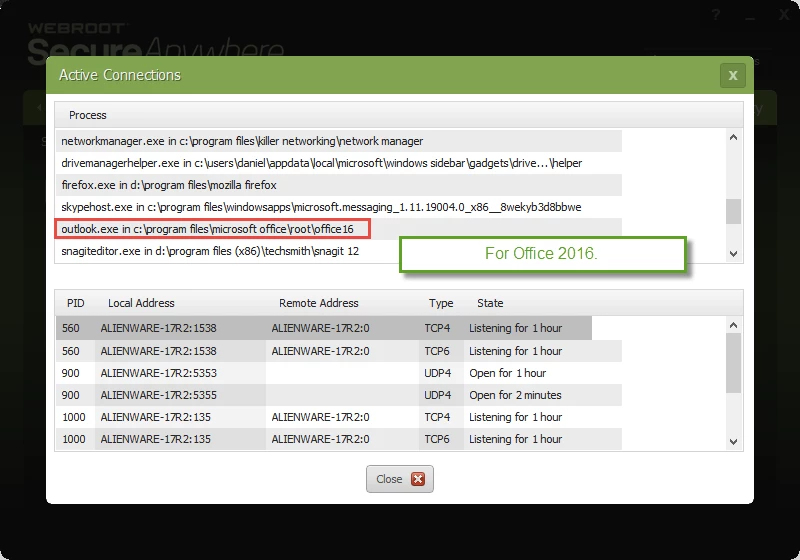
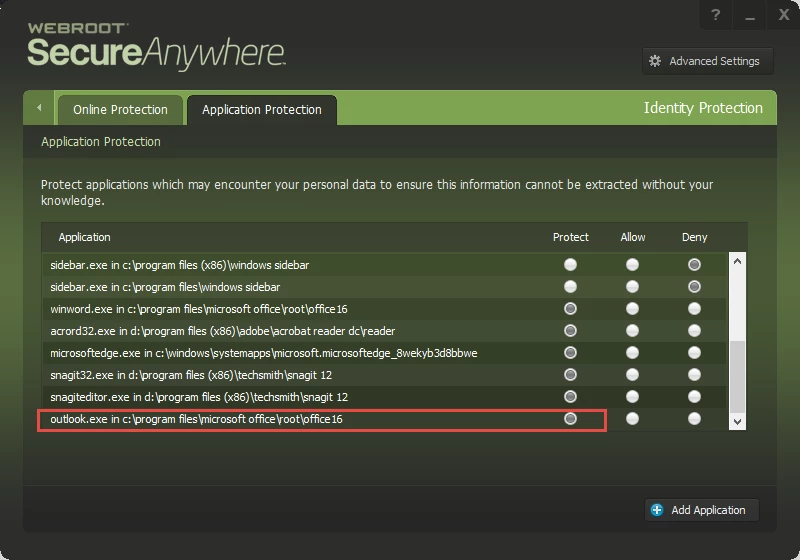
You can add it back but put it under protect: http://www.webroot.com/En_US/SecureAnywhere/PC/WSA_PC_Help.htm#C6_IDProtection/CH6c_ManagingProtectedApps.htm you will have look for outlook.exe to add it back to ID Shield. Now you have Windows 7 and you have access to WSA's Firewall so look in there to make sure it's set to Allow if it's under Block: http://www.webroot.com/En_US/SecureAnywhere/PC/WSA_PC_Help.htm#C4_Firewall/CH4c_ManagingActiveConnections.htm I'm sure that's it as in Windows 8 and 10 WSA does not show the same settings in Windows 7 see here: https://community.webroot.com/t5/Ideas-Exchange/Outbound-connections-fw-control-in-Win-8-Win-8-1/idi-p/60003 and notice what JoeJ said here.@ wrote:
At first I would like to thank you for the help!
I'm using Windows 7 Home Premium 32-bit.
In the tab PC Security > Block/Allow files the file outlook.exe is set to 'allow' and in the tab Utilities > System control > Control Active Processes, outlook.exe is also set to 'allow'.
Finally in the tab Identity Protection > Application Protection the file outlook.exe was also set to 'allow' but now I have removed the file from that list and I don't know how and if I should restore it.
PrevxHelp( JoeJ, VP of Development ) wrote:
The firewall in Windows 8 is much easier to work with than previous platforms because of the built in OS controls. Every vendor needs to use the same APIs now (the older methods are deprecated), but that's exactly why we aren't doing it currently - no matter what vendor wraps the APIs, it will be exactly the same underlying calls which are built into the OS, and you can use the OS UI to do the same job if you want to customize it.
The reason why we have the functionality on Windows 7 and not Windows 8 is because Microsoft doesn't expose the same normalized interfaces on Windows 7 (or require vendors to use the new APIs).
Thanks,
Daniel ;)
From my Win 10 System!










Login to the community
No account yet? Create an account
Enter your E-mail address. We'll send you an e-mail with instructions to reset your password.