How long does it take to set up password manager?

  • February 6, 2016
  • 7 replies
  • 43 views

How long does it take to set up password manager?  Mine has been over 20 minutes & says preparing with a spinning circle. Is this normal?  If not, what should I do?

7 replies

Baldrick
Gold VIP
  • Gold VIP
  • February 6, 2016
Hi janstx
 
Welcome to the Community Forums.
 
It should actually take no time at all to set it up. In fact the Toolbar extension is automatically installed when you in stall WSA and that should be all there is to it. You then log into it when you open you browser and then when you enter login details for a site the Password Manager should automatically offer to save them or if you go to login into a previously saved site and you have Autofill set to 'On' it should automatically fill in the relevant fields for you.
 
I am therefore struggling to understand where you are trying to set it up? Are you trying to access password details via the web console?
 
Regards, Baldrick

  • Fresh Face
  • February 7, 2016
Im having the same problem. mine has been circling since last night its been over 12 hrs.

Baldrick
Gold VIP
  • Gold VIP
  • February 7, 2016
Once again I ask...where exactly are you both seeing this...are you trying to access the Password Manager from the web console (HERE) or are you doing so from the Password Manager toolbar icon?
 
It would be really helpful to know this if we are to provide you with assistance.
 
Thanks, Baldrick

  • Fresh Face
  • February 7, 2016
yes from the web browser 

  • Fresh Face
  • February 7, 2016
I also put the extension in on my google chrome. it still doesn't recongize my email address

Baldrick
Gold VIP
  • Gold VIP
  • February 7, 2016
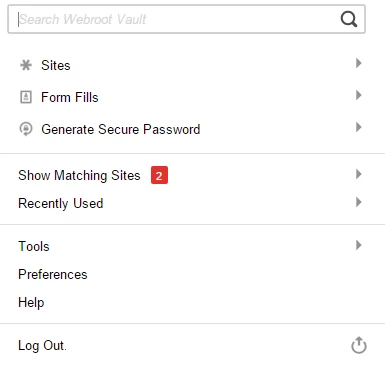
So you click on the toolbar icon in your browser and then what exactly happens? When I do so get the following:


What exactly happens for you?
 
Regards, Baldrick

  • Author
  • Fresh Face
  • February 8, 2016
Today I am not getting the spinning circle.  I open the webroot app on my decktop.  On the right side is a list; I opened password manager. Then click start now, this took me to the page where I was getting the progress circle before.  Today it takes me to my.webroot.com/?action=uberIdentity with Passwords highlighted in green. When I click to add a site or form fill profile I get an error message to try later.  
W