Solved

I blocked system32/netsh.exe with webroot, HELP!

  • January 19, 2017
  • 9 replies
  • 97 views

I was running an anti adware and now I accidently blocked netsh.exe when asked, so I need to re-enable it so I can use my PC 😞 PLEASE help!!!

Best answer by anthony

It was not in quarantine, and I already sent them a support ticket 😃 I let my mom take it over and she did a revert back to a previous version of the computer, so hopefully that will work. A system restore, I should say.

9 replies

RetiredTripleHelix
Gold VIP
Forum|alt.badge.img+56
Hello and Welcome to the Webroot Community!
 
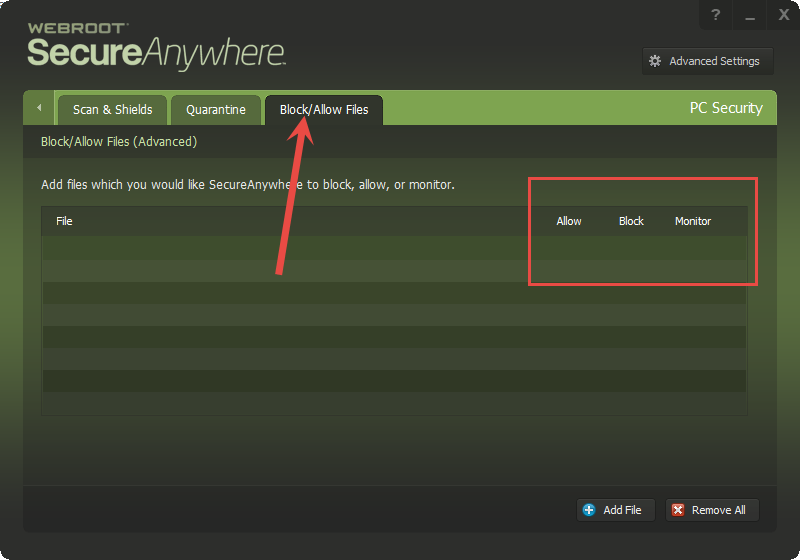
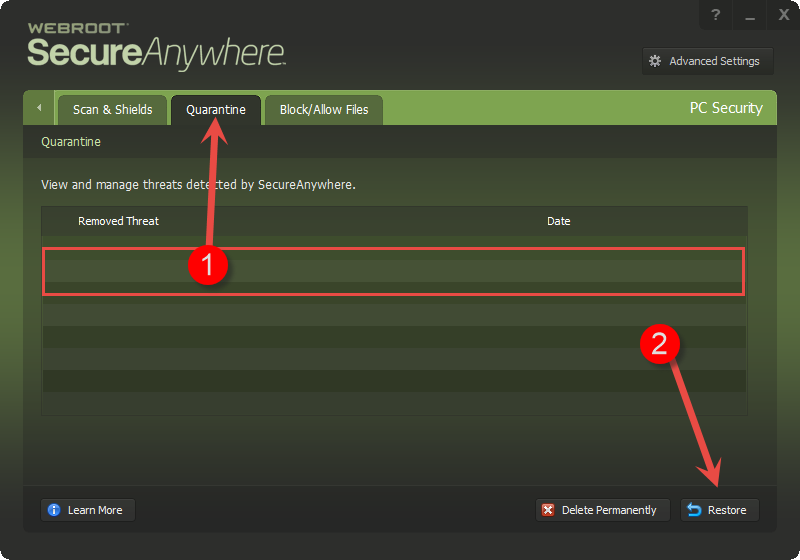
Hopefully it's only a Firewall Block:


RetiredTripleHelix
Gold VIP
Forum|alt.badge.img+56
If all the above fails try a clean reinstall of WSA!
 
Please follow the steps closely!
 
  • Make sure you have a copy of your 20 Character Alphanumeric Keycode! Example: SA69-AAAA-A783-DE78-XXXX
  • Be sure you add your Keycode to your Online Console: Webroot SecureAnywhere Online Console
  • KEEP the computer online for Uninstall and Reinstall to make sure it works correctly
  • Download a Copy Here (Best Buy Geek Squad Subscription PC users click HERE) Let us know if it is the Mac version you need.
  • Uninstall WSA and Reboot
  • Install with the new installer, enter your Keycode and do NOT import any settings if offered by the installer as you can set it up as you like once it's done
  • Let it finish it's install scan
  • Reboot once again
Please let us know if that resolves your issue?
 
Thanks,
 
Daniel 😉

  • Author
  • Fresh Face
  • January 19, 2017
Hi, I want to follow your "If all above fails" instructions but I am viewing this off of another pc, and the broken one has NO internet connection. Will that be a problem?

  • Author
  • Fresh Face
  • January 19, 2017
Hi, I want to follow your "If all above fails" instructions but I am viewing this off of another pc, and the broken one has NO internet connection. Will that be a problem?

RetiredTripleHelix
Gold VIP
Forum|alt.badge.img+56
@ wrote:

Hi, I want to follow your "If all above fails" instructions but I am viewing this off of another pc, and the broken one has NO internet connection. Will that be a problem?
The thing is if you deleted that file it would be in quarantine and you need it as it's part of your Internet files.
 
http://www.file.net/process/netsh.exe.html
 
https://msdn.microsoft.com/en-us/library/windows/desktop/bb736546(v=vs.85).aspx

RetiredTripleHelix
Gold VIP
Forum|alt.badge.img+56
If it's not in quarantine the best thing to do is wait and Submit a Support Ticket and hopefully they can get it back for you!

  • Author
  • Fresh Face
  • Answer
  • January 19, 2017
It was not in quarantine, and I already sent them a support ticket 😃 I let my mom take it over and she did a revert back to a previous version of the computer, so hopefully that will work. A system restore, I should say.

RetiredTripleHelix
Gold VIP
Forum|alt.badge.img+56
@ wrote:
It was not in quarantine, and I already sent them a support ticket 😃 I let my mom take it over and she did a revert back to a previous version of the computer, so hopefully that will work. A system restore, I should say.

Yea I keep forgetting about that feature.........! 😠 Let us know if it works out as I feel it should!
 
Thanks,
 
Daniel 😉

  • Author
  • Fresh Face
  • January 19, 2017
It did work out, so everything is good now 😃 Thank you for your help TripleHelix!