CRSS.EXE virus?

  • November 15, 2015
  • 7 replies
  • 139 views

I was told by Geeksquad that I have the crss.exe Trojan virus. I ran a scan with Webroot and Malware bytes.  Neither one detected a virus or anything malicious. I've searched around and I've read that the crss.exe file is a necessary Windows file that can become infected.  They say if it shows up multiple times in your processes, that one of them is a virus. It shows up twice.  However, I've also read that the infected one will use high CPU (which neither one is), and it will not be in the Systems 32 folder (and both are). Do I still need to be concerned?  My computer is running fine, now.  I had also done a system restore after I was told I had the virus, so maybe that fixed something. 

7 replies

Baldrick
Gold VIP
  • Gold VIP
  • November 15, 2015
Hi durban
 
Welcome to the Community Forums.
 
As you have correctly identified the problem here is that crss.exe can be a valid Windows file, but is also used by viruses with that name, and there are also several other viruses about with various mis-spellings.

The valid Windows file is a Client Server Runtime Process. A search for crss.exe can get lots of hits for virus activity, but that does not mean that it is a virus.
 
GIven what you say that you have done and that your system is running as you expect it to I would suggest that they were mistaken and that there is no issue...but I would monitor the situation for a couple of days and if you see any of the nefarious behaviour you have listed then I would check with the The Geek Squad again, and get them to look deeper. And if they persist with the view that you are infected, and that concerns you, then I would ask for a second opinion by contact the Webroot Support Team.
 
Regards, Baldrick

  • November 15, 2015
Hi ?
 
Welcome.
 
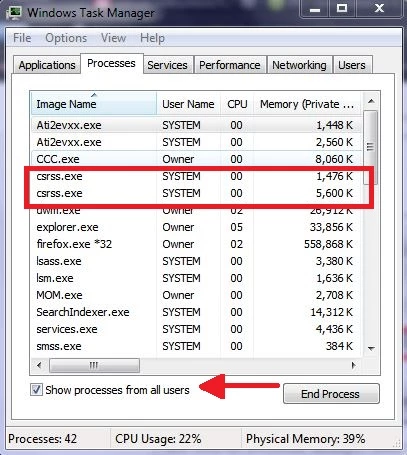
In addition to the excellent advice already given by @Baldrick I would just like to ask a simple question in regard to the crss.exe. Is there more than one user logged in when you notice the two processes? Just a thought because this will result in two legitimate instances of it showing. Even with just one user logged in there will be two instances (If Show processes from all users is selected.)
 
 
Thanks,
 
bd

  • Author
  • New Voice
  • November 15, 2015
No, there's only one user logged in.  Thanks for post!

  • Author
  • New Voice
  • November 15, 2015
Thanks for the advice.  I will keep an eye on it over the next few days.  

  • November 15, 2015
Hello ?
 
I had one bit of information to add.
 
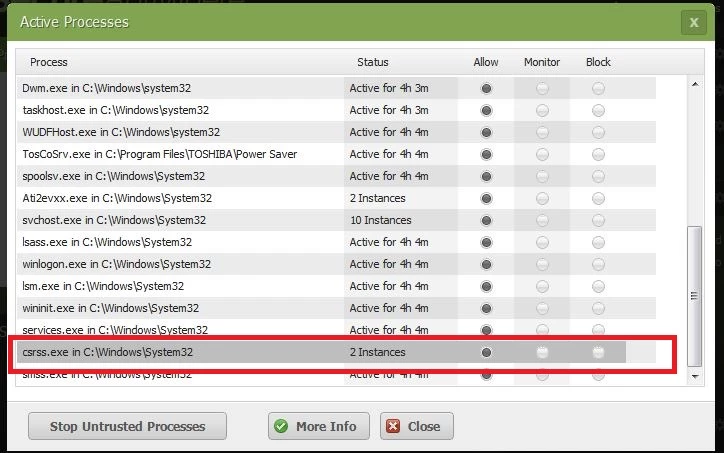
When you are looking at these two processes are you using the Windows Task Manager or the Webroot Active Processes screen?
 
The reason that I ask is that if I open the Active Processes screen in Webroot (right-click Webroot icon in system tray [by clock] and select Control Active Processes) I also show 2 instances of crss.exe. I have confirmed this on three different computers, WIN 7 Pro, Home Premium, WIN 10, with just one user logged in.


I also show two processes running if I select "Show processes from all users" in the Windows Task Manager. Again with only one user logged in.


So I don't really think what you're experiencing is abnormal.
 
Hope this info helps, :)
 
bd

Baldrick
Gold VIP
  • Gold VIP
  • November 15, 2015
Indeed, BD...this is very much normal behaviour and has been as far back as I can remember...but a point well worth precising. ;)

  • Author
  • New Voice
  • November 15, 2015
Thanks for the helpful screenshots, Burndaddy.  I was viewing from the Windows task manager, but I don't see the option of the "show processes from all users" in my task manager.  However, I checked 3 different computers in the house and they all 3 show the crss.exe file running twice.  I'm going to check my computer at work tomorrow, and if that also shows it running twice, I'm going to assume I don't have the virus.  But then I'll be wondering why Geeksquad told me this.  He tried to sell me an expensive software licence, too, so I'm really hoping he didn't make it up in order to make a commission!