

Answer

Allow Adobe Flash player to store info on PC?

  • April 7, 2014
  • 6 replies
  • 82 views

Almost everytime I open a video it seems I get a popup saying that some program want to store info on my computer.
The exact message is;
Local Storage
[url] is requesting permission to store information on your computer.
Requested: up to 10KB
Currently used: 1 KB"
Followed by option to Allow or Deny.
 
At first I noticed this on sites I was not very familiar with, but now it appears on sites I trust.  Up to now I have never allowed this, but now I wonder if it is OK to do so.  If I were to allow storage what risks am I running?
ehw

Best answer by Petrovic

Hello ehw and Welcome to the Webroot Community Forums!
 
Read this thread:
 

Local storage pop-up question

http://www.macromedia.com/support/documentation/en/flashplayer/help/help06.html
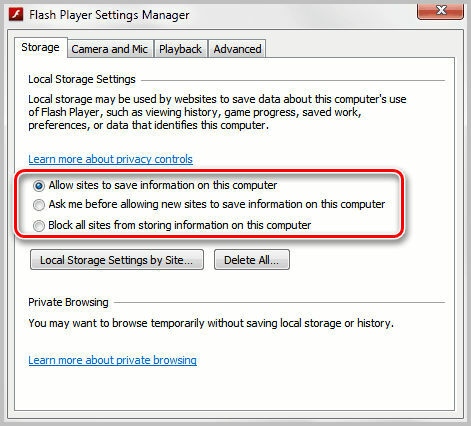


Additionally:
Flash Player Local Settings Manager / Using the Local Settings Manager
http://help.adobe.com/en_US/FlashPlayer/LSM/WS6aa5ec234ff3f285139dc56112e3786b68c-7fff.html
 
 
Thank you
Petr.


6 replies

Baldrick
Gold VIP
  • Gold VIP
  • April 7, 2014
Hi ehw
 
That is very interesting as I have never, ever seen this when I open a video. :S
 
Would you advise as to what you are using to open the videos?  Is it via a browser, and if so which one, or do you use a proprietary app?
 
Regards
 
 
Baldrick

Ssherjj
Moderator
Forum|alt.badge.img+62
  • Moderator
  • April 7, 2014
Hi ehu, Nice to meet you and great to have you in the Webroot Forum. I own a Mac PC running Maverick and also have seen popups from videos wanting to store on my computer, mostly on Safari Browser. I always deny this popup storing any info on my Hard Driveor OS which ever you perfer. My opinion is why store it? Premissions I prefer to deny. I feel safer with my security not knowing where this 10KB is from so I always deny.
 
Best to you, Sherry

Petrovic
Gold VIP
Forum|alt.badge.img+52
  • Gold VIP
  • Answer
  • April 8, 2014
Hello ehw and Welcome to the Webroot Community Forums!
 
Read this thread:
 

Local storage pop-up question

http://www.macromedia.com/support/documentation/en/flashplayer/help/help06.html


Additionally:
Flash Player Local Settings Manager / Using the Local Settings Manager
http://help.adobe.com/en_US/FlashPlayer/LSM/WS6aa5ec234ff3f285139dc56112e3786b68c-7fff.html
 
 
Thank you
Petr.



  • Author
  • Fresh Face
  • April 9, 2014
@ wrote:
Hi ehw
 
That is very interesting as I have never, ever seen this when I open a video. :S
 
Would you advise as to what you are using to open the videos?  Is it via a browser, and if so which one, or do you use a proprietary app?
 
Regards
 
 
Baldrick
Primarily Firefox

  • Author
  • Fresh Face
  • April 9, 2014
@ wrote:
Hello ehw and Welcome to the Webroot Community Forums!
 
Read this thread:
 
Local storage pop-up questionhttp://www.macromedia.com/support/documentation/en/flashplayer/help/help06.html
 [Snipped quote]

 
Additionally:
Flash Player Local Settings Manager / Using the Local Settings Manager
http://help.adobe.com/en_US/FlashPlayer/LSM/WS6aa5ec234ff3f285139dc56112e3786b68c-7fff.html
 
 
Thank you
Petr.
 
 
This helps a lot, Thanks Petr.

Baldrick
Gold VIP
  • Gold VIP
  • April 9, 2014
Hi ehw
 
Ah, thanks...I am more an IE user for that sort of thing but will be checking what Petrovic recommended to see what the settings on my PC are.  INterestingly I have never, ever made any chanes to Flash and who it installs/run/ is configureed so if I find my setting to be different to yours that begs a question as to why they are set differently...interesting, no?
 
Regards
 
 
Baldrick



