Answer

How do I temporarily turn off a pop-up blocker?

  • June 25, 2015
  • 7 replies
  • 195 views

Hello, I need to temporarily turn off my pop-up blocker to print a document. How do I do this? Thank you.

Best answer by TripleHelix

Thank you. I did that and turned off the Webroot Filtering Extensions, but still got this error message when I tried to access the page:

We have detected that you are using popup blocking software. Some site features require that popup blockers be turned off to run properly.


Well the Web Threat Extension is not a pop-up blocker so you need to disable your pop-up blocker if you really need to and re-enable the Web Threat Extension.


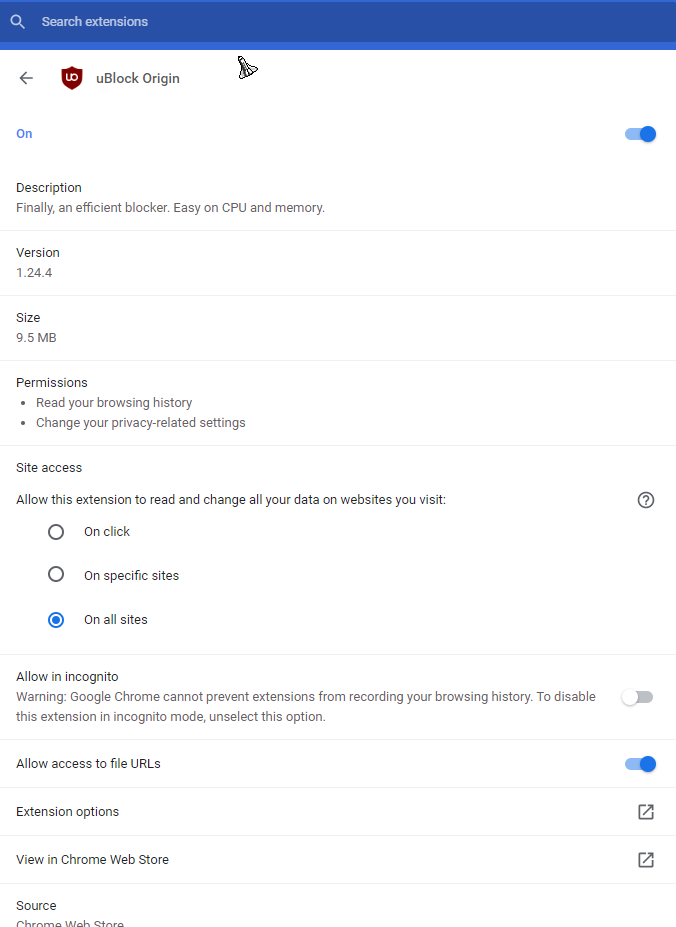
This is my pop-up blocker: https://chrome.google.com/webstore/detail/ublock-origin/cjpalhdlnbpafiamejdnhcphjbkeiagm


7 replies

JamesG
  • Retired Webrooter
  • June 25, 2015
Hello,
 
I would advise going to the developers website and check to see if there is an option to disable it, you can also navigate to your extensions and disable the pop-up blocker there before printing.

Best Regards,

Forum|alt.badge.img+1
  • New Member
  • April 1, 2020

What is “the developers website”? Aren’t we all talking about Webroot here?


Forum|alt.badge.img+1
  • New Member
  • April 1, 2020

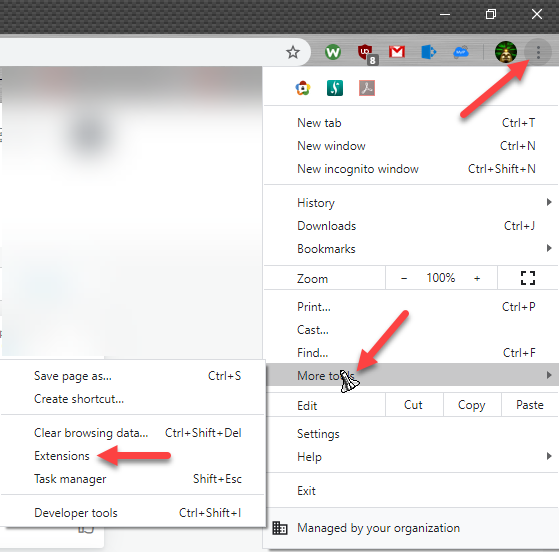
And how exactly do I “navigate to your extensions”?


TripleHelix
Moderator
Forum|alt.badge.img+63
  • Moderator
  • April 1, 2020

And how exactly do I “navigate to your extensions”?


This is a 4 year old thread, so go into your Browser or Browsers and go to the Extensions like here in Google Chrome:


HTH,


Forum|alt.badge.img+1
  • New Member
  • April 1, 2020

Thank you. I did that and turned off the Webroot Filtering Extensions, but still got this error message when I tried to access the page:

We have detected that you are using popup blocking software. Some site features require that popup blockers be turned off to run properly.

TripleHelix
Moderator
Forum|alt.badge.img+63
  • Moderator
  • Answer
  • April 1, 2020

Thank you. I did that and turned off the Webroot Filtering Extensions, but still got this error message when I tried to access the page:

We have detected that you are using popup blocking software. Some site features require that popup blockers be turned off to run properly.


Well the Web Threat Extension is not a pop-up blocker so you need to disable your pop-up blocker if you really need to and re-enable the Web Threat Extension.


This is my pop-up blocker: https://chrome.google.com/webstore/detail/ublock-origin/cjpalhdlnbpafiamejdnhcphjbkeiagm



Forum|alt.badge.img+1
  • New Member
  • April 1, 2020

Thanks. As it turns out, despite the popup blocker error message, it was another issue altogether, which was solved when I signed up as a new user, rather than trying to sign in as a current user, which I thought I was. But much appreciated for everyone’s feedback.