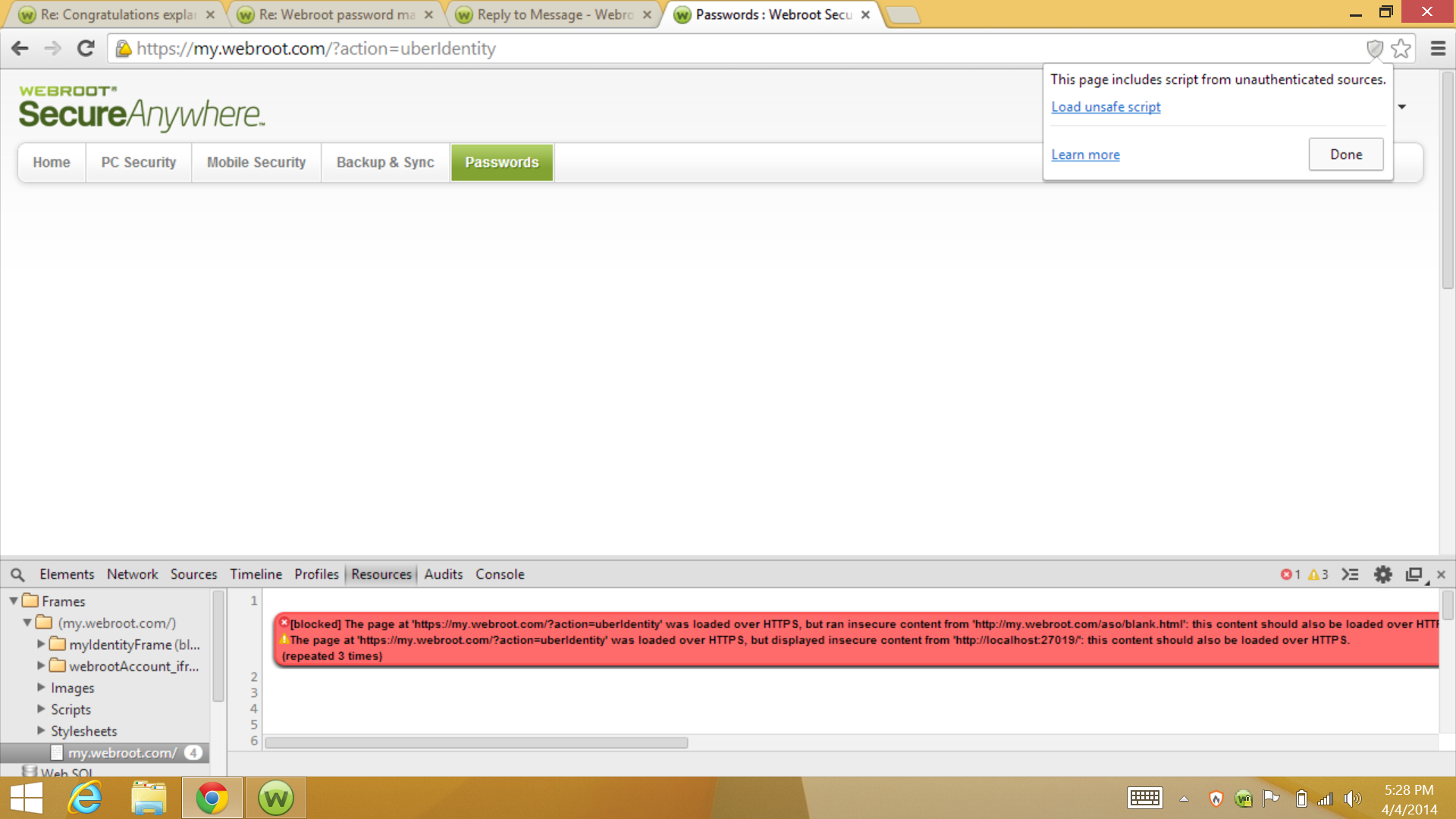
HTTPS mixed content error on passwords pane


  • April 3, 2014
  • 11 replies
  • 66 views

explanoit
Silver VIP
Forum|alt.badge.img+6
The page at 'https://my.webroot.com/?action=uberIdentity' was loaded over HTTPS, but ran insecure content from 'http://my.webroot.com/aso/blank.html': this content should also be loaded over HTTPS

11 replies

Shawn
  • OpenText Employee
  • April 4, 2014
I have alerted the troops and we're going in.
 
Thanks Explanoit, always so helpful.

explanoit
Silver VIP
Forum|alt.badge.img+6
  • Author
  • Silver VIP
  • April 4, 2014
@ Another one,
When you add a computer in consumer console, you go to download page, the WSA executable is downloaded over HTTP. Plz change to HTTPS?
 
https://my.webrootanywhere.com/download.aspx
http://anywhere.webrootcloudav.com/zerol/wsainstall.exe

RyanBot
Popular Voice
  • Popular Voice
  • April 4, 2014
There going to fix the problem explanoit.

explanoit
Silver VIP
Forum|alt.badge.img+6
  • Author
  • Silver VIP
  • April 4, 2014
Hi @ sorry can you clarify what you mean?

RyanBot
Popular Voice
  • Popular Voice
  • April 4, 2014
webroot is going to fix it

explanoit
Silver VIP
Forum|alt.badge.img+6
  • Author
  • Silver VIP
  • April 4, 2014
I have no doubt they will.

RyanBot
Popular Voice
  • Popular Voice
  • April 4, 2014
Ok

RyanBot
Popular Voice
  • Popular Voice
  • April 4, 2014
Also kudos to you!
:D:D

Shawn
  • OpenText Employee
  • April 4, 2014
Me again!
Explanoit, can you please provide steps to reproduce your first finding including what browser?
 
I have development curious about this behavior.
 
Thanks!

explanoit
Silver VIP
Forum|alt.badge.img+6
  • Author
  • Silver VIP
  • April 4, 2014
(Disclaimer: This is a freshly installed system, it doesn't have my full suite of customizations, don't judge me by the screenshot)
 
@

Here's as much detail as I think could be relevant. This also happens in IE11.

Freshly installed Win8->Win8.1->Win 8.1.1
Install Chrome MSI version and use it and restart

Install WSA
Launch Chrome

In Chrome, allow Webroot Filtering Extension
In Chrome, deny Webroot Password Manager

Open https://my.webrootanywhere.com/default.asp
Login to a WSA-C console
Click Passwords Tab
Get this view: Full size
Clicking "Load unsafe script" doesn't do anything other than make the HTTPS red.


  • Popular Voice
  • April 5, 2014
Hi explainoit
I tried it came up with can't display page I am wondering why are you typing that in? I use a easy tools for myself but I have computer. I'll try it again if you wish.

little voice
Frequent Voice

  • Popular Voice
  • April 5, 2014
You are right but up in the address bar on Internet Explorer. And it is long list there. Mine because maybe I went between both with out password not sure. Doesn't make sense to me my. Sorry

little voice