Answer

System cleanup

  • October 19, 2013
  • 11 replies
  • 248 views

How do I do a system cleanup with the new version 2013?
 
It was very simple to use with the last version I used, to clean out the cookies and clear the cache to optimize the system.
 
Thanks in advance

Best answer by shorTcircuiT

WSA-AV and WSA-IS Plus do not have the function, only WSA-Complete does if this helps to answer the question.  If you have the AV or the Internet Security Plus, you probably will not see that tab as available.


11 replies

shorTcircuiT
Gold VIP
  • Gold VIP
  • October 19, 2013
Hello DrChico and welcome to the Webroot Community!
 
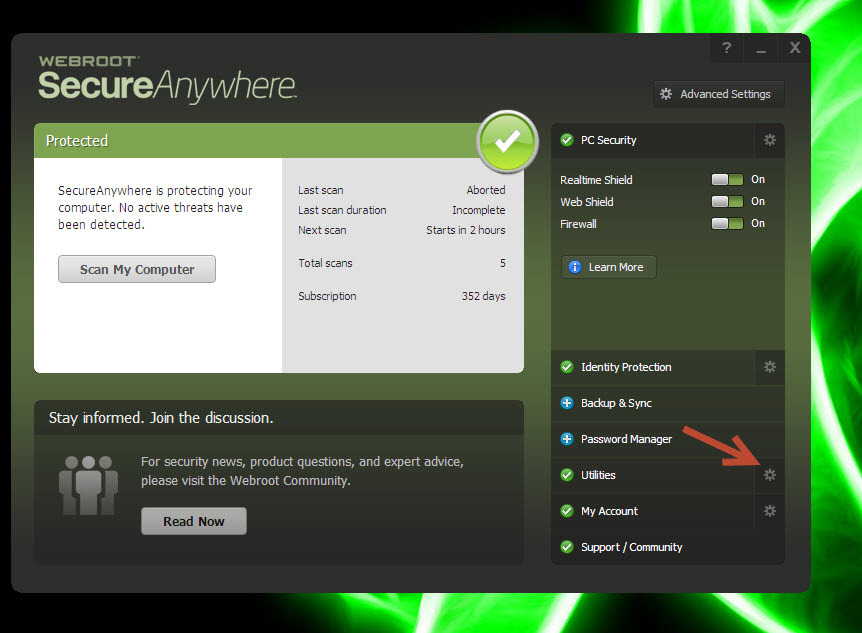
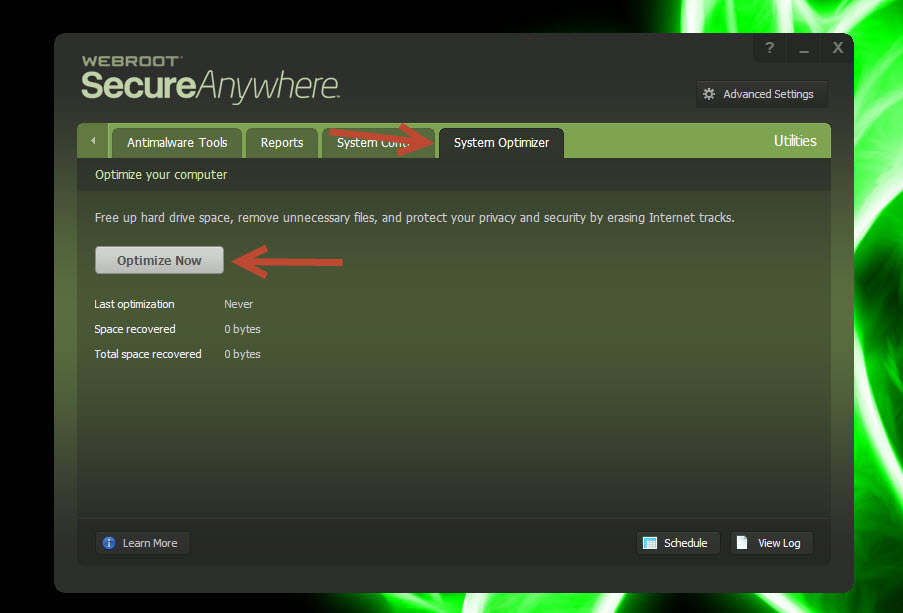
System Cleaner has been revamped and rename to System Optimizer.  Click on the gear tool next to Utilities, and then click on the System Optimizer tab.  

Purgatory
New Voice
Forum|alt.badge.img+7
  • New Voice
  • October 21, 2013
Click on 'system optimizer' tab it said, or, to be exact - 
"System Cleaner has been revamped and rename to System Optimizer.  Click on the gear tool next to Utilities, and then click on the System Optimizer tab."
 
when I go to utilities, there is no such tab to be seen.  I use SecureAnywhere, has the original poster placed his entry under the wrong group? - or do I have a problem?
Thanks in anticipation of your replies

shorTcircuiT
Gold VIP
  • Gold VIP
  • October 21, 2013
@ wrote:
Click on 'system optimizer' tab it said, or, to be exact - 
"System Cleaner has been revamped and rename to System Optimizer.  Click on the gear tool next to Utilities, and then click on the System Optimizer tab."
 
when I go to utilities, there is no such tab to be seen.  I use SecureAnywhere, has the original poster placed his entry under the wrong group? - or do I have a problem?
Thanks in anticipation of your replies
Hello Purgatory!  What version of WSA do you have?  The Original Poster, while posting here, appeared to possibly have a version above WSA-AV which does not have the System Optimizer feature.  I believe only WSA-Complete currently has this tab.

MikeR
  • Retired Webrooter
  • October 21, 2013
Just to confirm that System Optimizer is only available in the Internet Security Complete suite. I have included instructions below: 
 
Click on the gear icon next to 'Utilities'


Click on 'System Optimizer' and then 'Optimize Now'


RetiredTripleHelix
Gold VIP
Forum|alt.badge.img+56

MikeR
  • Retired Webrooter
  • October 21, 2013
Both ways are pretty easy. :robothappy:

explanoit
Silver VIP
Forum|alt.badge.img+6
  • Silver VIP
  • October 21, 2013
Who else thinks Mike's tiny avatar looks suspiciously like Edward Snowden.
I didn't know Webroot had a Moscow office, comrade.

MikeR
  • Retired Webrooter
  • October 21, 2013
You got me! :robotembarrassed:

shorTcircuiT
Gold VIP
  • Gold VIP
  • October 21, 2013
LOL!

Purgatory
New Voice
Forum|alt.badge.img+7
  • New Voice
  • October 22, 2013
SO, the answer is that the modest version that I have 8.0.4.17 does not include this facility.
In other words the posting was wrongly placed in SecureAnywhere, and should have been placed in a higher spec version/group?

shorTcircuiT
Gold VIP
  • Gold VIP
  • Answer
  • October 22, 2013
WSA-AV and WSA-IS Plus do not have the function, only WSA-Complete does if this helps to answer the question.  If you have the AV or the Internet Security Plus, you probably will not see that tab as available.