Answer

teamviewer problem

  • March 28, 2014
  • 6 replies
  • 340 views

durantash
Community Leader
Forum|alt.badge.img+37
Hi ,
 
i install teamviewer and try use it .
 
when my webroot is active ( run ) my teamviewer can not activing and get ID , but when shut down my webroot solve problem .
 
could you please help me ?
 
thank you .
 

Best answer by Petrovic

Hi
 
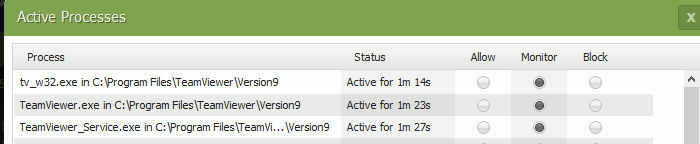
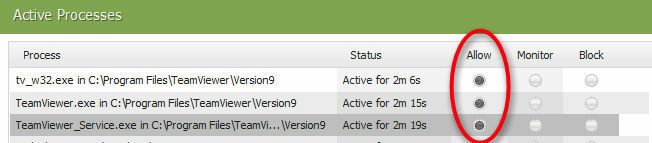
Allow this process:


&


Thank you
Petr.

6 replies

Baldrick
Gold VIP
  • Gold VIP
  • March 28, 2014
Hi durantash
 
That is strange as I use TeamViewer and I have no trouble whatsoever...when I open the app I get an ID presented to me as I would expect.
 
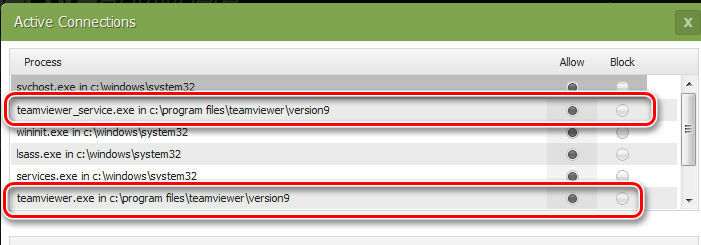
Check under Active Processes as I have an entry for TeamViewer_Service.exe and other .exes which are  showing as 'Allow'...make sure that is not set to 'Block'.  Same under the Firewall...under Active Connections...the same .exe as above is showing and I have the permissions set to 'Allow'...check that it is not set to 'Block' there as that would stop communication with the Web and the downloading of an ID.
 
HTH?
 
Regards
 
 
Baldrick

Petrovic
Gold VIP
Forum|alt.badge.img+52
  • Gold VIP
  • Answer
  • March 29, 2014
Hi
 
Allow this process:


&


Thank you
Petr.

durantash
Community Leader
Forum|alt.badge.img+37
  • Author
  • Community Leader
  • March 29, 2014
Thank you  so much .
 
After I add and allow teamviewer process and files  at Webroot Settings , my problem solved .


Petrovic
Gold VIP
Forum|alt.badge.img+52
  • Gold VIP
  • March 29, 2014
Thanks
Please feel free to ask any further questions you might have.
 
Petr

Baldrick
Gold VIP
  • Gold VIP
  • March 29, 2014
Hi durantash
 
Glad that you issue is solved.  Always happ to be of help as and where one can.
 
Have a great weekend.
 
Regards


Baldrick

RetiredTripleHelix
Gold VIP
Forum|alt.badge.img+56
@ wrote:
Thank you  so much .
 
After I add and allow teamviewer process and files  at Webroot Settings , my problem solved .


Just add what Solly and Petr said I would Submit a Support Ticket so they can get those files Whitelisted and if it updates the same thing can happen again and send another support ticket to get them whitelisted!
 
Cheers,
 
Daniel 😉