

Answer

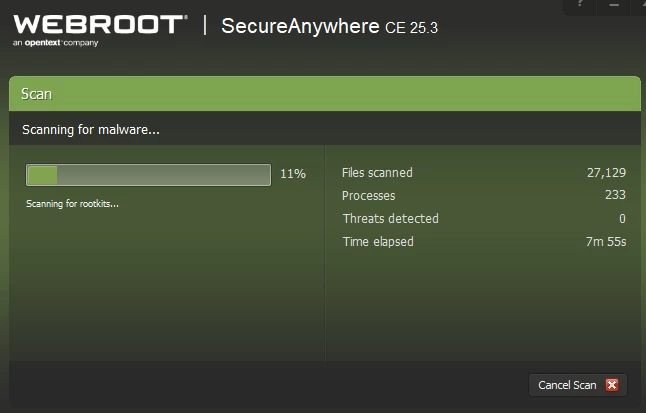
Webroot Frooze, Not Moving at 11%

  • September 9, 2025
  • 3 replies
  • 74 views

Forum|alt.badge.img+17

Hello Everyone.

I just scanned my computer, and noticed webfoot is Frozen at 11%. I tried scanning again, same issue. I did scan with my Malwarebyes, there was no issue. Here is the screen-shot

Thanks
 

Best answer by TripleHelix

Hello ​@venus60 


Try rebooting the system and do another scan and if that doesn’t work try a clean reinstall.


Please follow the steps closely!

  • Make sure you have a copy of your 20 Character Alphanumeric Keycode! Example: SA69-AAAA-A783-DE78-XXXX
  • KEEP the computer online for Uninstall and Reinstall to make sure it works correctly
  • Download a Copy Here (Best Buy Geek Squad Subscription PC users click HERE) Let us know if it is the Mac version you need
  • Uninstall WSA and Reboot
  • Go into Safe Mode and Delete these Folders if they are there!
  • C:\Program Files\Webroot Folder
  • C:\ProgramData\WRData Folder (Hidden Folder)
  • C:\ProgramData\WRCore Folder (Hidden Folder)
  • Boot back into normal mode
  • Install with the new installer, enter your Keycode
  • Let it finish it's install scan
  • Reboot once again
  • DO NOT import any old settings as you can set it up as you like once it's done

Info in case you don’t know how to go into Safe Mode: https://support.microsoft.com/en-us/windows/start-your-pc-in-safe-mode-in-windows-10-92c27cff-db89-8644-1ce4-b3e5e56fe234


Please let us know if that resolves your issue?

Thanks,

This topic has been closed for replies.

3 replies

TripleHelix
Moderator
Forum|alt.badge.img+63
  • Moderator
  • Answer
  • September 9, 2025

Hello ​@venus60 


Try rebooting the system and do another scan and if that doesn’t work try a clean reinstall.


Please follow the steps closely!

  • Make sure you have a copy of your 20 Character Alphanumeric Keycode! Example: SA69-AAAA-A783-DE78-XXXX
  • KEEP the computer online for Uninstall and Reinstall to make sure it works correctly
  • Download a Copy Here (Best Buy Geek Squad Subscription PC users click HERE) Let us know if it is the Mac version you need
  • Uninstall WSA and Reboot
  • Go into Safe Mode and Delete these Folders if they are there!
  • C:\Program Files\Webroot Folder
  • C:\ProgramData\WRData Folder (Hidden Folder)
  • C:\ProgramData\WRCore Folder (Hidden Folder)
  • Boot back into normal mode
  • Install with the new installer, enter your Keycode
  • Let it finish it's install scan
  • Reboot once again
  • DO NOT import any old settings as you can set it up as you like once it's done

Info in case you don’t know how to go into Safe Mode: https://support.microsoft.com/en-us/windows/start-your-pc-in-safe-mode-in-windows-10-92c27cff-db89-8644-1ce4-b3e5e56fe234


Please let us know if that resolves your issue?

Thanks,


Forum|alt.badge.img+17
  • Author
  • Community Guide
  • September 10, 2025

Dear Triple Helix.

I followed your Instruction, and now its working

Thanks again.


TripleHelix
Moderator
Forum|alt.badge.img+63
  • Moderator
  • September 10, 2025

Dear Triple Helix.

I followed your Instruction, and now its working

Thanks again.

Great to hear and thanks for letting us know.


As this is now solved it will be closed.


