when i reboot the computer i get a popup from wsa saying " Webroot & Geek Squad keep you protected"


  • March 8, 2015
  • 5 replies
  • 35 views

i get a popup when i reboot from wsa saying " Webroot & Geek Squad keep you protected"  with a learn more button - it is quite annying - i know how to check what you're doing for me and i don't need the constant reminder.

 
how do i turn it off?

5 replies

Petrovic
Gold VIP
Forum|alt.badge.img+52
  • Gold VIP
  • March 8, 2015
Hello and Welcome to the Webroot Community Forums!
 
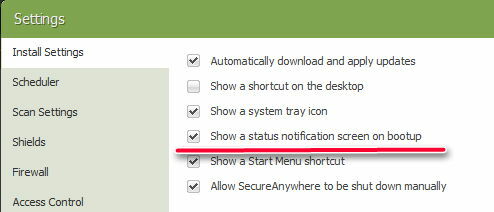
try to disable it


Didn't work for me. I still get the geek squad reminder.

Baldrick
Gold VIP
  • Gold VIP
  • May 4, 2015
Hi xxINS4NExWoC
 
Welcome to the Community Forums.
 
If your version of WSA came from Best Buy/The Geek Squad, then I would contact them about this as the only popups that you shgould get from WSA are the one that Petrovic has explained how to turn off, or the Security Report that comes out from time to time and which WSA recommends you read...but neither of those have mention of the Geek Squad in them.
 
Hence my suggestion that you contact them if your purchase was not from Webroot direct or a non Best Buy retailer.  Contact options can be found here.
 
Regards, Baldrick


This thing. I did buy from best buy. I tried the above fix but it still pops up on reboot.

Baldrick
Gold VIP
  • Gold VIP
  • May 4, 2015
Hi xxINS4NExWoC
 
Well, that looks like a customised (for The Geek Squad) of the Security Report that comes out from time to time.
 
If it is one and the same then I am afraid that there is currently no way to prevent it from popping up.  I usually recommend that one takes the prompt and clicks 'OK' to view the report, as that sometimes rids one of the popups there after.  But if it does not then usually they disappear after a couple of days at most...so it is a case, unfortunately, of being patient.
 
But if it does not disappear in a couple of days then contact The Geek Squad and see what they have to say about it.
 
Regards, Baldrick