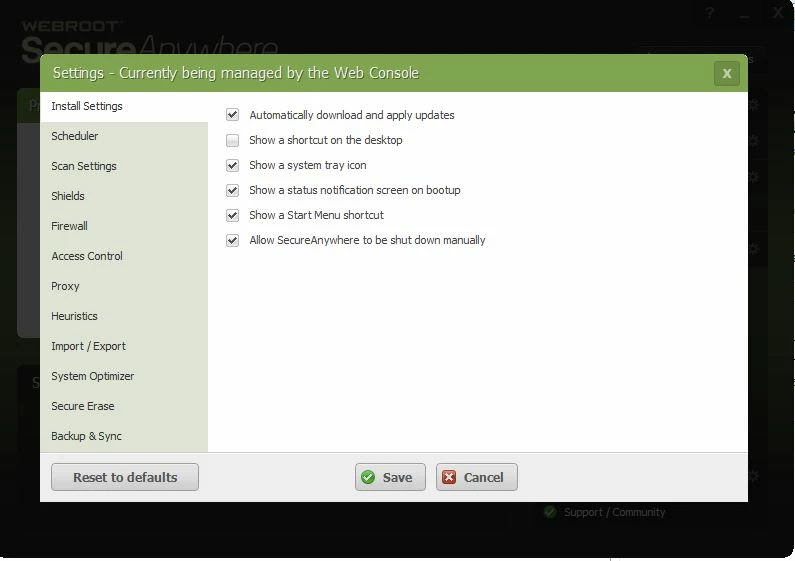
although it seems to be running, sometimes at boot up, it does not always appear in the task bar.

  • July 27, 2015
  • 1 reply
  • 25 views

sometimes the icon appears down there, and sometimes it doesn''t.  When I open the program to scan, it says "protected", so I'm assuming it is running, but why does the icon not pop up consistently at boot up in the notification area?.  

1 reply

Ssherjj
Moderator
Forum|alt.badge.img+62
  • Moderator
  • July 27, 2015
Hello ?,
 
Welcome to the Webroot Community,
 
Please check the Webroot Menu by opeing Webroot and go to the cog on the right upper side and you will see Advanced Settings and this is what you will  see. Make sure you have a check mark in the boxes you wish to be checked. This should be checked by default.


Otherwise It sounds as you have a corrupt install can you please go to Add/Remove and uninstall WSA
 
Can you please do a clean reinstall of WSA and Please follow the steps closely!
 
  • Make sure you have a copy of your 20 Character Alphanumeric Keycode! Example: SA69-AAAA-A783-DE78-XXXX
  • KEEP the computer online for Uninstall and Reinstall to make sure it works correctly
  • Download a Copy Here (Best Buy Subscription PC users click HERE)
  • Uninstall WSA and Reboot
  • Install with the new installer, enter your Keycode and don't import any settings if asked to as you can set it up as you like once it's done
  • Let it finish it's install scan
  • Reboot once again
Please let us know if that resolves your issue?
,
 
KInd Regards,