Answer

amount of files from a scan

  • April 23, 2020
  • 1 reply
  • 279 views

I used webroot on both my wifes and my systems.  When I run it, it only scans 8 to 9 thousand files and takes about 90 seconds.  When I run it on my wife’s system, it scans close to 100 thousand files and take 8 minutes.  Her system is a fresh load of windows 10, not an upgrade but a completely new load.  Why does she have so many more files to scan than I do?  We both only have World of Warcraft on our systems.  All music and personal files are kept on removable media.


Your help is appreciated.

Best answer by TripleHelix

Hello @troysaway 


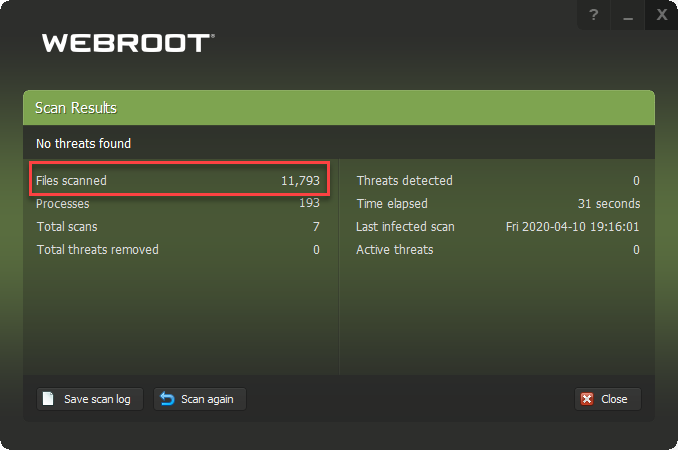
There are many reasons why but the average is about 8 to 10 thousand files and mine is:


Also mine scans in about 30 seconds as I have fast systems with SSD’s!


If you would like to do a clean reinstall on that system that scans 100 thousand files that would help to lower the scan time and the amount of files scanned.


Please follow the steps closely!

  • Make sure you have a copy of your 20 Character Alphanumeric Keycode! Example: SA69-AAAA-A783-DE78-XXXX

  • Be sure you add your Keycode to your Online Console: Webroot SecureAnywhere Online Console
  • KEEP the computer online for Uninstall and Reinstall to make sure it works correctly
  • Download a Copy Here (Best Buy Geek Squad Subscription PC users click HERE) Let us know if it is the Mac version you need
  • Uninstall WSA and Reboot
  • Install with the new installer, enter your Keycode
  • Let it finish it's install scan
  • Reboot once again
  • DO NOT import any old settings as you can set it up as you like once it's done

Please let us know if that resolves your issue?

Thanks,

This topic has been closed for replies.

1 reply

TripleHelix
Moderator
Forum|alt.badge.img+63
  • Moderator
  • Answer
  • April 23, 2020

Hello @troysaway 


There are many reasons why but the average is about 8 to 10 thousand files and mine is:


Also mine scans in about 30 seconds as I have fast systems with SSD’s!


If you would like to do a clean reinstall on that system that scans 100 thousand files that would help to lower the scan time and the amount of files scanned.


Please follow the steps closely!

  • Make sure you have a copy of your 20 Character Alphanumeric Keycode! Example: SA69-AAAA-A783-DE78-XXXX

  • Be sure you add your Keycode to your Online Console: Webroot SecureAnywhere Online Console
  • KEEP the computer online for Uninstall and Reinstall to make sure it works correctly
  • Download a Copy Here (Best Buy Geek Squad Subscription PC users click HERE) Let us know if it is the Mac version you need
  • Uninstall WSA and Reboot
  • Install with the new installer, enter your Keycode
  • Let it finish it's install scan
  • Reboot once again
  • DO NOT import any old settings as you can set it up as you like once it's done

Please let us know if that resolves your issue?

Thanks,