Answer

Autoscan USB when inserted

  • May 24, 2021
  • 2 replies
  • 1206 views

Is there a way to have Webroot auto scan a USB for threats and disable user interaction (so they cannot stop the scan)?


Thanks!

Best answer by TripleHelix

Hello @MRacine 


Webroot has a USB Shield: https://docs.webroot.com/us/en/home/wsa_pc_userguide/wsa_pc_userguide.htm#ShieldingYourPC/PCShieldsOverview.htm?TocPath=Shielding%2520Your%2520PC%257C_____1


USB Shield — Monitors an installed USB flash drive for threats, blocks and removes any threats that it finds.
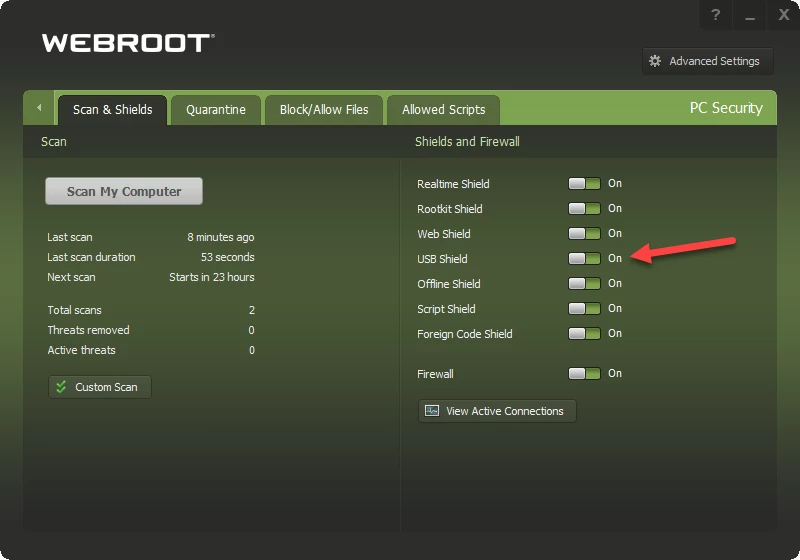


HTH,

2 replies

TripleHelix
Moderator
Forum|alt.badge.img+63
  • Moderator
  • Answer
  • May 24, 2021

Hello @MRacine 


Webroot has a USB Shield: https://docs.webroot.com/us/en/home/wsa_pc_userguide/wsa_pc_userguide.htm#ShieldingYourPC/PCShieldsOverview.htm?TocPath=Shielding%2520Your%2520PC%257C_____1


USB Shield — Monitors an installed USB flash drive for threats, blocks and removes any threats that it finds.


HTH,


Forum|alt.badge.img+34
  • Community Expert Advisor
  • May 25, 2021

@MRacine 

Webroot doesn’t automatically scan inserted USB drives, but it will handle and adjust it’s scanning and heuristics based on files/programs accessed from external media. 

But for some compliance requirements, yes, autoscanning USB is needed. Webroot has a separate tool to do this. 

You can download https://download.webroot.com/usbmonitor.zip

Extract the contents and read the included readme file carefully for install instructions. 

Once installed, when you insert a USB drive, it’ll auto start webroot and scan the contents of the drive. 

This is an older tool now and there doesn’t seem to be any new version, so your mileage may vary with the new agents. 

Hope this helps

John