can not activate account

  • May 9, 2015
  • 1 reply
  • 82 views

can not activate account and I have reentered several times and  says log in failed. I have written everything down and know that it is correct, and is there icon forthe desktop. regretting I have paid for this


1 reply

Ssherjj
Moderator
Forum|alt.badge.img+62
  • Moderator
  • May 10, 2015
Hello and Welcome to the Webroot Community Forum,,
 
 
Just to be sure you are following these instruction below to activate.
 
Are you entering  a  20 Character Alphanumeric Keycode! Example:SA69-AANA-A783-DE78-C58
 
  • Open SecureAnywhere (see Using the SecureAnywhere interface).
  • Click the gear icon next to My Account. Your account panel displays.[img]http://www.webroot.com/En_US/SecureAnywhere/PC/Content/Resources/Images/MyAccountDetails.png[/img]
  • Under Activate a new keycode, enter the keycode you want to add and click Activate.
If you are having issues activating please submit a Support Ticket free of charge with an active subscription.
 
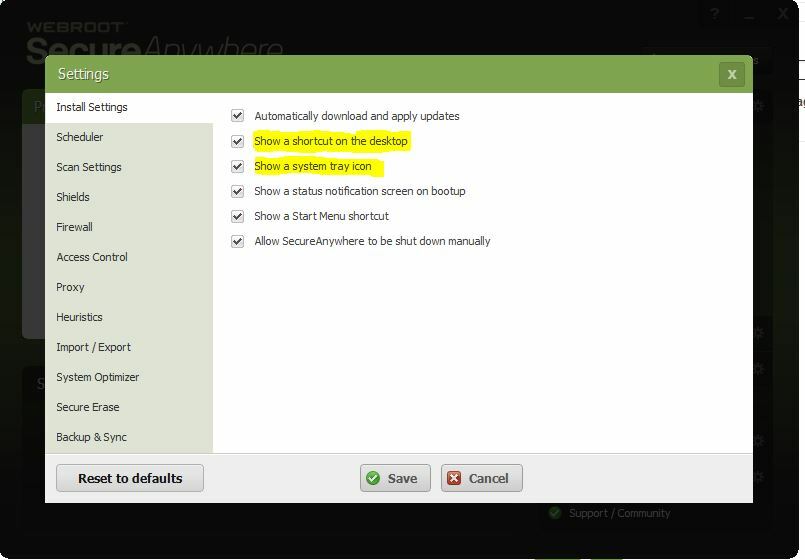
To add a icon to your desktop open up Webroot from the taskbar. View Status and in the right upper hand corner you will see Advanced Setting, click on the gear and this is what you'll see:


Hope this helps,


Kind Regards,