My Webroot Web threat shield has suddenly dissapear after a FireFox update (76.0.1)
I saw from the community, a post from an another user that got the same problem.
Ok, great, I go to the KB that give information to reinstall the extension, clic the download link, allow of course...and
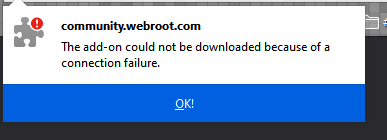
I got the error message
Is there an another way that I can download the extension ?
Thanks and have a nice day
Best answer by Jasper_The_Rasper
HI @BonskY
I had this same problem myself.
Go to this page and in paragraph 1. right click on the link. you will be given the choice to save the link as.
Save it into your downloads folder.
Go your downloads folder on your computer and highlight the file you have just downoaded.
Next open your Add-On via the Tool tab in firefox and then DRAG the file from your download folder into the Add-Ons list, it should install itself then.
Go to this page and in paragraph 1. right click on the link. you will be given the choice to save the link as.
Save it into your downloads folder.
Go your downloads folder on your computer and highlight the file you have just downoaded.
Next open your Add-On via the Tool tab in firefox and then DRAG the file from your download folder into the Add-Ons list, it should install itself then.