Solved

Can webroot detect Rombertik malware?

  • May 5, 2015
  • 13 replies
  • 64 views

Researchers have uncovered new malware that takes extraordinary measures to evade detection and analysis, including deleting all hard drive data and rendering a computer inoperable.
 
http://arstechnica.com/security/2015/05/04/super-secretive-malware-wipes-hard-drive-to-prevent-analysis/#p3

Best answer by Rakanisheu Retired

The dropper is bad in our database already. Also the first point of infection is via email, dont open email attachements from strangers. Following that simple step will stop so many threats. People just blinding open attachments and start clicking on files like its going out of fashion. 
 
Even if the file wasnt bad we wont allow the infection to write to the MBR. And if your a limited user account (which you should be) you are unable to write to the MBR (requires kernel level 0 access). Still wont stop data from being encrypted though.
 
You should be able to rebuild the MBR using the windows recovery disk via the Fixmbr option too. That isnt made too clear from the article if they tried that. 

13 replies

Rakanisheu Retired
The dropper is bad in our database already. Also the first point of infection is via email, dont open email attachements from strangers. Following that simple step will stop so many threats. People just blinding open attachments and start clicking on files like its going out of fashion. 
 
Even if the file wasnt bad we wont allow the infection to write to the MBR. And if your a limited user account (which you should be) you are unable to write to the MBR (requires kernel level 0 access). Still wont stop data from being encrypted though.
 
You should be able to rebuild the MBR using the windows recovery disk via the Fixmbr option too. That isnt made too clear from the article if they tried that. 

RetiredTripleHelix
Gold VIP
Forum|alt.badge.img+56
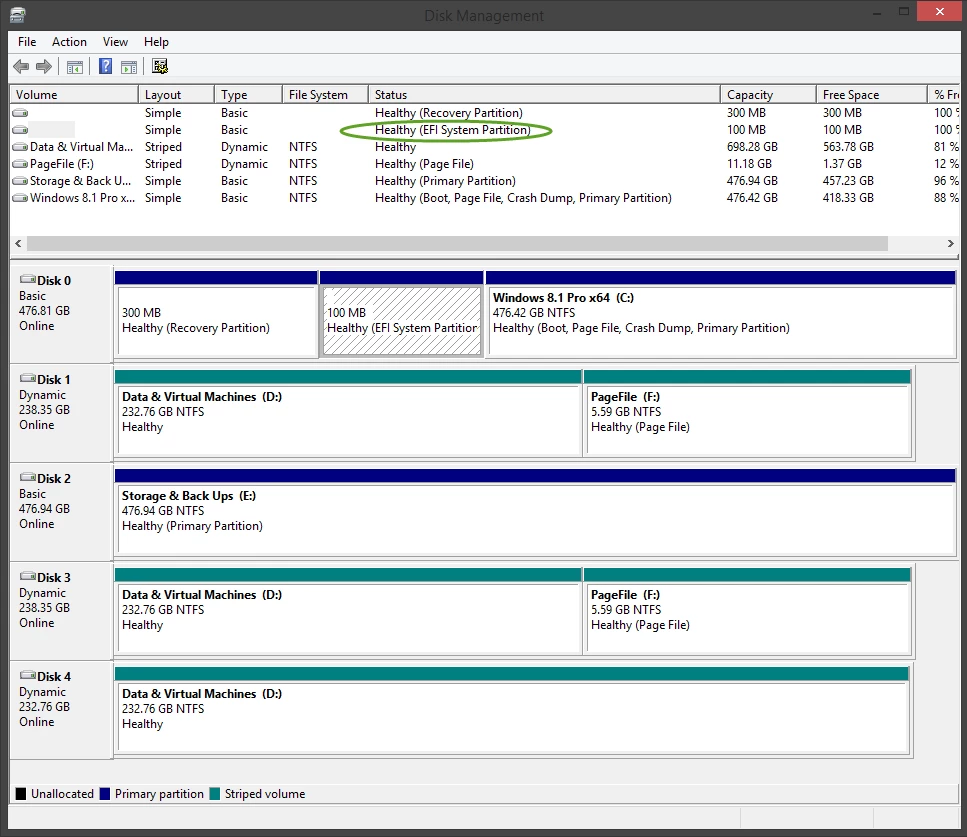
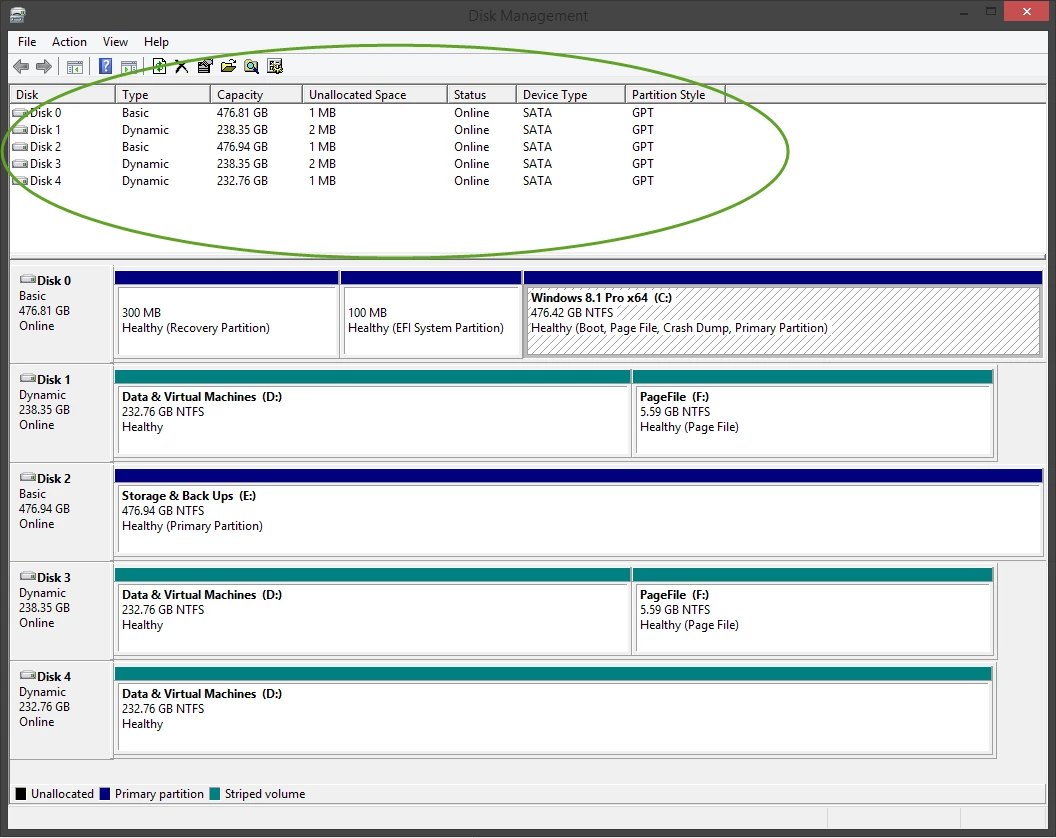
Hey @ how about UEFI systems?
 
Daniel 😉

Rakanisheu Retired
In theory the secure boot should offer some more protection. I dont actually have a PC with UEFI handy to test this particular piece of malware on. In fact that reminds me I have to get one! Nice one :)
 
*Edit* Looking at the article I am assuming that if it cant write to the MBR which it wont be able to, the it will delete all the users documents as per 
 
"If the malware does not have permissions to overwrite the MBR, it will instead destroy all files in the user’s home folder (e.g. C:Documents and SettingsAdministrator) by encrypting each file with a  randomly generated RC4 key"
 
What a lovely piece of malware!

  • New Voice
  • May 7, 2015
what about gpt (non-mbr) systems and those that house our files on a seconds drive(ssd space limitations)?
 

RetiredTripleHelix
Gold VIP
Forum|alt.badge.img+56
@ wrote:
In theory the secure boot should offer some more protection. I dont actually have a PC with UEFI handy to test this particular piece of malware on. In fact that reminds me I have to get one! Nice one :)
 
*Edit* Looking at the article I am assuming that if it cant write to the MBR which it wont be able to, the it will delete all the users documents as per 
 
"If the malware does not have permissions to overwrite the MBR, it will instead destroy all files in the user’s home folder (e.g. C:Documents and SettingsAdministrator) by encrypting each file with a  randomly generated RC4 key"
 
What a lovely piece of malware!
Can you explain more Roy as to UEFI systems and as the poster asked UEFI is GPT as well and as we know it doesn't have an MBR.
 
Thanks,
 
Daniel 😉

  • New Voice
  • May 7, 2015
actually uefi is gpt-compatible but not necessarily gpt as gpt vs mbr partition table type is entirely seperate though in theory having gpt should immunize you against the boot attack as the mbr isn't there for it to attack(im not sure whether it can attack via the fake mbr in a gpt boot sector) and in theory storing your files seperately on another drive should immunize you against the file destruction aspect but that part depends on how they coded it whether they coded it to scan for your files or whether they coded using envirmental variable(and if you ever changed them), hard-coded directories, or used explorers library shortcuts.
 
the article doesn't say as gpt partition tables are a non-standard configuration vs use of mbr(which windows defaults to unless your using a greater than 2 tb boot drive) although i don't know why they didn't test with alternate-drive user file directories(such as f:/userfiles, f:/files, f:/ etc) since with the advent of ssds and the size limitations they impose thats becoming a more common configuration
 
and further i don't know about how this would be impacted in a hybrid mbr/gpt.
 
"GPT requires a fake MBR with a single full disk partition of type 0xee. In a hybrid this is a normal MBR with one 0xee partition (and potential for major problems if the MBR data goes out of sync with the GPT data)."
 
bare in mind this is all just theory id still say that a better expert than i should answer

Rakanisheu Retired
Great post Fishbait! You are dead right there was a bit missing from the article. I have been so busy that I havent had a chance to test this malware fully (it was blocked by WSA, which is really the important part). It will be something I do next week, my gut says it will fall over and just encrypt the data. I will keep people posted! 

  • New Voice
  • May 8, 2015
im not sure it might not be able to "c:documents and settingsob" is windows xp or lower "c:usersob" is vista and above it also depends on whether vista and above have any compatibility shortcuts that enable software to reference those directories and be redirected, it also depends on how they coded it if it scans for common file types your doomed, but if the hard-coded the directories then it won't find anything worthwhile if the user uses a small ssd and has moved their files to another drive, and i don't even know what it might do if its coded with enviromental variables, or whether or not they coded anything to take advantage of the windows explorer libraries eg documents, music, photo, and video vs the old my documents, my music, my pictures, my videos
 
i wonder if this isn't an older extraordinarily rare virus or if their simply giving up on windows vista/7/8/8.1/10
 
even worse if it really used Administrator because that folder has no user files thats the hidden system admin account and its deactivated by default in vista and above

Rakanisheu Retired
My opinion (and people are welcome to discuss) is that is realistically speaking not going to hit a lot of PC's. It's going after old Windows XP PC's, a modern OS shouldnt be affected.

  • New Voice
  • May 8, 2015
agreed though the article wasn't real praticular about the target for this malware. <regular arstechnica reader

RetiredTripleHelix
Gold VIP
Forum|alt.badge.img+56
Here is a snapshot of my UEFI, GTP system! Maybe you can see what I'm talking about?
 
Daniel ;)


  • New Voice
  • May 8, 2015
"agreed though the article wasn't real praticular about the target for this malware. <regular arstechnica reader"
 
i meant the target os it seems if they are pulling examples from the malware itself like this is targeting windows xp or lower machines the prime segment of which based on the defense mechanisms and the need for absolute secrecy and no competetion on the same machine is windows xp embedded and the bulk of embedded machines don't have any way to pull and off-line scan a disk 
 
id guess that this may-be malware designed to go after cash registers and credit processors and spread itself in that way using a dropper package that deposits a spreading worm that loads this malware or it maybe a defensive decoy or container malware that defends the real malware, by now malware authors by and large must havee figured out that signature dbs are being updated in near real-time hence if they want to use the same code the only practical way is to build container malware
that defends the malware from detection scanning cataloging etc and allows it to remain commercially viable by virtue of stealth 
 
but this is just a hypotheses 

  • New Voice
  • May 8, 2015
"Here is a snapshot of my UEFI, GTP system! Maybe you can see what I'm talking about?
 
Daniel

 "
 
i know what your talking about i just wanted to clarify that uefi can have either GPT or MBR partition style and that GPT has an MBR fake in a normal GPT not so in a hybrid GPT (used primarily in macs for compatibility)
 
in theory if the MBR is a fake decoy then itll do nothing to GPT thinking it fouled the pc but if the MBR is a compatibility layer it might foul the GPT too(im not real sure of the particulars of the implementation of the fake mbr in a normal GPT let alone a hybrid one)
 
EDIT: after a little research 0xee, the sole entry in the fake mbr, is the hex for an efi boot partition now the question becomes is the entry integral or seperate as in does the gpt refer to the fake mbr for the location(integral)  of the efi partition or does it maintain its own(seperate).
i wonder if thats the difference between hybrid (integral?) and normal (seperate?)