'check virus protection' windows 10

  • April 15, 2016
  • 18 replies
  • 130 views

I keep getting the above message several times, every hour, the the Notification area on Windows 10. Webroot and Windows Firewall are both turned on and Defender is turned off, yet still the messages keep arrivung.
 
I restarted Windows Management Instrumention (which did clear this fault a few weeks ago) but that made no difference.
 
Any ideas please?

18 replies

Ssherjj
Moderator
Forum|alt.badge.img+62
  • Moderator
  • April 15, 2016
Hello ?
 
Welcome to the Webroot Community,
 
Sorry this a known issue but be assured that WSA is still protecting you see here for more info: Windows 10 Action Center Notification


  • Author
  • New Voice
  • April 15, 2016
Hello Sherry, thanks for the prompt response.
 
I've been reading up on this fault and now realise it affects other security programs as well, not just WSA, which is reassuring !
 
I also did a re-install about 20 mins ago and so far so good.
 
Another thing that is bugging me is that I cannot see any dates appended to posts, other than saying '4 weeks ago' or something like that. My sight is poor anyway but it looks as though there are no dates attached to each post. Why is that, if I'm right?
Thank s.

Ssherjj
Moderator
Forum|alt.badge.img+62
  • Moderator
  • April 15, 2016
Hi bertie11,
 
Yes there are not any dates to these posts. Here is a post from yesterday. https://community.webroot.com/t5/Webroot-SecureAnywhere-Antivirus/Windows-10-Action-Center-Notification/td-p/242510/page/4
 
Mainly what I am having you look at this thread is for you to know that is is happening to others and that by looking at this thread/or posts you will be able to get updates to how this issue is progressing. I am seeing this thread was started March 4th 2016 to now. And then the posts will say 4 weeks ..2 weeks..etc.
 
We aplogize for any inconviences and please have some more patience as I am sure this issue will be resolved soon.
 
Sorry I didn't explain myself better to you.:@


  • Author
  • New Voice
  • April 15, 2016
Thanks for the explanation Sherry, I do think  (for me, anyway) that it would be so much better to have the actual date showing when a post was written, like, for example TenForums (a brilliant forum, by the way).
 
That would satisfy my 'pedantic' mode!
 
Regards.

Ssherjj
Moderator
Forum|alt.badge.img+62
  • Moderator
  • April 15, 2016
Hello bertie11
 
Well I can understand that and I would advise you to put this idea in the Feature Request and then others can kudo your idea and see where it goes from there.
 
And you are most welcome!;)

RetiredTripleHelix
Gold VIP
Forum|alt.badge.img+56
Could be do to the Forum software lets see what ? has to say about this as I was wondering as well.
 
Thanks,
 
Daniel 😉

Ssherjj
Moderator
Forum|alt.badge.img+62
  • Moderator
  • April 15, 2016
I agree Daniel! I was wondering the same thing..

nic
Forum|alt.badge.img+56
  • Retired Webrooter
  • April 15, 2016
The date of the post should show right under the title. Is that not showing up for you guys?

Baldrick
Gold VIP
  • Gold VIP
  • April 15, 2016
 
@ wrote:
The date of the post should show right under the title. Is that not showing up for you guys?
Showing up nice and dandy here...Nic. ;)

RetiredTripleHelix
Gold VIP
Forum|alt.badge.img+56
It's odd see here:


  • Author
  • New Voice
  • April 15, 2016
All I'm getting is 'n minutes ago'.

Ssherjj
Moderator
Forum|alt.badge.img+62
  • Moderator
  • April 15, 2016
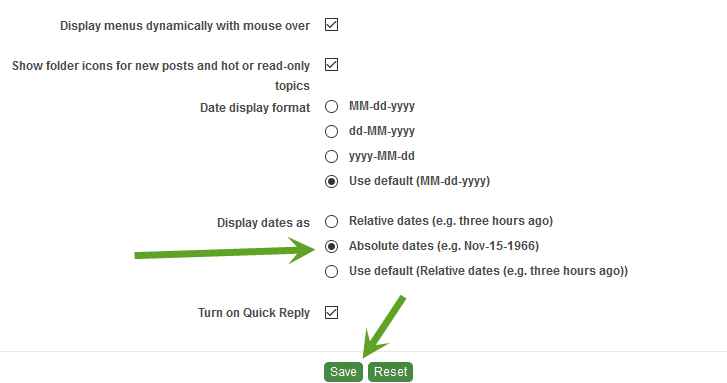
This is what I am getting on some pages:


nic
Forum|alt.badge.img+56
  • Retired Webrooter
  • April 15, 2016
Looks like this is a preference setting:
https://community.webroot.com/t5/user/myprofilepage/tab/user-preferences%3Adisplay

If you change that to Absolute Dates then you should be good to go. Let me know if that works!

RetiredTripleHelix
Gold VIP
Forum|alt.badge.img+56
@ wrote:
All I'm getting is 'n minutes ago'.
Yes in here for now.

RetiredTripleHelix
Gold VIP
Forum|alt.badge.img+56
@ wrote:
Looks like this is a preference setting:
https://community.webroot.com/t5/user/myprofilepage/tab/user-preferences%3Adisplay

If you change that to Absolute Dates then you should be good to go. Let me know if that works!
There is no setting to add the exact time. Like for me it's 12:48 PM EDT

Ssherjj
Moderator
Forum|alt.badge.img+62
  • Moderator
  • April 15, 2016
@ wrote:
Looks like this is a preference setting:
https://community.webroot.com/t5/user/myprofilepage/tab/user-preferences%3Adisplay

If you change that to Absolute Dates then you should be good to go. Let me know if that works!
Ok it;s working now! Thankj you NIc! That was simple. Thank you @ for pointing this out!:D

RetiredTripleHelix
Gold VIP
Forum|alt.badge.img+56
@ wrote:
Looks like this is a preference setting:
https://community.webroot.com/t5/user/myprofilepage/tab/user-preferences%3Adisplay

If you change that to Absolute Dates then you should be good to go. Let me know if that works!
Okay got it now and it works nicely!


Thanks to all, I now have the time and date instead of the #of hours ago something was added/posted. I got a long way to go to understand everything about my protection but by dropping in every other day or so to see whats new, Im learning.