Solved

Chromium Extension

  • April 2, 2014
  • 21 replies
  • 169 views

Hello
 
I've started using Chromium over Google's Chrome.
 
All the extensions I use have installed without problem, with one exception. The Webroot Password Manager...
 
I have tried the Webroot_Button_Fix.exe and the toolbarfix.exe in an attempt to install the extension in Chromium. Neither has installed the extension. This is most likey thrwarted by the fact that you do not "install" Chromium as you do a normal application. That is my opinion.
 
Is there any other option to install the password manager extension for Chromium?

Best answer by RetiredTripleHelix

Hello Vince_C and Welcome to the Webroot Community Forums!


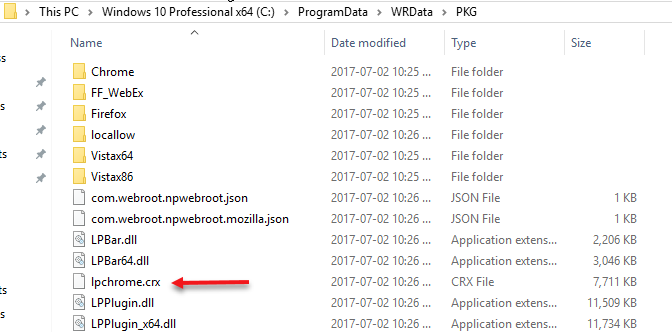
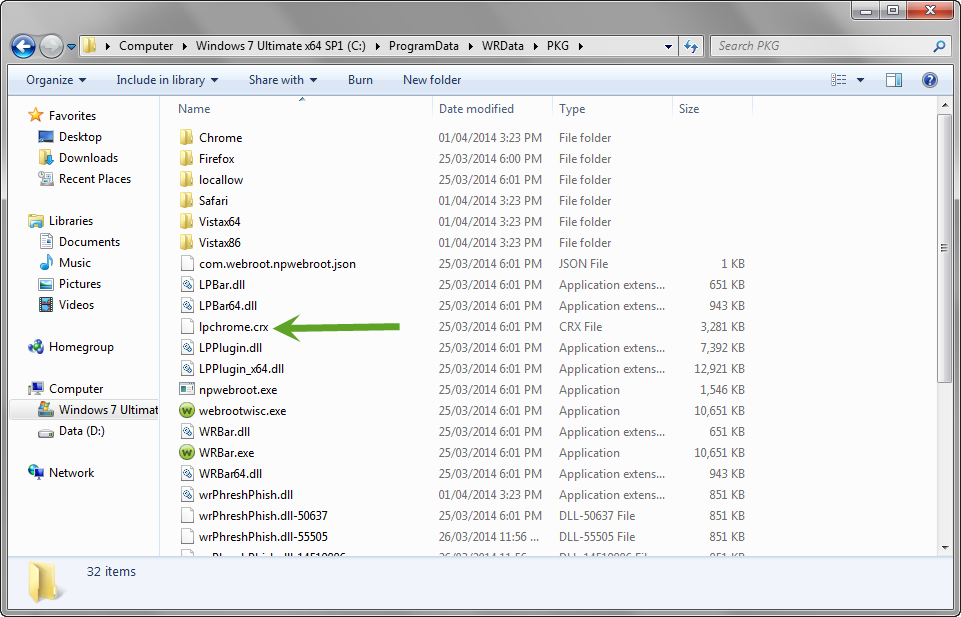
Can you go to this hidden area C:ProgramDataWRDataPKGlpchrome.crx and DRAG the file into the open Browser and it should install! Please let us know if it works and or how to get to the hidden area!
 
Thanks,
 
Daniel ;)

 

21 replies

RetiredTripleHelix
Gold VIP
Forum|alt.badge.img+56
Hello Vince_C and Welcome to the Webroot Community Forums!


Can you go to this hidden area C:ProgramDataWRDataPKGlpchrome.crx and DRAG the file into the open Browser and it should install! Please let us know if it works and or how to get to the hidden area!
 
Thanks,
 
Daniel ;)


  • Author
  • New Voice
  • April 2, 2014
I receive an error stating, "Apps, extensions, and user scripts cannot be added from this web site." It has an OK button and a Learn More link in the alert... I reviewed the Learn More link to learn how to complete the installation.
 
The "TRICK" to installing it with the drag-n-drop method is to navigate to Setting / Extensions and drag-n-drop the file you mention into the Extensions page.
 
It is now installed and functioning properly... I will see if this method must be used after every Chromium update, but the method is simple enough...  :D
 
Thank you very much for your outstanding service and support!  

RetiredTripleHelix
Gold VIP
Forum|alt.badge.img+56
You're very welcome but the New Opera is based on Chromium also and someone tried that and it worked but to let you know it's not Officially Supported only IE, Firefox & Chrome are!
 
Cheers,
 
Daniel 😉

shorTcircuiT
Gold VIP
I have never actually had a problem with the extensions due to a chrome update... however if you ever remove the extensions they are very difficult to get back in.  Chrome has a protection that bars extensions by default if the user has manually removed them.

RetiredTripleHelix
Gold VIP
Forum|alt.badge.img+56
Well I remove and install extensions on Chrome by the Drag & Drop and it always work and to even update to a new version of the extensions Drag & Drop works for me others it might not so this was a good guess! ;)
 
Daniel

Miquell
Community Leader
  • Community Leader
  • April 2, 2014
I agree with David! :D
I have been using Chrome and haven't noticed any issues with the extensions due to its updates.
 
Regards,
 
Mike

  • Author
  • New Voice
  • April 2, 2014
I updated Chromium today and the extension migrated to the new version without problems.
 
Now running Chromium Version 36.0.1923.0 (261132) and all is well...

RetiredTripleHelix
Gold VIP
Forum|alt.badge.img+56
Great to hear Vince thanks for the update!
 
Daniel 😉

  • Fresh Face
  • April 7, 2015
This helped me with my problem. For some reason when chrome updated it took away my password manager. I followed TripleHelix directions and it worked for me. +1 for TripleHelix!

RetiredTripleHelix
Gold VIP
Forum|alt.badge.img+56
Awesome! And Welcome to the Webroot Community!
 
Daniel 😉

  • February 1, 2017
It didn't work for me unfortunately. I am running Windows 10 64-bit and just reinstalled 64-bit Chrome and it says that it is up to date. However, it also says that the extension may have been corrupted. Any ideas?

Ssherjj
Moderator
Forum|alt.badge.img+62
  • Moderator
  • February 1, 2017
Hello tduboods,
 
Welcome to the Webroot Community,
 
Have you tried installing the Webfilter Extension located here? https://chrome.google.com/webstore/detail/webroot-filtering-extensi/kjeghcllfecehndceplomkocgfbklffd
 
EDITED
Webroot Password Manager
 
https://chrome.google.com/webstore/detail/webroot-password-manager/ngkhgikojglcgnckopipfdajaifmmnnc
 

  • February 1, 2017
Yes, I had all of it installed but the password manager extension wouldn't let me sign in. So I went back to the web portal where I had originally set up the password manager. Logged in, clicked on Password Manager...and error. Said to contact customer support. So I did. They told me to uninstall webroot and reinstall. Well I did that and the pw mngr extension didn't reinstall but the Webroot filtering one did. And so I am here now.

Ssherjj
Moderator
Forum|alt.badge.img+62
  • Moderator
  • February 1, 2017
Hi tduboods,
 
Thank you for that information. Did you uninstall/reinstall Webroot like this below
 
Please follow the steps closely!
 
  • Make sure you have a copy of your 20 Character Alphanumeric Keycode! Example: SA69-AAAA-A783-DE78-XXXX
  • Be sure you add your Keycode to your Online Console: Webroot SecureAnywhere Online Console
  • KEEP the computer online for Uninstall and Reinstall to make sure it works correctly
  • Download a Copy Here (Best Buy Geek Squad Subscription PC users click HERE) Let us know if it is the Mac version you need.
  • Uninstall WSA and Reboot
  • Install with the new installer, enter your Keycode and DO NOT import any old settings as you can set it up as you like once it's done
  • Let it finish it's install scan
  • Reboot once again
If you did that above already. Please Contact Support again.
 
Support Number: 1-866-612-4227 M-F 7am?6pm MT
Send us a Support Ticket: https://detail.webrootanywhere.com/servicewelcome.asp


  • October 2, 2017
I have just gone through the same problems with this. Chrome states they do not provide the .crs file anylonger. (I uninstalled Chrome, and when I reinstalled it, the chrome .crs was not there. Tech support provided this link to Chromes site, and it works seemlessly: 
https://chrome.google.com/webstore/detail/webroot-password-manager/ngkhgikojglcgnckopipfdajaifmmnnc?utm_source=chrome-app-launcher-info-dialog

  • October 2, 2017
Tech support provided me this link:
https://chrome.google.com/webstore/detail/webroot-password-manager/ngkhgikojglcgnckopipfdajaifmmnnc?utm_source=chrome-app-launcher-info-dialog

tried all your ideas, but Chrome isn't providing the lpchrome.crx file any longer

RetiredTripleHelix
Gold VIP
Forum|alt.badge.img+56
@ after trying the provided links to install the extensions it would be best to Submit a Support Ticket and they will help you get the extensions installed.
 
Thanks,
 
Daniel 😉

  • October 2, 2017

RetiredTripleHelix
Gold VIP
Forum|alt.badge.img+56
@ wrote:
Tech support provided me this link:
https://chrome.google.com/webstore/detail/webroot-password-manager/ngkhgikojglcgnckopipfdajaifmmnnc?utm_source=chrome-app-launcher-info-dialog

tried all your ideas, but Chrome isn't providing the lpchrome.crx file any longer
 
@ wrote:
@ wrote:
Tech support provided me this link:
https://chrome.google.com/webstore/detail/webroot-password-manager/ngkhgikojglcgnckopipfdajaifmmnnc?utm_source=chrome-app-launcher-info-dialog
That is the link to Webroot Password Manager for Chrome.
 
This is the link to Webroot Web Filtering Extension for Chrome:
https://chrome.google.com/webstore/detail/webroot-filtering-extensi/ihepcfbmkcalpfhoeaaodembpppbaboh?utm_source=chrome-app-launcher-info-dialog
By the looks of things he want's the Password Manager! @ you can try this Password Toolbar repair tool from Webroot:
 
Password Management Toolbar Fix Tool For PC:
http://download.webroot.com/toolbarfix.exe
 
THanks,
 
Daniel 😉

  • October 2, 2017
I think he's referring to the old method of getting extensions and pointing out the .crs file method no longer works:
 
@ wrote:
I have just gone through the same problems with this. Chrome states they do not provide the .crs file anylonger. (I uninstalled Chrome, and when I reinstalled it, the chrome .crs was not there. Tech support provided this link to Chromes site, and it works seemlessly: 
https://chrome.google.com/webstore/detail/webroot-password-manager/ngkhgikojglcgnckopipfdajaifmmnnc?utm_source=chrome-app-launcher-info-dialog
From what he says, he seems to have successfully downloaded Password Manager using the Chrome Store link Support gave him.
 
Problem seems to be he had been referring to your fix in a much earlier post on this thread back in the dim distant past of 2014 :S instead of referring to more recent posts by Sherry from earlier this year.

RetiredTripleHelix
Gold VIP
Forum|alt.badge.img+56
@ wrote:
I think he's referring to the old method of getting extensions:
 
@ wrote:
I have just gone through the same problems with this. Chrome states they do not provide the .crs file anylonger. (I uninstalled Chrome, and when I reinstalled it, the chrome .crs was not there. Tech support provided this link to Chromes site, and it works seemlessly: 
https://chrome.google.com/webstore/detail/webroot-password-manager/ngkhgikojglcgnckopipfdajaifmmnnc?utm_source=chrome-app-launcher-info-dialog
 and pointing out the .crs file method no longer works.
 
From what he says above, he seems to have successfully downloaded Password Manager using the Chrome Store link Support gave him.
 
Problem seems to be he had been referring to your fix in a much earlier post on this thread back in the dim distant past of 2014 :S instead of referring to more recent posts by Sherry from earlier this year.
The Password Fix tool will work as well. I don't think the Drag and Drop is an Option like before either?