

My account shows 3 computers but only 2 actually exist - one died and I added a new computer to the account.
I cannot figure out how to deactivate the dead computer from my account.
I need to know because I am about to replace a computer
Thanks
Answer
Deactivate computer showing on account
Best answer by Baldrick
Hi r3ad3r
That is strange...I have just followed the instructions myself (I know them but your post left me with a doubt) and I very definitively have a 'Commands' option for any of the PCs I have listed.
OK then, click on your user name in the top right hand corner and from the dropdown select 'Account Settings' and at the bottom of the page displayed you should see something like this:
What do have where I have highlighted with the arrow? Please advise back.
If it does not say 'Admin' then click on 'Change' and you should see something similar to the following:
Click on the down arrow on the right (arrowed above) and select 'Admin' from the dropdown options...then click on Save Access & Permissions...and now go back and see if the 'Commands' option has appeared where the KB article described.
Let us know how things go.
Regards
Baldrick
That is strange...I have just followed the instructions myself (I know them but your post left me with a doubt) and I very definitively have a 'Commands' option for any of the PCs I have listed.
OK then, click on your user name in the top right hand corner and from the dropdown select 'Account Settings' and at the bottom of the page displayed you should see something like this:
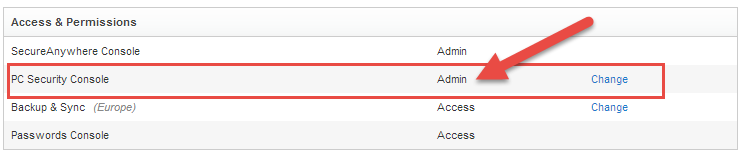
What do have where I have highlighted with the arrow? Please advise back.
If it does not say 'Admin' then click on 'Change' and you should see something similar to the following:
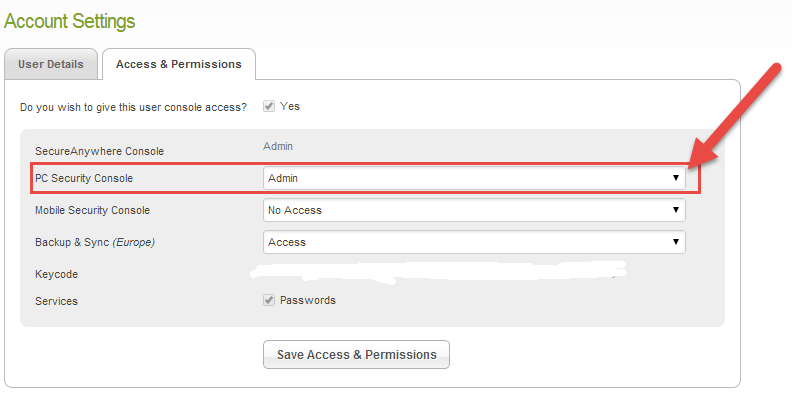
Click on the down arrow on the right (arrowed above) and select 'Admin' from the dropdown options...then click on Save Access & Permissions...and now go back and see if the 'Commands' option has appeared where the KB article described.
Let us know how things go.
Regards
Baldrick




Login to the community
No account yet? Create an account
Enter your E-mail address. We'll send you an e-mail with instructions to reset your password.