

I want to switch SecureAnywhere to a new computer. First I need to deactivate SecureAnywhere on the old computer I will no longer be using.
There are two pertinent pages in Support discussing this issue. They are old and their advice does not work for me--I see different screens than shown when I follow the advice.
https://community.webroot.com/t5/Webroot-SecureAnywhere-Antivirus/How-to-Deactivate-a-PC/ta-p/31240
and
https://community.webroot.com/t5/Introduce-yourself-to-the/Deactivation-problems/m-p/75849/highlight/true#M1975
When I do what it says on the first post, and yes, I first log in to my Webroot account, but instead of seeing tabs along the top including PC Security, there are no tabs. I do see four boxes as in that picture, but the box in the upper left says "Buy PC Security," not "PC Security," as if I am a prospective customer instead of a registered owner.
When I follow the advice in the second post, I do see my e-mail address in the upper right. I can click it and choose Manage Users but it just shows me with no detailed information about my installations which would allow to deactivate one of them.
I've tried this on two different computers and two different browsers including a bare one--it's not an add-on issue.
Solved
Deactivation not working as described by Webroot
Best answer by Ssherjj
Hello ?
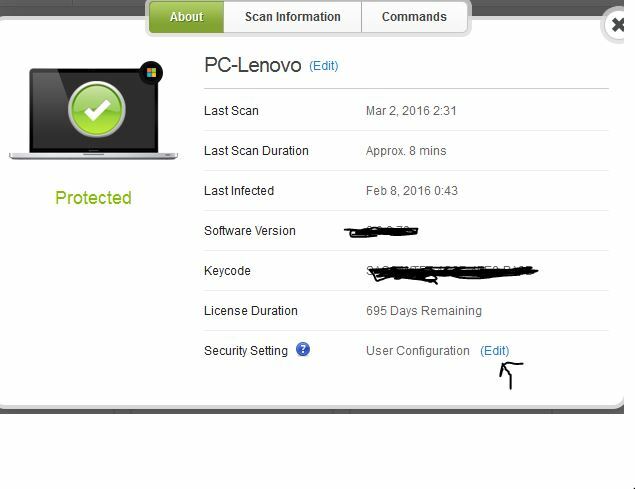
Would you go back into your Account Console and check to see if you have "User Configuration" as shown in the screen below? And if you don't then please tap edit.
If you still cannot get into the Command screen to deactivate then my advice would be to Submit that Support Ticket and they can get this working for you . This is a free service with your Webroot Subscription,
Please excuse my sloppy preview. I am not on my home computer.:D
Hope thiss helps!
Would you go back into your Account Console and check to see if you have "User Configuration" as shown in the screen below? And if you don't then please tap edit.
If you still cannot get into the Command screen to deactivate then my advice would be to Submit that Support Ticket and they can get this working for you . This is a free service with your Webroot Subscription,
Please excuse my sloppy preview. I am not on my home computer.:D
Hope thiss helps!





Login to the community
No account yet? Create an account
Enter your E-mail address. We'll send you an e-mail with instructions to reset your password.