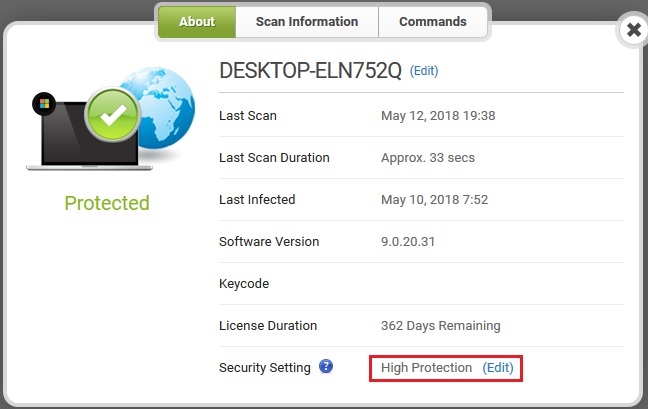
Dear wb communitiy,
i want to ask,if i change the level of security at the web console,it change also in webroot Av ?
Which is the Default security level,web console Or webroot Antivirus ?
i will appreciate any help from you,
Thank you.
Best answer by BurnDaddy
Hello ELn752Q,
Yes, if you make changes to the Web console they will affect the PC you made the changes to. Be aware that any setting in the Web console other than "User Configuration" will result in the Webroot PC settings being controlled onlyfrom the Web console and users of the PC in question will have limited options in the GUI. (The little globe icon you see in the Web console for that PC means that the PC is managed by the Web Console.) Default is "User Configuration" (PC console).
Hope this info helps. Let us know if you have any questions. 😉
Yes, if you make changes to the Web console they will affect the PC you made the changes to. Be aware that any setting in the Web console other than "User Configuration" will result in the Webroot PC settings being controlled onlyfrom the Web console and users of the PC in question will have limited options in the GUI. (The little globe icon you see in the Web console for that PC means that the PC is managed by the Web Console.) Default is "User Configuration" (PC console).
Hope this info helps. Let us know if you have any questions. 😉
@ wrote:
Hi BurnDaddy,Thank you very much for your answer :-)
You're welcome, ELn752Q. Glad I could help.
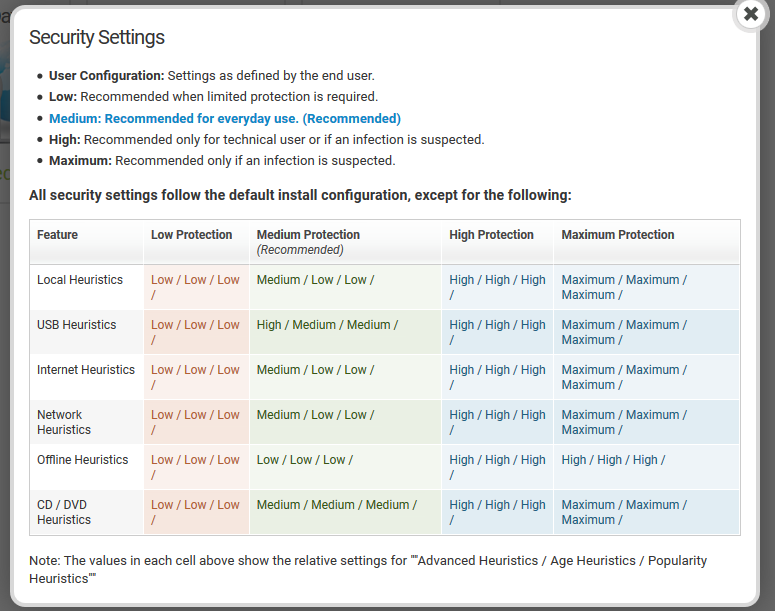
Here is a breakdown of the different Web console settings. I recommend just using the default setting, but that is up to you and what you are trying to achieve with Webroot. I do manage some of my PCs though. Helps me to keep an eye on what's going on with those machines. ;)
@ wrote:
Hi BurnDaddy,Thank you very much for your answer :-)
You're welcome, ELn752Q. Glad I could help.
Here is a breakdown of the different Web console settings. I recommend just using the default setting, but that is up to you and what you are trying to achieve with Webroot. I do manage some of my PCs though. Helps me to keep an eye on what's going on with those machines. ;)
Hi TripleHelix,
Thank you very much for help :-)
from day to day,i start to love webroot more and more.
i think,wrc is the Only one that is looking like a professional web console,i love it 😉