Every time I log on my computer I have over 200 temp language files from Webroot to remove .

  • September 28, 2015
  • 23 replies
  • 234 views

Among other unnecessary temp files that I remove from my computer, I find over 200 temp language files generated by
Webroot. Why is this? I only needed one when I installed and registered my Webroot SecureAnywhere software.  This
issue hasn't caused me any problems that I am aware of, other than being a NUISANCE.
 
These unnecessary files are only found when I boot-up and scan for unnecessary files. They never occur again until I log off
and reboot again. My wife also has this problem with her same Webroot software, so I'm not inclined to think that this is an
isolated problem. Perhaps this goes unnoticed by some of the less-observant users.
 
Is there anything that we can do to stop all these temp files from recurring?
 
Thank You

23 replies

JamesG
  • Retired Webrooter
  • September 28, 2015
Hello,
 
Can you please provide the path where you are seeing those temp files?
 
Regards,

RetiredTripleHelix
Gold VIP
Forum|alt.badge.img+56
Hello and Welcome to the Webroot Community!
 
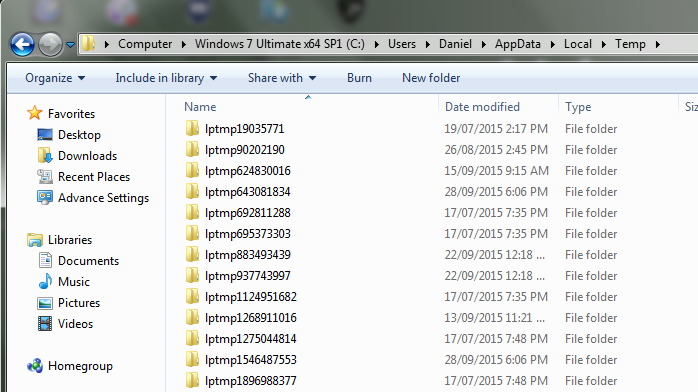
I have seen them before but don't see any at this time as I did a cleaning about an hour ago from:


So if I see some I will post an updated picture or if someone else can show a picture? ? ? ? and I always wondered why there was many updated files in %TEMP% and they look similar to this one

I know there for the Password Manager.
 
Thanks,
 
Daniel 😉

shorTcircuiT
Gold VIP
  • Gold VIP
  • September 28, 2015
Hi ?
 
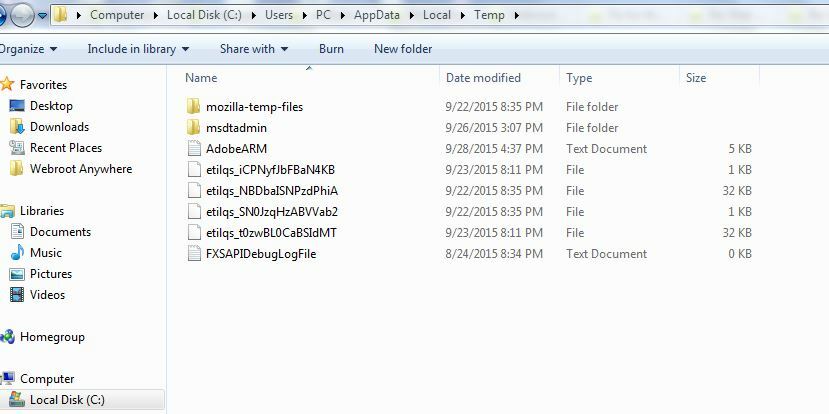
Remember, I re-installed WSA over the weekend on a fresh WIndows install.  I had a couple issues getting my PW Manager working right, so I did run the toolbarfix.exe utility, though I do not know if that affected the files on my computer.
 
Here is what I have:


Each of the folders contains a zip file, and then also 146 individual language files.  The total space taken by each folder is about 7.7 MB
 
I hope this helps answer the question Daniel?
 
Thanks for the '@ ping'.  I wasn't watching the Community, but I do check email if I am near the computer ?  :)


RetiredTripleHelix
Gold VIP
Forum|alt.badge.img+56
Here is a snapshot from my other laptop.
 
Daniel ;)


shorTcircuiT
Gold VIP
  • Gold VIP
  • September 28, 2015
Woah.. that is a lot of temp files there on your other computer Daniel!

Ssherjj
Moderator
Forum|alt.badge.img+62
  • Moderator
  • September 28, 2015
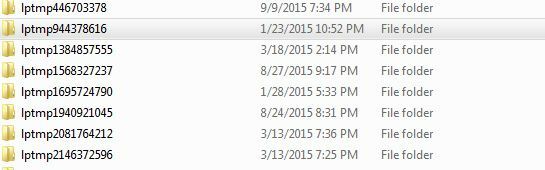
Here is what I have in W7


I have all
languages listed in all of these folders below! But they arent from Webroot?


RetiredTripleHelix
Gold VIP
Forum|alt.badge.img+56
@ wrote:
Here is what I have in W7


I have all
languages listed in all of these folders below! But they arent from Webroot?


Yes they are! Webroot Password Manager based off of Lastpass and just rebranded.
 
Thanks,
 
Daniel 😉

Ssherjj
Moderator
Forum|alt.badge.img+62
  • Moderator
  • September 28, 2015
Well now what? That's crazy!:D

  • Author
  • New Voice
  • October 10, 2015
The path I discover when all of the language files (200+/-. Sometimes over 400) appear in my unnecessary files is as follows:
 
C:Users(User name)AppDataLocalTemplptmp(followed by a nine digit numder that changes with each log-on)
languages(language code) e.g.- zh_CN or other language code per file entry.
 
I have traced the "lptmp" to the Webroot Directory, so I know these files originate there.

Dermot7
Gold VIP
Forum|alt.badge.img+3
  • Gold VIP
  • October 10, 2015
Hello ? I have posted a Feature Request (idea) here: https://community.webroot.com/t5/Ideas-Exchange/Added-capabilities-for-deletion-of-excess-and-redundant-files/idi-p/220668 which includes asking for possibility to delete these more easily.   
You may wish to add comments to it, or kudo it. 


  • Author
  • New Voice
  • October 12, 2015
Thanks, Dermot7. I'll Check out the link.:D

Forum|alt.badge.img+1
  • New Voice
  • October 17, 2015
Hi I deleted 700MB (!) of lptmp files from my Win 7 machine yesterday. I use Internet Security Plus only to secure my smartphone and tablet and don't use the (LastPass) password manager (let alone all languages). A serious waste of space! That on top of the 46.7GB my WRData folder grew to yesterday (fixed for the n'th time after a whitelisting request to Support). I like WSA but these space issues are a major flaw IMO.

  • Author
  • New Voice
  • May 25, 2016
I have not found a solution yet that works for me to permanently delete the extra language and other temp files from
the use of Webroot, but I have found a solution for quickly removing these files, each time I log onto my computer.
I think this solution will work well for other Webroot users that have the same files problem, but do not have effective file
scanning programs to detect and delete (at least untill the next log-on / reboot) these unneeded files:
 
Open Webroot, and on the home page, find in the options listed on the lower right side of the page. Next, find the
Utilities option and left click on the icon that looks like a gear across and to the right of "Utilities". This will take you
to another page of Utilities options.  In the options find "System Optimize". Left click on "System Optimize" and it will
take you to another page giving you the option to Optimize Now. Left click on Optimize Now and it will scan and remove
all the extra language and other temp file related to Webroot. When the scan is complete, you will be taken back to the
Webroot home page. To view the amount of file data space (usually in Mb- Megabytes) returned to your computer from
the deletion of these files, close and reopen Webroot and go back to System Optimize, as described above, open it,
and it will show the the amount of space that was returned to your computer.  Hope this helps someone.

Baldrick
Gold VIP
  • Gold VIP
  • May 25, 2016
Hi Trisstar11
 
Thanks for the 'tip' however that will only work for users runningnthe Complete or Gamer versions of WSA as they are the only ones that include the Optimizer feature.
 
The standard Antivirus and Internet Security Plus version do not include it.
 
Regards, Baldrick

  • Author
  • New Voice
  • May 30, 2016
Thank you for your reply:D

Baldrick
Gold VIP
  • Gold VIP
  • May 30, 2016
Hi Tristar11
 
You are most welcome. :D
 
Regards, Baldrick

  • Author
  • New Voice
  • May 30, 2016
Hello paulderdash,
 
Thank you for your observations! I agree with your view of all the wasted space. I don't use the password
protection registry either. >>> I can find all the unecessary files in my app files, but I'm not sure which ones
are safe to delete (i.e.- Which language file abbreviation is for American English?). The Lastpass files are
obviously used in the password protection program. I have no reservation about deleting those.

Forum|alt.badge.img+1
  • New Voice
  • May 31, 2016
Pity. They should consider adding the Optimizer option to all WSA versions. I switched from WSA ISP to AV because I didn't want another password manager, or mobile protection, but I still have the lptmp files?

Nemo
Community Leader
Forum|alt.badge.img+34
  • Community Leader
  • May 31, 2016
Hi pauldedash
 
If you are using AV then you will not have the lptmp files. I started out with the AV version and can't say I missed having the Optimizer as I always use Ccleaner which does a very good job of clearing out temp files amongst other things.

Baldrick
Gold VIP
  • Gold VIP
  • May 31, 2016
I very much agree with you, Nemo...CCleaner is far more effective than the System Optimizer...but then again I suspect that the latter was never designed or intended to be a CCleaner rival or alternative.
 
Baldrick

Forum|alt.badge.img+1
  • New Voice
  • June 1, 2016
OK, my lptmp files must still be a hangover from when I had Internet Security Plus. I do use CCleaner. Will check it out, maybe I need to add a rule.

Forum|alt.badge.img+1
  • New Voice
  • June 1, 2016
Doh ... my apologies. These files are now from LastPass itself, and not due to Webroot. Getting old 😉

  • Author
  • New Voice
  • June 3, 2016
paulderdash,
 
Thanks for your feedback!:D