Failed to run initial scan. Cannot connect to the internet.

  • June 3, 2016
  • 4 replies
  • 140 views

I downloaded Webroot SecureAnywhere Internet Security for my Mac and it keeps saying failed to run initial scan and cannot connect to the internet. I have looked at the boards and uninstalled and reinstalled it twice. I have restarted my computer multiple times. It is not my internet connection because that is working fine. I'm running El Capitan 10.11.5. I do not know what else to do. Help would be appreciated. 

4 replies

Baldrick
Gold VIP
  • Gold VIP
  • June 3, 2016
Hi calvinchance58
 
Welcome to the Community Forums.
 
Given what you have tried I would say that the best option here is to Open a Support Ticket to notify the Support Team. Tnry should be able to investigate the issue and resolve it for you.
 
I will also ping our resident Mac guru ? just in case she has some other approaches you can explore whilst awaiting the intervention of the Support Team.
 
Regards, Baldrick

Ssherjj
Moderator
Forum|alt.badge.img+62
  • Moderator
  • June 3, 2016
Hello ?,
 
Welcome to the Webroot Community,
 
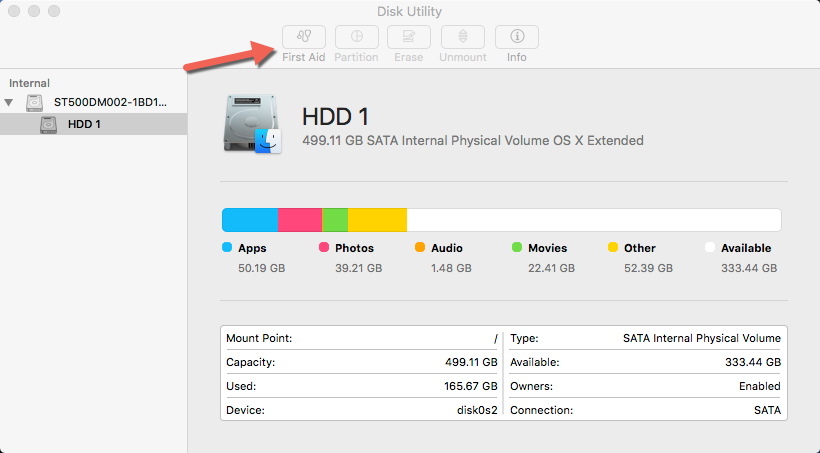
I do believe that the Mac Support Team should handle this. They will probably need to handle this remotely by doing Sumo Commands. One thing came to mind and that was you might want to run a Disk Check with First Aid.  Try that and then see if it helps. Then either do another rescan of Webroot or uninstall/reinstall one more time. Running First Aid will fix Disk Permissions that sometimes will interfere with Webroot. Go to the Launchpad and look for "Other" and then open Disk Utility and select Run.


Thanks for the help you guys. After I changed my firewall permissions and shut it down last night it finally worked this morning. 

Ssherjj
Moderator
Forum|alt.badge.img+62
  • Moderator
  • June 3, 2016
That's super! Thanks for letting us know!

Have a great day!