For some reason the WR Toolbar was removed/turned off. How do I turn it on again?

  • June 13, 2016
  • 3 replies
  • 29 views

Mysteriously, toolbar disappeared.  Need to turn it on to use auto-login feature.  The last time this happened was after a WR upgrade.  Is this going to be the case each upgrade?

3 replies

Ssherjj
Moderator
Forum|alt.badge.img+62
  • Moderator
  • June 13, 2016
Hello mike4080
 
Welcome to the Webroot Community,
 
I am not sure why you woud of lost your Password Manager toolbar. Have you checked your add on/extensions in your browser to see if it's disabled?
 
This sometimes does happen and to try to resolve it you can try running the Toolbarfix tool.  You can download it for here.  
 
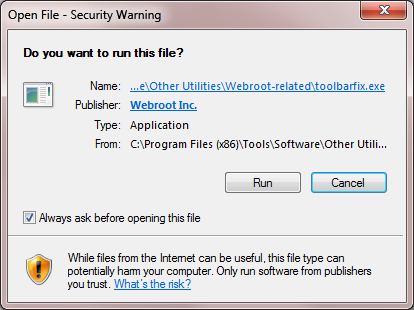
Once downloaded launch it by clicking on the executable, and you should see the following, if then that is fine and you should click on 'Run':


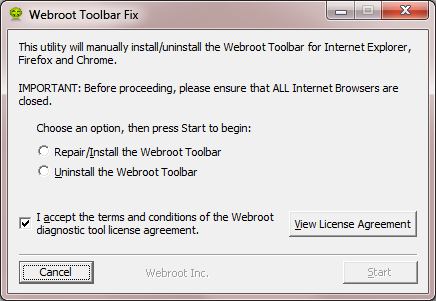
which should then take you to the following dialog:


on which you should choose/check the option 'Repair/Install the Webroot Toolbar' and then press 'Start'.
 
That should initiate the fix process and you just have to wait for it to finish, close the dialog and then check in your browser to see if the Password Manager Toolbar icon is now visible.  If the fix has been successful you should see the following greyed out icon in a toolbar at the top of the IE browser page:


One then double clicks on that so that the login dialog is presented, etc.
 
Please check the above out and come back if anything is not clear or if it does not help/respond to your query.
 
Note: This will not work in Microsoft Edge. Webroot is currently awaiting that MS allow addons/extensions to be used with Edge. Please seeHERE for a KB Article on the subject.

  • Author
  • New Voice
  • June 13, 2016
Yes, that's it. Add-on turned off in browser. Once enabled WR icon reappeared in toolbar. Thank you so much for this simple fix. WR support was telling me to do all sorts of things that would have taken so much time and need not be tired. Appreciate your help so much.

Ssherjj
Moderator
Forum|alt.badge.img+62
  • Moderator
  • June 14, 2016
Your quite welcome mike4080,
 
 
Thanks for letting us know. I'm happy that this was easy for you. Sometimes we can over look the simple things. lols 😉