

past 2 days on system boot into windows i keep getting Hata Region Unload in little grey box in center of screen, on net searching is not much info other than TROJAN, i have scanned my pc with oh so many trojan/malware scanners, even booted fron usb scanners to find nothing what so ever, all say i'm clean. this is the culprit
http://www.diskusjon.no/uploads/monthly_09_2010/post-182697-1283552686,678_thumb.jpg
any help well appreciated
Solved
Hata Region Unload
Best answer by explanoit
This is a Microsoft website that provides a tool to identify the source of program.
Please download this and run it.
http://live.sysinternals.com/procexp.exe
File > Show Details for All Programs
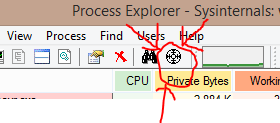
Along the top in the toolbar next to the graphs and the binoculars is a weapon reticule. Click and drag it onto the Hata window. When you're hoving over the window, let go of the mouse click.
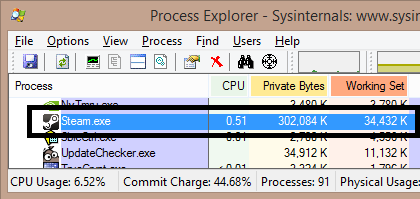
In the main Process Explorer window it will then highlight the program causing the window to appear in its list in BLUE.
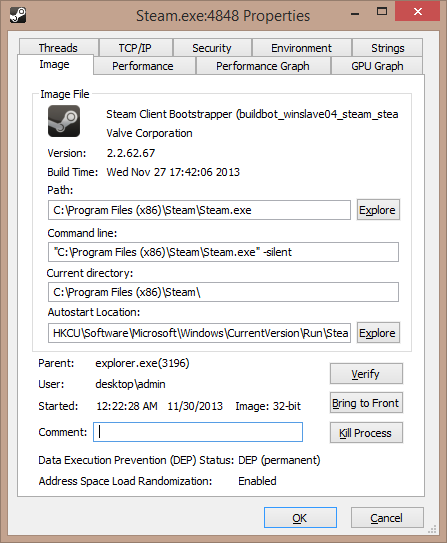
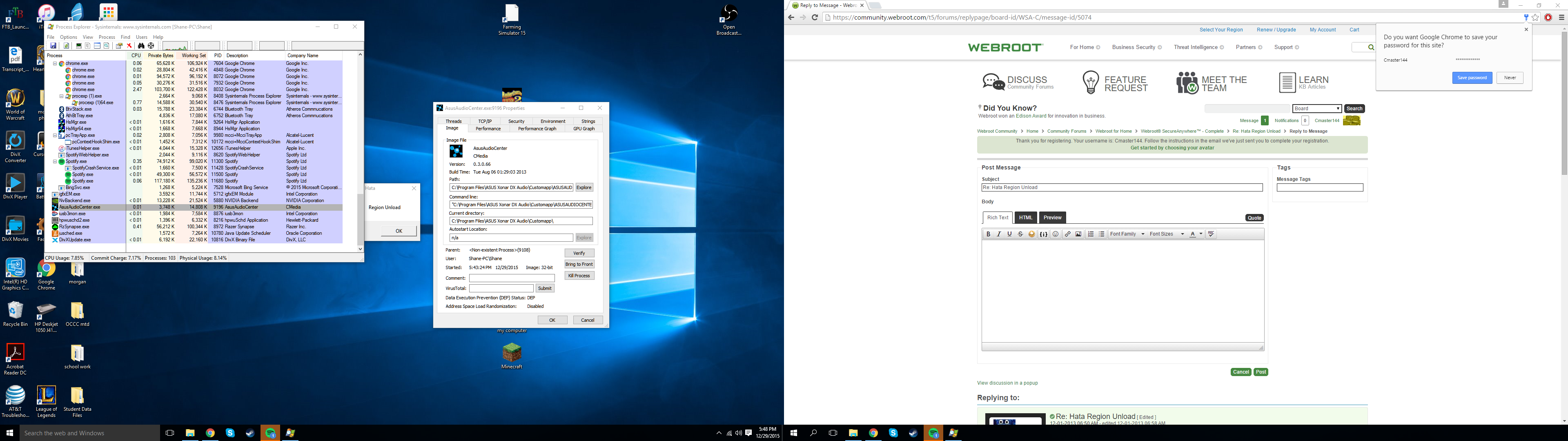
Right-click the blue highlighted program in the list > Properties and post a screenshot of the window that appears.
Please download this and run it.
http://live.sysinternals.com/procexp.exe
File > Show Details for All Programs
Along the top in the toolbar next to the graphs and the binoculars is a weapon reticule. Click and drag it onto the Hata window. When you're hoving over the window, let go of the mouse click.
In the main Process Explorer window it will then highlight the program causing the window to appear in its list in BLUE.
Right-click the blue highlighted program in the list > Properties and post a screenshot of the window that appears.





Login to the community
No account yet? Create an account
Enter your E-mail address. We'll send you an e-mail with instructions to reset your password.