How can I identify the devices that are assigned to my account?

  • December 26, 2015
  • 3 replies
  • 429 views

 
How can I identify the devices that are assigned to my account by model or s/n?

3 replies

Baldrick
Gold VIP
  • Gold VIP
  • December 26, 2015
Hi russellryan
 
Welcome to the Community Forums.
 
I do not believe that there is a way to do this. I have checked the online console (HERE) again, which lists all protected devices but there does not seem to be any information related to model or serial no. re. the device protected.
 
Regards, Baldrick

  • December 26, 2015
Hi ?,
 
If I may just add to what Baldrick has posted.
 
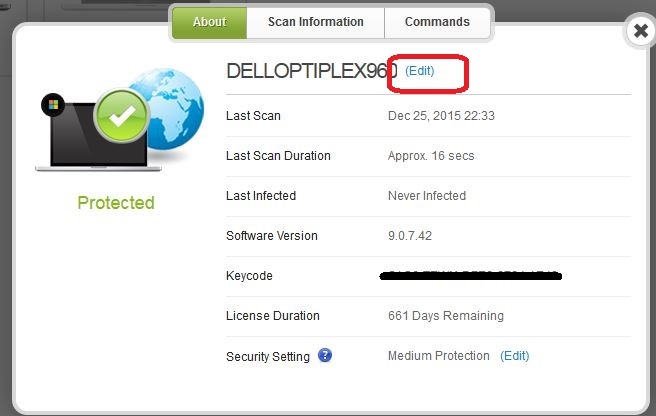
When Devices like PC's are added to the Web Console they are given the name that was assigned to the computer when you installed Windows. However, if you select a device in your Web Console you will be given the choice to "edit" the name of the device. You could rename your devices with the Model number or s/n of the device if you so choose. When installing Windows I routinely name the computer by whatever model the PC is. If you see my screenshot below you will see where you can edit your device's name.


While this takes a little configuring, it will allow you to rename your device by model, serial no., or whatever you so choose.
 
Hope you find this information useful, :)
 
bd

  • Author
  • Fresh Face
  • December 26, 2015
Thank you but I am aware of that.  I'm trying to identify which machines by model or s/n I now have associated.