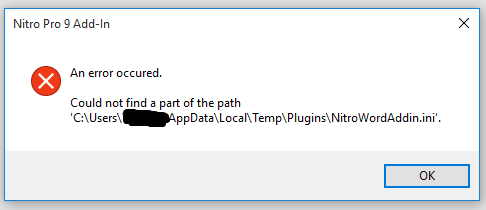
How can I restore files deleted from system optimizer feature?

  • November 5, 2015
  • 6 replies
  • 178 views

I performed the system optimizer feature in my Webroot, running Win 10. Some necessary ini files were stored by the software programs, in app data temp files. How can I go find and restore them?


6 replies

shorTcircuiT
Gold VIP
  • Gold VIP
  • November 5, 2015
Hello ?, welcome to the Community!
 
I have to ask, if I may, if you could let us know what programs were affected?  It is not normal for programs to leave required .ini files in a temp folder at all.

  • Author
  • Fresh Face
  • November 5, 2015
NitroPro 9 Outlook plug-in. I'm experiencing issues with Chrome browser, intermittently and will be shutting down and restarting shortly to see what else was affected.

  • Author
  • Fresh Face
  • November 5, 2015
Looks like it affected my Windows Office word as well.


shorTcircuiT
Gold VIP
  • Gold VIP
  • November 5, 2015
You will need to re-install the plug-in I am fairly sure.  I do not believe that files can be brought back.  I would suggest you check the install path of the plug-in and make sure it is not installing to a temp directly.  Nothing should ever be installed into a temp directory: that is intended just to temporarily hold files during the install process perhaps, but not actually contain the installed program as temp folders are intended to be allowed to be emptied.
 
? ? I am not very familiar with this plug-in, if you have any additional suggestions that would be great.
 
 
To be very honest, hearing it was in the temp directory made me think it would be spyware, malware or otherwise undesirable, but a quick google search makes me think that is not the case.  It appears legit

Ssherjj
Moderator
Forum|alt.badge.img+62
  • Moderator
  • November 5, 2015
? No I really don't have any ideas how to retrieve that plug in. I was just wondering if System Restore would bring back her files?

Baldrick
Gold VIP
  • Gold VIP
  • November 5, 2015
I think that if System Optimizer has 'dealt' with them then unless the Secure Erase method is set to 'Normal' (Deletes the files without overwriting them.) they will not be recoverable unless by the use of foresenic recovery tools. Hopefully, 'Normal' is the default and therefore unless it has been changed it should remain.
 
That being the case then a freeware data recovery app such as Defraggler might do the trick...and I say 'might' as there is no guarentee.
 
Unfortuantely, System Restore will be of no use here as it would only cater for Windows system files and not user data-related files...:(
 
Regards, Baldrick