how do I get my webroot circle that holds my passwords on the bar at top of page on windows 10

  • September 20, 2015
  • 2 replies
  • 23 views

just downloaded win 10 and cant get my little webroot circle to show up on the bar at top of pagw. any sugg.


2 replies

Baldrick
Gold VIP
  • Gold VIP
  • September 20, 2015
Hi ckramer
 
Welcome to the Community Forums.
 
Yes, this seems to be an issue with a number of users in the Community who are using Chrome. If you have access to another browser then please try it instead, otherwise the other thing that you can do is look to disable the extension/addon.
 
Also, please Open a Support Ticket, to let the SupportTeam know of this issue. 
 
Regards, Baldrick

Baldrick
Gold VIP
  • Gold VIP
  • September 20, 2015
Hi ckramer
 
My apologies but when looking back at my reply to you I believe that I may have misinformaed you as I think that you are referring to the Password Manager extension rather than the Web Filtering extension.
 
If that is the case then may I ask you to advise back as to which browser you are trying to get the toolbar icon showing under?
 
If in the Edge browser then I am afriad that this is not currently possible as Edge dioes not yet support browser extensions/addons.
 
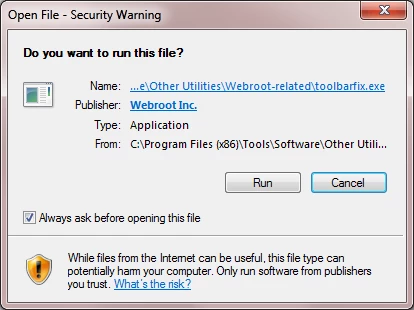
If one of the other browsers such as Firefox or Chrome then this sometimes does happen and to try to resolve it you can try running the Toolbarfix tool.  You can download it for here.  Once downloaded launch it by clicking on the executable, and you should see the following, if then that is fine and you should click on 'Run':


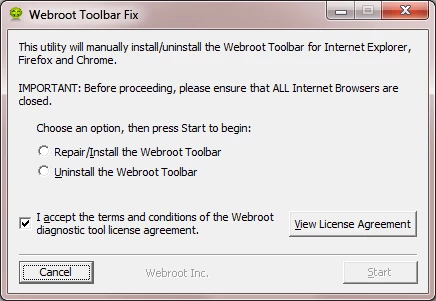
which should then take you to the following dialog:


on which you should choose/check the option 'Repair/Install the Webroot Toolbar' and then press 'Start'.
 
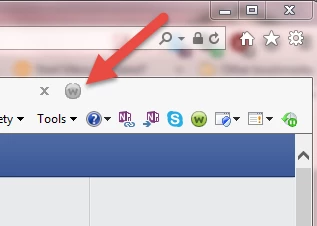
That should initiate the fix process and you just have to wait for it to finish, close the dialog and then check in your browser to see if the Password Manager Toolbar icon is now visible.  If the fix has been successful you should see the following greyed out icon in a toolbar at the top of the IE browser page:


One then double clicks on that so that the login dialog is presented, etc.
 
Please check the above out and come back if anything is not clear or if it does not help/respond to your query.  And again, my apologies for misreading your initial post and therefore responding incorrectly.
 
Regards, Baldrick