
How do I know my computer is being protected by WEBROOT when I am searching the web?
I don't get the green check marks when I search.
Solved
How do I know for sure that WEBROOT is protecting my Firefox?
Best answer by Baldrick
Hi Tutee-2016
Welcome to the Community Forums.
If I may just add to what BD has posted...the Webroot extension (the Web Filtering Extension) which effectively handles, amonsgt other aspects, the display of the green check marks, should be installed into Firefox or any of the main browsers (such as Chrome, IE, etc.) when one installs WSA, however:
1. Not all browsers are supported, anbd whilst Firefox is Firefox Portable is not, justi n case that is the version, like me, that you are using.
2. So you should checking in Firefox under Setting > Addons, for the extension being installed & enabled.
3. If not enabled then try enabling it.
4. If not installed then please check in 'Advanced Settings > Firewall/Web Shield' to see how the relavant settings are set, as per the screenshot below:
and if not set as above then please do so and then reboot before checking Firefox again, etc.
5. Finally if none of the above works you could try an uninstall/clean reinstall of WSA, for which we can provide instructions should you decide you need to try that...just post back to ask for them.
Hopefully some of the above additional information will be of assistance?
Regards, Baldrick
Welcome to the Community Forums.
If I may just add to what BD has posted...the Webroot extension (the Web Filtering Extension) which effectively handles, amonsgt other aspects, the display of the green check marks, should be installed into Firefox or any of the main browsers (such as Chrome, IE, etc.) when one installs WSA, however:
1. Not all browsers are supported, anbd whilst Firefox is Firefox Portable is not, justi n case that is the version, like me, that you are using.
2. So you should checking in Firefox under Setting > Addons, for the extension being installed & enabled.
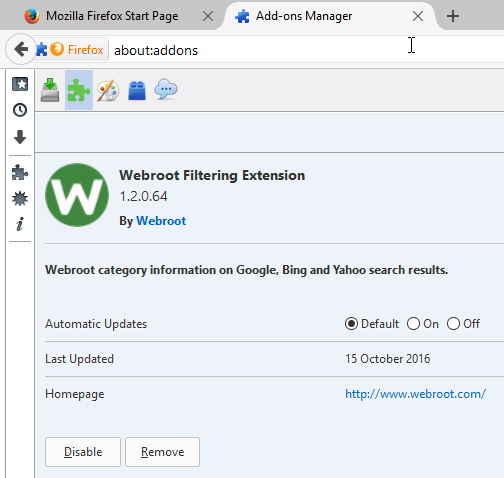
3. If not enabled then try enabling it.
4. If not installed then please check in 'Advanced Settings > Firewall/Web Shield' to see how the relavant settings are set, as per the screenshot below:
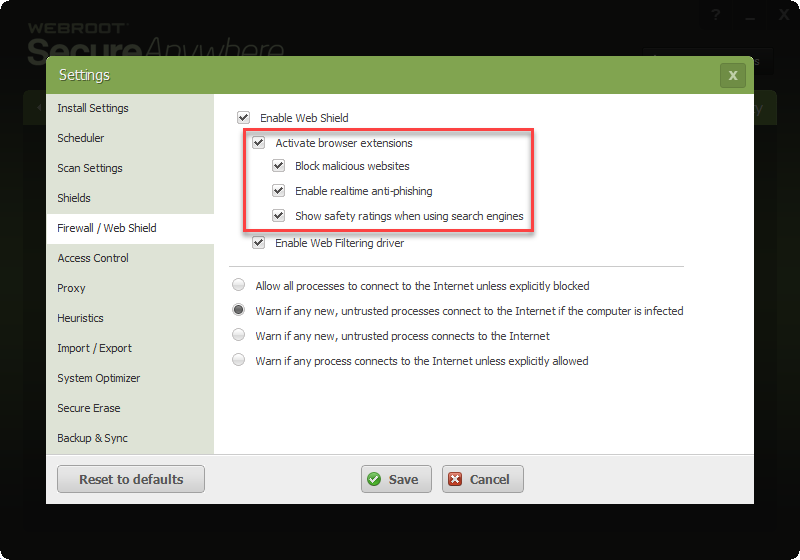
and if not set as above then please do so and then reboot before checking Firefox again, etc.
5. Finally if none of the above works you could try an uninstall/clean reinstall of WSA, for which we can provide instructions should you decide you need to try that...just post back to ask for them.
Hopefully some of the above additional information will be of assistance?
Regards, Baldrick






Login to the community
No account yet? Create an account
Enter your E-mail address. We'll send you an e-mail with instructions to reset your password.