


Due to the rapid scans and minimal impact on performance, it can sometimes look like Webroot isn't doing anything at all. But don't worry, all of that performance is being offloaded to our cloud servers. Here's some more details about exactly how Webroot works quietly in the background, told by one of the most knowledgeable people on our community:
From @Baldrick:
Yes, this is normal with WSA and...Yes...you are well protected despite WSA not finding anything.
This is essentially down to the way that WSA works; it does not scan your entire drive and every file by default but rather it only scans for active files/apps, on the premise that if malware is dormant/inactive then it is not a threat...which makes absolute sense when you really think about it...but the moment that a dormant file/app starts to run/goes active WSA pounces on it, determines if good or bad and acts accordingly, i.e., allows to proceed or blocks & cleans, etc.
In the case of a non determination WSA will restrict the file's/app's actions and 'monitor' it which journalling its actions so that if at a later date it determines the file is bad then it can block/clean it and with the help of the journalled information reverse all changes made by it...pretty cool, eh?
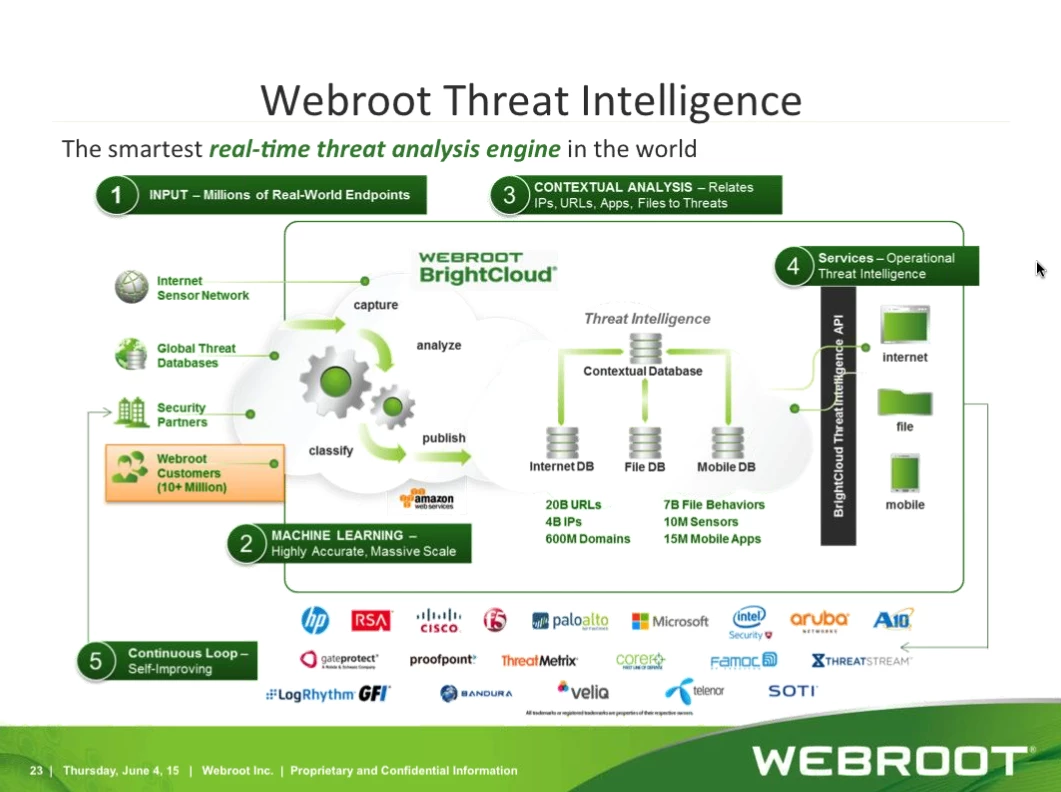
And to give you the bigger picture on how WSA protects you please have a look at the below:
Original topic here.





