how do i remove the fug virus?

  • February 11, 2016
  • 5 replies
  • 53 views

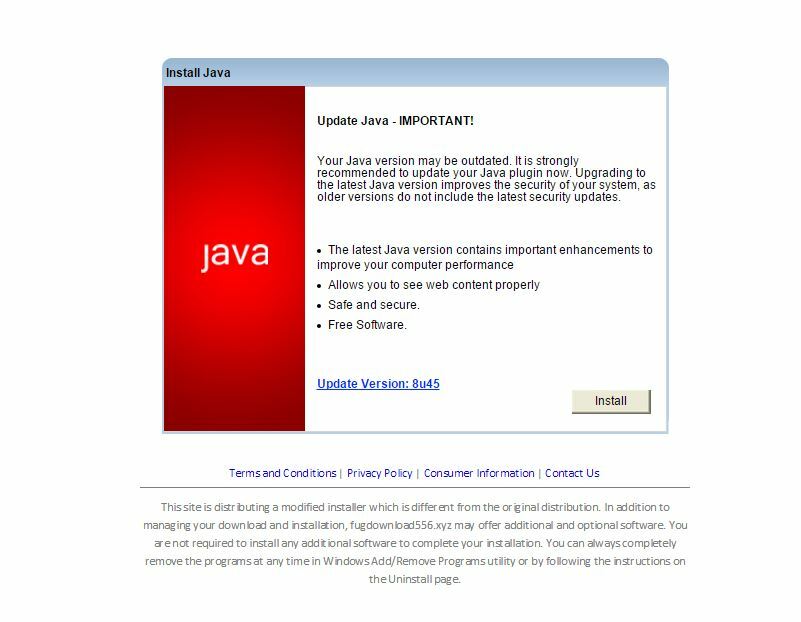
I believe a virus is causing some web pages to redirect.  Seems to something with fug in the name.  Any ideas?
 

5 replies

RetiredTripleHelix
Gold VIP
Forum|alt.badge.img+56
Hello and Welcome to the Webroot Community!
 
It doesn't sound like a Virus but a PUA see here for more info: https://community.webroot.com/t5/Techie-KB/How-to-Remove-Potentially-Unwanted-Applications/ta-p/40744 also note at the bottom of that page install a good Ad-Blocker and if in the end that doesn't work please Submit a Support Ticket and they will help you.
 
Thanks,
 
Daniel 😉

  • Author
  • Fresh Face
  • February 12, 2016
It seems to be behaving like a virus or a Trojan.  Often, when I navigate in Chrome (Windows10) a second tab pops up with fug.if address and what looks to be a bogus Java page


Baldrick
Gold VIP
  • Gold VIP
  • February 12, 2016
Hi Johnnye
 
Welcome to the Community Forums.
 
Nice spot...you are indeed correct that this is a fake, and not a bad one at that with respect to the presentation.
 
Downloader.F.gif is a Trojan horse that downloads remote files from predetermined Web sites. From what I read the Trojan uses alternate data streams to hide its presence on the compromised computer.
 
Regards, Baldrick

  • Author
  • Fresh Face
  • February 12, 2016
Does Webroot have a removal for this?

RetiredTripleHelix
Gold VIP
Forum|alt.badge.img+56
Please Submit a Support Ticket and they will help you.
 
Thanks,
 
Daniel 🙂