How do I turn off the "Learn More" pop-up window that comes on every time I turn on my computer?

  • April 2, 2015
  • 4 replies
  • 42 views

How do I turn off the "Learn More" pop-up window that comes on every time I turn on my computer? VERY ANNOYING Webroot!


4 replies

Petrovic
Gold VIP
Forum|alt.badge.img+52
  • Gold VIP
  • April 2, 2015
Hello and Welcome to the Webroot Community Forums!
 
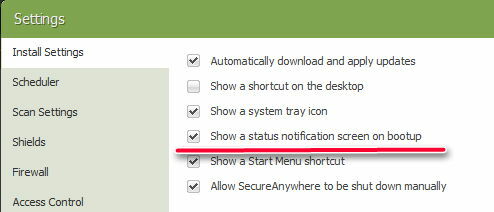
try to disable it


  • Author
  • Fresh Face
  • April 2, 2015
thank you!

  • Author
  • Fresh Face
  • April 3, 2015
Hi. I tried disabling all of those selection in the "Advanced Settings" but that pop up window still apears on start-up and it doesn't go away until I close it manually. Then after a while it pops up again.
 
Is anyone else having this problem?
 
Any help would be appreciated.
 
Thank you.

Baldrick
Gold VIP
  • Gold VIP
  • April 3, 2015
Hi anonymous8791
 
In the circumstances I would Open a Support Ticket so that the Support Team can have a look at this for you.
 
Regards, Baldrick